
So, i'm still working on this FlatLafDark-Tkeme. The problem with the icons is solved, now i#m scaling with factor 2, but some fonts must be corrected.
And it's almost complete, but i'm still facing two problems:
Screenshots
https://disk.yandex.ru/d/VY_66hCaQxUThg
The two font components are still very huge. In Flatlaf can every component be separately scaled (Label.font = x, MenuBar.font = x, MenuItem.font = x, etc.)
But i dont know the name of this element:
1. keystrokes in menu bar (red arrows)
2. title over this internal frame/pane (red arrows)
Does anybody know?
Dark Mode
This topic has been viewed 46910 times and has 34 replies
Re: Dark Mode | name of the components
1. MenuItem.acceleratorFont
2. TitledBorder.font

2. TitledBorder.font

Re: Dark Mode | name of the components
Great you found by yourself [:)]
Emmanuel Puybaret, Sweet Home 3D creator

Re: Dark Mode | name of the components
Great work! That looks really good and a lot better for the eyes.
Are you willing to share the endresult? As a jar file or as a fork on sourceforge?
I'd appreciate that very much.
Are you willing to share the endresult? As a jar file or as a fork on sourceforge?
I'd appreciate that very much.
Dodecagon.nl
1300+ 3D models, manuals, and projects
1300+ 3D models, manuals, and projects
Re: Dark Mode | name of the components
Hi Keet,
Thank you for your interest! I like to share the files. First for testing. Small corrections are still necessary and I hope that someone will test it and make suggestions for improvement.
There are 3 files in this compressed file:
https://disk.yandex.ru/d/n85Oi_gPPyITgQ
1. SweetHome3D-7.4.jar
-> the Icons for the Dark theme are inside
2. plugins_dark.zip
-> all available plugins with the NEW icons, matching the design
3. flatlaf-3.4.1.jar -> swing-engine, with property files, the settings for the Dark theme are also already in this library.
You are an advanced user, so I don't have to explain everything in detail. Nevertheless, I have to make a few hints.
Before you start, you should consider which environment and which monitors you have, because that is necessary for the correct configuration of the interface.
I describe how I did it and then we can see how you have to adjust it when it's not working.
My situation:
- Linux (open SuSE) with KDE, java -> Oracle (21,22 both ok)
- 2 Monitors with the Resolution 2560x1440
- Fonts (very important!) Droid Sans
- this is what my startup script looks like on Linux:
As you can see, I start in the scaling mode (factor 2x), because the plugin Icons in the toolbar were not scaled (must be clear why). SO the icons are now displayed correctly. All in the resolution 32x32 pixels, as in the files *@2x.png.
With the 2x scaling, ALL components are scaled in the swing, including the font sizes.
And that was the biggest problem now. It was necessary to adjust the font sizes of ALL components. I have already configured the colors for another application earlier.
It is important to understand that the font size setting in FlatLaf depends on the operating system (Mac, Linux, WIndows), the size and resolution of the monitor and, last but not least, on personal preferences.
Unfortunately, you can't do this via the program's interface, but you can manually adjust the properties file in the Flatlaf library.
You must edit and repack FlatDarkLaf.properties.
Important configuration:
Try it with your system and let me know how it looks, then I'll give you recommendations on how to adjust the font scaling.
Thank you for your interest! I like to share the files. First for testing. Small corrections are still necessary and I hope that someone will test it and make suggestions for improvement.
There are 3 files in this compressed file:
https://disk.yandex.ru/d/n85Oi_gPPyITgQ
1. SweetHome3D-7.4.jar
-> the Icons for the Dark theme are inside
2. plugins_dark.zip
-> all available plugins with the NEW icons, matching the design
3. flatlaf-3.4.1.jar -> swing-engine, with property files, the settings for the Dark theme are also already in this library.
You are an advanced user, so I don't have to explain everything in detail. Nevertheless, I have to make a few hints.
Before you start, you should consider which environment and which monitors you have, because that is necessary for the correct configuration of the interface.
I describe how I did it and then we can see how you have to adjust it when it's not working.
My situation:
- Linux (open SuSE) with KDE, java -> Oracle (21,22 both ok)
- 2 Monitors with the Resolution 2560x1440
- Fonts (very important!) Droid Sans
- this is what my startup script looks like on Linux:
Code: Select all
#!/bin/sh
# source the jpackage helpers
VERBOSE=1
. /usr/share/java-utils/java-functions
# set JAVA_* environment variables
set_javacmd
check_java_env
set_jvm_dirs
set_options "--add-opens=java.desktop/sun.awt=ALL-UNNAMED" "-Djava.library.path=/usr/lib64:/usr/lib" "-Dcom.eteks.sweethome3d.resolutionScale=2" "-Dswing.defaultlaf=com.formdev.flatlaf.FlatDarkLaf" "-Dflatlaf.updateUIOnSystemFontChange = false" "-Dflatlaf.uiScale.allowScaleDown=true" "-Dcom.eteks.sweethome3d.j3d.PhotoRenderer.highQuality.shininessShader=glossy" "-Dcom.eteks.sweethome3d.singleInstance=false"
#"-Dflatlaf.uiScale.allowScaleDown=true" "-Dflatlaf.uiScale=0.8"
#"-Dcom.eteks.sweethome3d.resolutionScale=2"
CLASSPATH=`build-classpath SweetHome3D java-3d`
MAIN_CLASS="com.eteks.sweethome3d.SweetHome3D"
# add some extra catalogs if they exist
mkdir -p $HOME/.eteks/sweethome3d/furniture
for model in `find "/usr/share/SweetHome3D" -type f -name "*.sh3f"`; do
ln -sf ${model} $HOME/.eteks/sweethome3d/furniture
done
mkdir -p $HOME/.eteks/sweethome3d/textures
for texture in `find "/usr/share/SweetHome3D" -type f -name "*.sh3t"`; do
ln -sf ${texture} $HOME/.eteks/sweethome3d/textures
done
run
With the 2x scaling, ALL components are scaled in the swing, including the font sizes.
And that was the biggest problem now. It was necessary to adjust the font sizes of ALL components. I have already configured the colors for another application earlier.
It is important to understand that the font size setting in FlatLaf depends on the operating system (Mac, Linux, WIndows), the size and resolution of the monitor and, last but not least, on personal preferences.
Unfortunately, you can't do this via the program's interface, but you can manually adjust the properties file in the Flatlaf library.
You must edit and repack FlatDarkLaf.properties.
Important configuration:
Code: Select all
#---- typography / fonts ----

defaultFont = 11 "Droid Sans", "Open Sans", "Noto Sans", Roboto, Arial

# SH3D scaling 2x -> we make the fonts smaller after scaling

@scaledFont = 7
@scaledFontPlus = 8
@scaledFontMinus = 6
Re: Dark Mode | changingt the accent base color
Next, I would like to explain that you can customize the accent color in Flatlaf. In addition, there are several variations of the accent color in the Dark theme. But of course you don't have to change all of them, just this one:
So change the hex code by @accentBaseColor. Done!
Code: Select all
#######################################################
# Breeze-Dark by DMA
# EDIT YOUR INDIVIDUAL accentBaseColor :-) #64989A
@accentBaseColor = #64989A
#
#The Purple (CANONICAL AUBERGINE) is #772953
#The Orange (UBUNTU ORANGE) is #e95420
#Fedora MEDIUM ELECTRIC BLUE #0B57A4
#######################################################
Re: Dark Mode | name of the components
Thank you! I'm on Debian so like you on linux. That should make it a little easier. I'll try to get it up and running.
Dodecagon.nl
1300+ 3D models, manuals, and projects
1300+ 3D models, manuals, and projects
Re: Dark Mode | Some impressions Beta-1
Linux Breeze, FlatDarkLaf



Re: Dark Mode | Some impressions Beta-1
About plugins LaF(particularly Generate Roof).
1. I don't got it this: If you have a huge monitor why you need to have a double size fonts and icons?
When I buy a bigger monitor was for to see more information on that not the same but bigger. If so I use zoom or batter eyes glasses.
It doesn't matter!
2. On defaults it have to look like this (metal and nimbus):
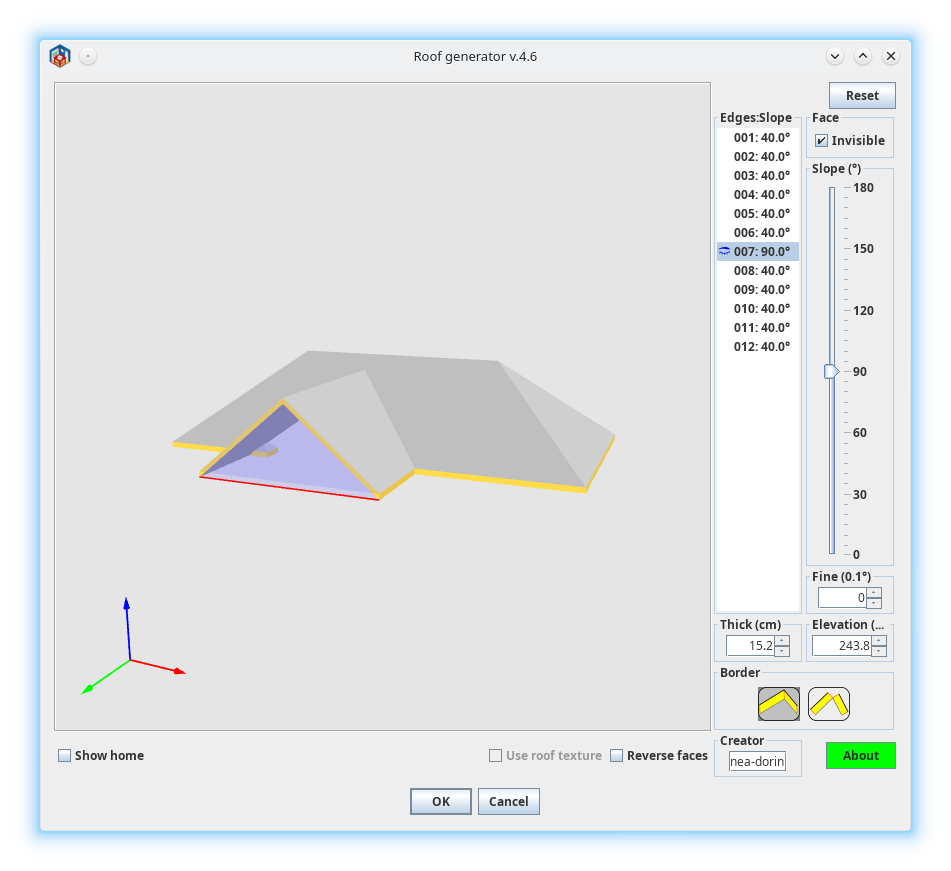
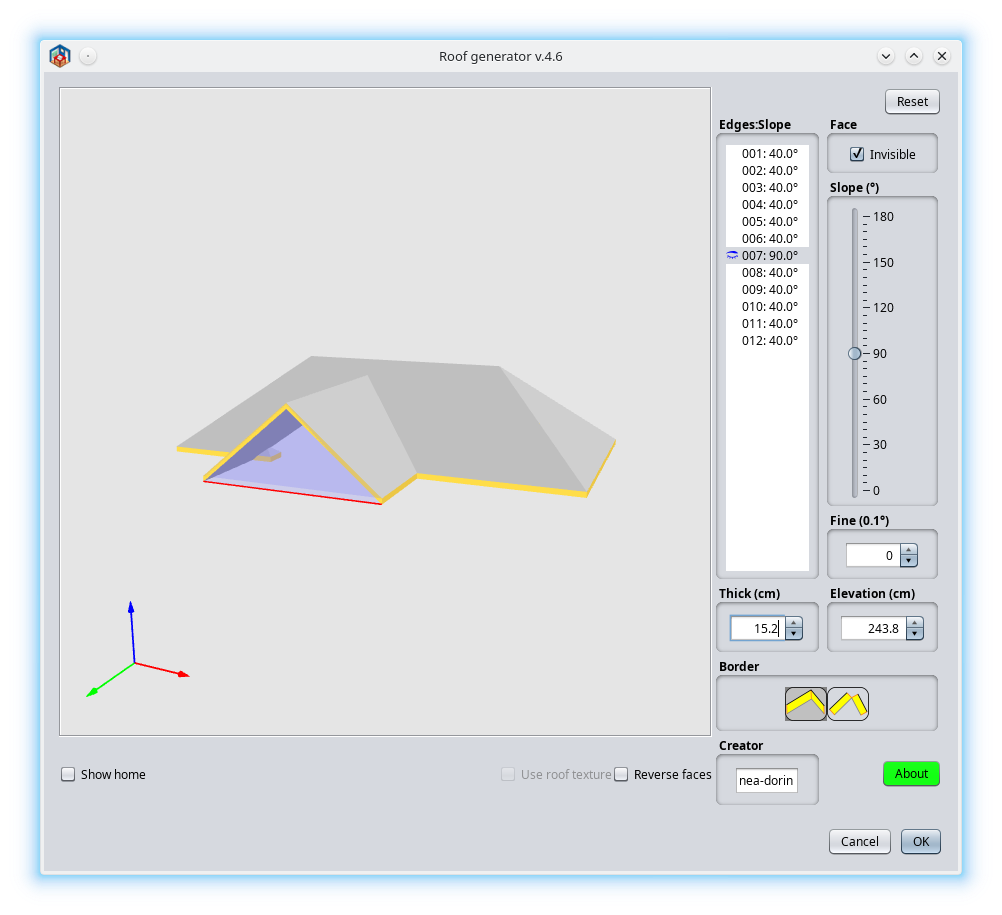
On macOS it looks similar (not exactly) as Nimbus.
If under FlatDarkLaf or other LaF don't look OK (columns wide, fonts, borders, icons size etc) I suspect it is the fault of LaF not of the applications.
I think (rarely) it is easiest to correct the theme than to modify 100+ applications.
No offense, it is only my wrong opinion.
1. I don't got it this: If you have a huge monitor why you need to have a double size fonts and icons?
When I buy a bigger monitor was for to see more information on that not the same but bigger. If so I use zoom or batter eyes glasses.
It doesn't matter!
2. On defaults it have to look like this (metal and nimbus):
On macOS it looks similar (not exactly) as Nimbus.
If under FlatDarkLaf or other LaF don't look OK (columns wide, fonts, borders, icons size etc) I suspect it is the fault of LaF not of the applications.
I think (rarely) it is easiest to correct the theme than to modify 100+ applications.
No offense, it is only my wrong opinion.
A computer program does what you tell it to do, not what you want it to do. Murphy's Law
When all else fails, read the instructions. Murphy's Law
If you don't like "AS IS", DIY. Dorin's law
When all else fails, read the instructions. Murphy's Law
If you don't like "AS IS", DIY. Dorin's law
Re: Dark Mode | Some impressions Beta-1
That's the right opinion. I ran into this when I was trying to set this up. I stopped when I discovered that every program affected needs a special version. That will completely ruin the updates through the plugin manager unless there is maintenance for two different versions. That is not going to happen and rightfully so. A theme has to work on unchanged applications and only affect the display. It should not depend on what monitor(s) I have. That would mean changing code/settings with every monitor change and for every individual user. Basically I want a dark theme changing the color palette. Not bigger/smaller fonts or icons, only colors. I'm going to look into that but I'm incredibly busy at the moment.I think (rarely) it is easiest to correct the theme than to modify 100+ applications.
No offense, it is only my wrong opinion.
Still, this looks very good so we'll see where it goes. A simple drop-in of a theme file as intended is the best result we can hope for.
Dodecagon.nl
1300+ 3D models, manuals, and projects
1300+ 3D models, manuals, and projects
Who is online
Users browsing this forum: No registered users and 1 guest