
That looks very promising! This might turn out as not only a roof generator but a complete object drawing plugin like a advanced 'Generate 3D shape' tool.
I see this plugin being 'abused' for other purposes just like the terrain generator is 'abused' for things other than terrains. I used the terrain generator to create half of a pillow [:))]
I'm looking forward to the next release.
Generate roof plugin
This topic has been viewed 2463579 times and has 338 replies
Re: Generate roof plugin
Dodecagon.nl
1300+ 3D models, manuals, and projects
1300+ 3D models, manuals, and projects
Re: Generate roof plugin
Mulțumesc/Thanks.Probably you want something like this:
Unfortunately not now (not yet).
It's still a lot of work and I don't have much motivation.
If I'm still alive, probably next year.
Exactly what I'm looking for.
My workaround is to create 3 roofs (is section 3 triangles inside one big triangle, like bellow) with same angle and to hide what I don't need. It is ok but not perfect.
So there is no way to get V5.0 beta?
./\........../\
/\/\....../....\
Thank you.

Re: Generate roof plugin
Recently we received a new donation. Many thanks to the donors!
GRT decided to reward these users with v.5.0.beta6. Their list is <here> .
Well, knowing how difficult it is to work with and how unstable it is, it will probably feel more like a punishment.
BTW We don't know yet if a final v.5.0 will ever be released.
At least we know for how many users we waste time.
GRT decided to reward these users with v.5.0.beta6. Their list is <here> .
Well, knowing how difficult it is to work with and how unstable it is, it will probably feel more like a punishment.
BTW We don't know yet if a final v.5.0 will ever be released.
At least we know for how many users we waste time.
A computer program does what you tell it to do, not what you want it to do. Murphy's Law
When all else fails, read the instructions. Murphy's Law
If you don't like "AS IS", DIY. Dorin's law
When all else fails, read the instructions. Murphy's Law
If you don't like "AS IS", DIY. Dorin's law
Re: Generate roof plugin
Some kind of a new version 4.6 .
News:
-simplified the UI and tried to make it look OK under macOS X
-add axis on 3D
-add pre-maded translation files for all languages available on SH3D
-reorganize the plugin internals according to my new rules.
Also on Source Forge .
News:
-simplified the UI and tried to make it look OK under macOS X
-add axis on 3D
-add pre-maded translation files for all languages available on SH3D
-reorganize the plugin internals according to my new rules.
Also on Source Forge .
A computer program does what you tell it to do, not what you want it to do. Murphy's Law
When all else fails, read the instructions. Murphy's Law
If you don't like "AS IS", DIY. Dorin's law
When all else fails, read the instructions. Murphy's Law
If you don't like "AS IS", DIY. Dorin's law
Re: Generate roof plugin
@byDMA You've right about the huge edges list. I've fixed (I hope).
I've replaced the plugin so you and others will have to download it again.
I've replaced the plugin so you and others will have to download it again.
A computer program does what you tell it to do, not what you want it to do. Murphy's Law
When all else fails, read the instructions. Murphy's Law
If you don't like "AS IS", DIY. Dorin's law
When all else fails, read the instructions. Murphy's Law
If you don't like "AS IS", DIY. Dorin's law

Re: Generate roof plugin
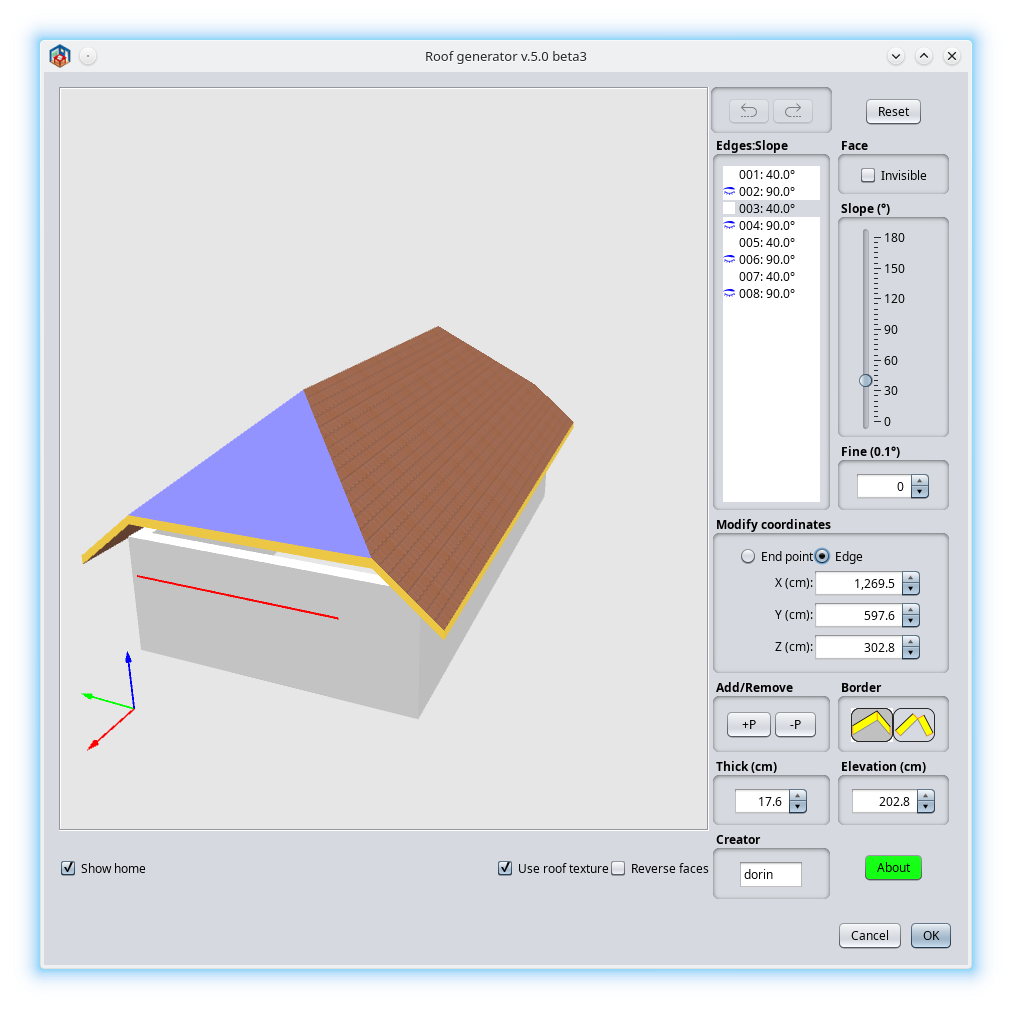
Thank you Dorin! I know GridConstraints in Java are very tricky. It is much better, unfortunately still not correct (perfect). I show the screens in Flatlaf, but in Metal it's the same.
1. The window after maximizing comes back. Well done!
2. But both after maximizing and in the starting size, the splits are minimally too small. Edge List Frame shows the scrollbar at the bottom, so it's still a bit too narrow. It's ok with the slider, but there are languages where the words are very long, for example German That's why it could be slightly wider.
Couldn't the width be programmed relatively? 60% 3D View, 20% Edges, 20% Slider?
If this is not possible or is too expensive, then maybe enough rising the insets?

1. The window after maximizing comes back. Well done!
2. But both after maximizing and in the starting size, the splits are minimally too small. Edge List Frame shows the scrollbar at the bottom, so it's still a bit too narrow. It's ok with the slider, but there are languages where the words are very long, for example German
That's why it could be slightly wider.Couldn't the width be programmed relatively? 60% 3D View, 20% Edges, 20% Slider?
If this is not possible or is too expensive, then maybe enough rising the insets?
Re: Generate roof plugin
Sorry, another problem, I'm only seeing that now. The Axis XYZ disappear in full screen.
Re: Generate roof plugin
I know that. Only under nimbus and macOS (English) the texts looks better.I show the screens in Flatlaf, but in Metal it's the same.
A possible solution could be to detect the LaF (like I detect the OS) and instruct the plugin what specific settings to use for the current LaF.(icons, text etc.)
I know that also. I've used the default axis provided by SH3D ModelPreview. This wasn't programed for full screen.The Axis XYZ disappear in full screen.
A possible solution could be to make my own axis with labels. I will see.
Anyway I remain open to suggestions and pieces of code.
A computer program does what you tell it to do, not what you want it to do. Murphy's Law
When all else fails, read the instructions. Murphy's Law
If you don't like "AS IS", DIY. Dorin's law
When all else fails, read the instructions. Murphy's Law
If you don't like "AS IS", DIY. Dorin's law
Re: Generate roof plugin
I have to study this part (but not today) (GenrateRoofPluginView.java)
The Insets must be set correct according to
https://docs.oracle.com/javase/8/docs/a ... nsets.html
and
https://docs.oracle.com/javase/8/docs/a ... aints.html
or I ask someone in my company.
The Insets must be set correct according to
https://docs.oracle.com/javase/8/docs/a ... nsets.html
and
https://docs.oracle.com/javase/8/docs/a ... aints.html
Code: Select all
/**
	 * Layout user interface
	 * @author Daniels118
	 */
	protected JPanel createUI() {
		JPanel roofPanel = SwingTools.createTitledPanel(null);
		roofPanel.setBorder(null);
		// Column 0~3 Row 0~9
		roofPanel.add(roofPreview,
				new GridBagConstraints(0, 0, 4, 9, 1, 1, GridBagConstraints.LINE_START, GridBagConstraints.BOTH, new Insets(0, 0, 0, 0), 0, 0));
		// Column 4 Row 1
		if (OperatingSystem.isMacOSX()) {
			roofPanel.add(edgesLabel,
					new GridBagConstraints(4, 1, 1, 1, 0, 0, GridBagConstraints.LINE_START, GridBagConstraints.NONE, new Insets(0, 10, 0, 0), 0, 0));
		}
		// Column 4 Row 2~4
		roofPanel.add(scrollEdgesPane,
				new GridBagConstraints(4, 2, 1, 4, 0, 0, GridBagConstraints.NORTH, GridBagConstraints.BOTH, new Insets(0, 0, 0, 0), 0, 0));
		// Column 5 Row 0
		roofPanel.add(resetButton,
				new GridBagConstraints(5, 0, 1, 1, 0, 0, GridBagConstraints.EAST, GridBagConstraints.NONE, new Insets(0, 0, 0, 0), 0, 0));
		if (OperatingSystem.isMacOSX()) {
			roofPanel.add(invisibilityLabel,
					new GridBagConstraints(5, 1, 1, 1, 0, 0, GridBagConstraints.LINE_START, GridBagConstraints.HORIZONTAL, new Insets(0, 10, 0, 0), 0, 0));
		}
		// Column 5 Row 1
		roofPanel.add(invisibilityPane,
				new GridBagConstraints(5, 2, 1, 1, 0, 0, GridBagConstraints.LINE_START, GridBagConstraints.HORIZONTAL, new Insets(0, 0, 0, 0), 0, 0));
		// Column 5 Row 3+4
		roofPanel.add(faceAngleSlider,
				new GridBagConstraints(5, 3, 1, 2, 0, 1, GridBagConstraints.LINE_START, GridBagConstraints.BOTH, new Insets(0, 0, 0, 0), 0, 0));
		// Column 5 Row 5
		roofPanel.add(finePane,
				new GridBagConstraints(5, 5, 1, 1, 0, 0, GridBagConstraints.CENTER, GridBagConstraints.HORIZONTAL, new Insets(0, 0, 0, 0), 0, 0));
		// Column 4 Row 6
		roofPanel.add(thickPane,
				new GridBagConstraints(4, 6, 1, 1, 0, 0, GridBagConstraints.CENTER, GridBagConstraints.HORIZONTAL, new Insets(0, 0, 0, 0), 0, 0));
		// Column 5 Row 6
		roofPanel.add(elevationPane,
				new GridBagConstraints(5, 6, 1, 1, 0, 0, GridBagConstraints.CENTER, GridBagConstraints.HORIZONTAL, new Insets(0, 0, 0, 0), 0, 0));
		// Column 4 Row 9
		roofPanel.add(creatorPane,
				new GridBagConstraints(4, 9, 1, 1, 0, 0, GridBagConstraints.CENTER, GridBagConstraints.HORIZONTAL, new Insets(0, 0, 0, 0), 0, 0));
		// Column 0 Row 9
		roofPanel.add(showHome,
				new GridBagConstraints(0, 9, 1, 1, 1, 0, GridBagConstraints.LINE_START, GridBagConstraints.HORIZONTAL, new Insets(0, 0, 0, 0), 0, 0));

		// Column 2 Row 9
		roofPanel.add(showTexture,
				new GridBagConstraints(2, 9, 1, 1, 0, 0, GridBagConstraints.LINE_END, GridBagConstraints.HORIZONTAL, new Insets(0, 0, 0, 0), 0, 0));
		// Column 3 Row 9
		roofPanel.add(reverseFaces,
				new GridBagConstraints(3, 9, 1, 1, 0, 0, GridBagConstraints.LINE_END, GridBagConstraints.HORIZONTAL, new Insets(0, 0, 0, 0), 0, 0));
		// Column 4 Row 8
		roofPanel.add(bordersPane,
				new GridBagConstraints(4, 8, 2, 1, 0, 0, GridBagConstraints.SOUTH, GridBagConstraints.HORIZONTAL, new Insets(0, 0, 0, 0), 0, 0));
		// Column 5 Row 9
		roofPanel.add(aboutButton,
				new GridBagConstraints(5, 9, 1, 1, 0, 0, GridBagConstraints.EAST, GridBagConstraints.NONE, new Insets(0, 0, 0, 0), 0, 0));

		// First refresh roof
		edgesList.updateUI();
		plugin.refreshRoof(plugin.homeView, plugin.resource);
		return roofPanel;
	}
Re: Generate roof plugin
Thanks for the availability to help.
Take care about the compatibility with other common users.
Take care about the compatibility with other common users.
A computer program does what you tell it to do, not what you want it to do. Murphy's Law
When all else fails, read the instructions. Murphy's Law
If you don't like "AS IS", DIY. Dorin's law
When all else fails, read the instructions. Murphy's Law
If you don't like "AS IS", DIY. Dorin's law
Who is online
Users browsing this forum: No registered users and 1 guest