Generate roof plugin

This topic has been viewed 2464007 times and has 338 replies
Thread status: Active
Questions about extending features and developing plug-ins [img]http://www.sweethome3d.com/images/flags/en_small.gif[/img]
User avatar
captaincook
Posts: 403
Joined: Fri Oct 20, 2017 3:16 pm
Country: France

Re: Generate roof plugin

Post by captaincook »

Et avec les murs et les fenêtres, c'est mieux.

Image

Image

Encore merci et bon week-end à vous, Dorin.

User avatar
dorin
Posts: 824
Joined: Thu Apr 24, 2014 9:14 am
Country: Vatra Dornei, Suceava, Romania

Re: Generate roof plugin

Post by dorin »

New version 4.7.1 (Francis)
News:
-improves the roof windows library (version 0.2)
--correct the previous and add a new one which could be used for holes on the roof face
--it could be used to do dormers more easy
-adapt the plugin code to use it
I'm not fully satisfied, so
TODO: improving the holes in the roof to be more accurate in all situations

Also on Source Forge
Suggestion: remove the previously versions.

@captaincook
Thanks for the inspiration. [>:D<]
@Keet
1. The mean of roof_window_deep I've explained at the last part of V.4.5 tutorial
2.
If I wanted to create a roof window, how do I determine what the roof_window_deep value should be? Or is it always 11.0?
It mean how much of the window height you decide should be inside the roof.
3. I need you to help me to improve (to be functional) and simplify (reduce number of) roof windows.
A computer program does what you tell it to do, not what you want it to do. Murphy's Law
When all else fails, read the instructions. Murphy's Law
If you don't like "AS IS", DIY. Dorin's law
AceLemos
Posts: 3
Joined: Sun May 11, 2025 10:07 am
Country: Ireland

Re: Generate roof plugin

Post by AceLemos »

Hi @dorin, amazing plugin and great work to everyone! I just discovered it as I was struggling to create a roof for my house. However, I found an issue I can't see to be able to fix. My house has gables on each side and one side juts out with big windows. The roof generator doesn't seem to understand that so I tried messing around with it, but I have been at it for about 2 days now with no success.

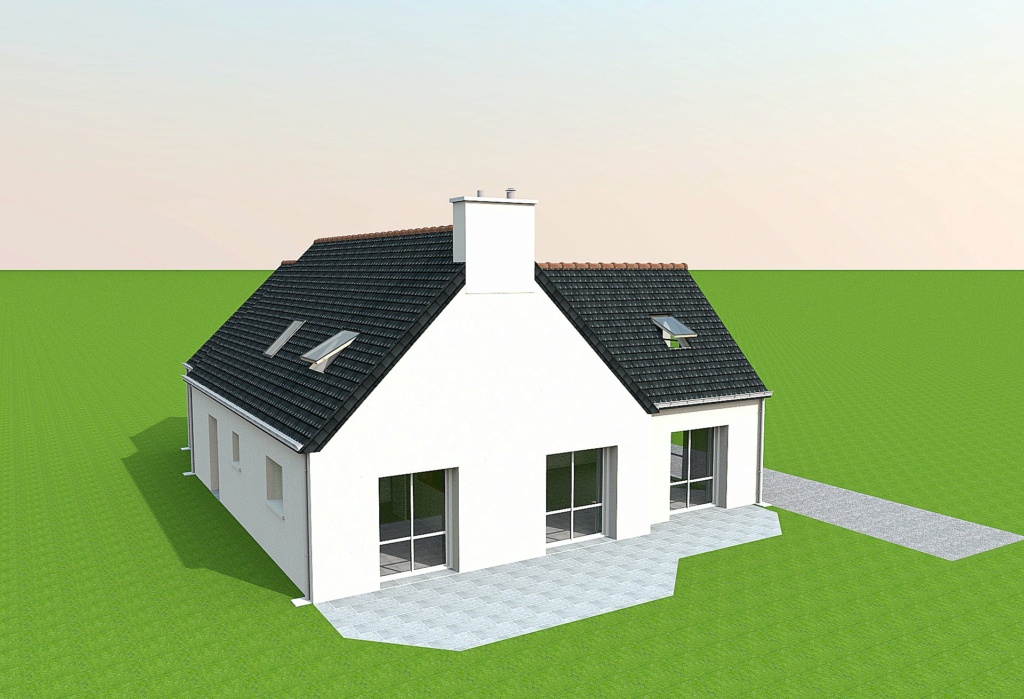
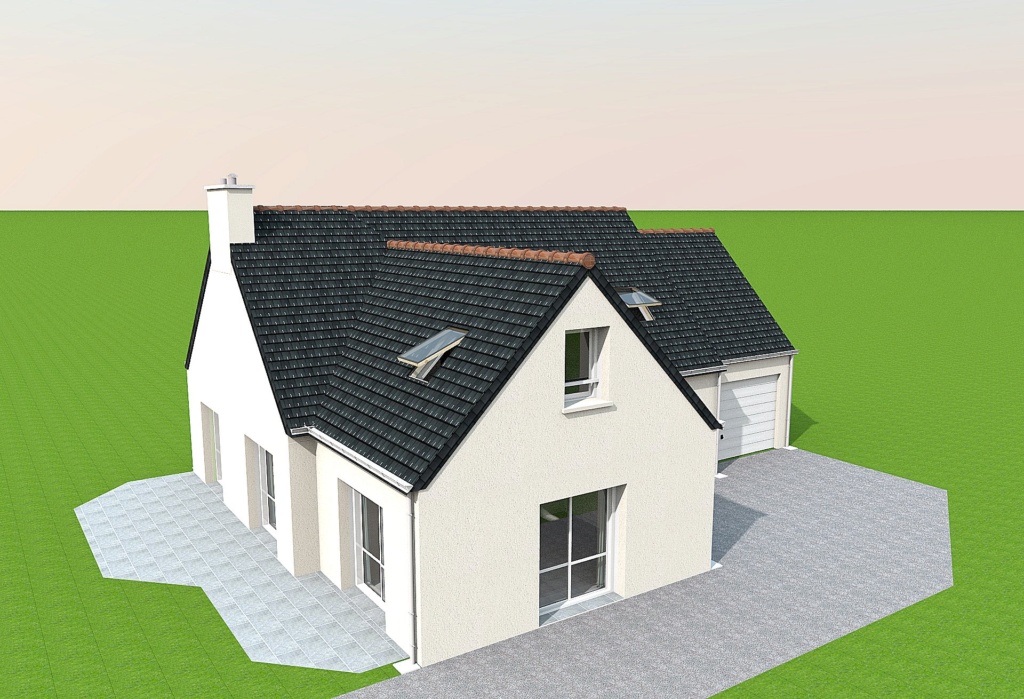
This is the architect's render of the elevations:
Image

When I draw a floor to render the roof, I do this:
Image

So when I generate the roof, this is what I get (even after adjusting for the gables):
Image

I can't seem to get the left side of the back to the shape the architect drew. I think it is because I don't have a part jutting out like in your tutorial. Any ideias?

Thanks for any help!

Cheers
User avatar
dorin
Posts: 824
Joined: Thu Apr 24, 2014 9:14 am
Country: Vatra Dornei, Suceava, Romania

Re: Generate roof plugin

Post by dorin »

The roof generator doesn't seem to understand that
Indeed. Is not an AI.
You need a trick. Something like this.
Add a very tinny part at the room (1 cm or even less). You will have to test.
Image
I've zoomed to be more visible.
Image
The roof generator.
Image
Final result.
Image
Good luck!
A computer program does what you tell it to do, not what you want it to do. Murphy's Law
When all else fails, read the instructions. Murphy's Law
If you don't like "AS IS", DIY. Dorin's law
User avatar
Keet
Posts: 1807
Joined: Fri Apr 08, 2022 7:13 am
Country: Netherlands

Re: Generate roof plugin

Post by Keet »

Maybe you can make it so that just adding a room point is enough without the 1cm break. I haven't tested it but that might already work.
Dodecagon.nl
1300+ 3D models, manuals, and projects
User avatar
dorin
Posts: 824
Joined: Thu Apr 24, 2014 9:14 am
Country: Vatra Dornei, Suceava, Romania

Re: Generate roof plugin

Post by dorin »

You need 2 points to define an edge.
Need to be at least at 1 cm distance between them because the plugin clean the very close and collinear points.
A computer program does what you tell it to do, not what you want it to do. Murphy's Law
When all else fails, read the instructions. Murphy's Law
If you don't like "AS IS", DIY. Dorin's law
AceLemos
Posts: 3
Joined: Sun May 11, 2025 10:07 am
Country: Ireland

Re: Generate roof plugin

Post by AceLemos »

Maybe you can make it so that just adding a room point is enough without the 1cm break. I haven't tested it but that might already work.
Sorry for the dumb question, but what is a room point? Do you mean drawing a room in that space separate from the rest?
AceLemos
Posts: 3
Joined: Sun May 11, 2025 10:07 am
Country: Ireland

Re: Generate roof plugin

Post by AceLemos »

The roof generator doesn't seem to understand that
Indeed. Is not an AI.
You need a trick. Something like this.
Add a very tinny part at the room (1 cm or even less). You will have to test.
Image
I've zoomed to be more visible.
Image
The roof generator.
Image
Final result.
Image
Good luck!
Thank you @dorin, this worked! I put an indent on that wall just in the room I used to generate the roof (not on the actual wall of the floor below it). Thank you. Just speculating here, would it be possible in the plugin to do reference points in the room or something like @keet said? I am not even sure what a room point is, but maybe that is something to go on for future versions?
User avatar
dorin
Posts: 824
Joined: Thu Apr 24, 2014 9:14 am
Country: Vatra Dornei, Suceava, Romania

Re: Generate roof plugin

Post by dorin »

I'm using a personal version (5.14) that can manipulate points and roof edges.
BUT
It is very difficult to use even for me.
I will have to find a better approach (if I live until then).
A computer program does what you tell it to do, not what you want it to do. Murphy's Law
When all else fails, read the instructions. Murphy's Law
If you don't like "AS IS", DIY. Dorin's law
User avatar
dorin
Posts: 824
Joined: Thu Apr 24, 2014 9:14 am
Country: Vatra Dornei, Suceava, Romania

Re: Generate roof plugin

Post by dorin »

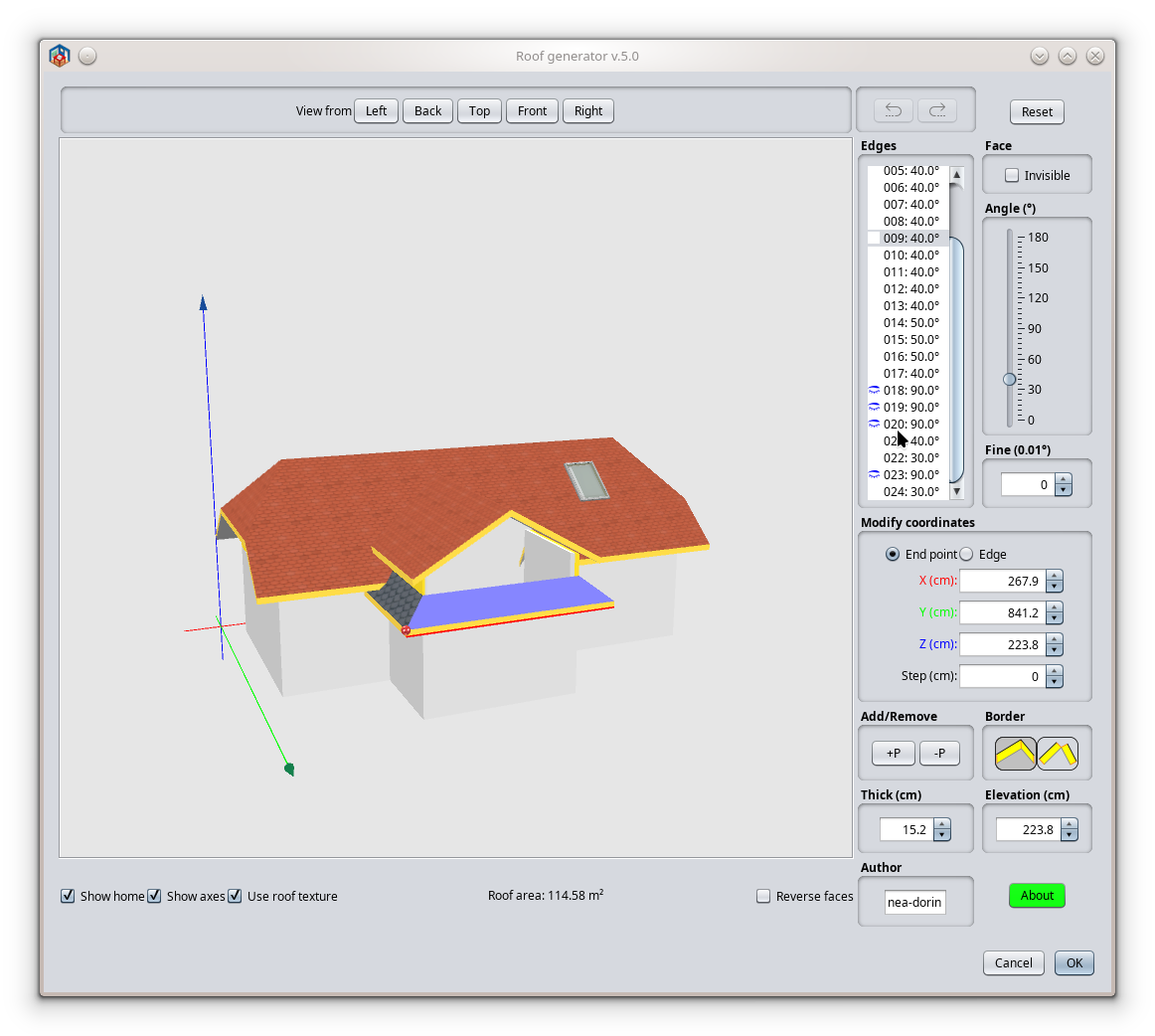
New version 5.0
News:
*keep the name given by the user after creation and modification;
*add point of view buttons
*add option to modify roof points/edges coordinates (one at a time);
*add features to:
**add(insert) a point(+P) on selected edge (by splitting the selected edge in two);
**delete a point(-P)(the end point) of selected edge (delete the selected edge);
*add a local undo/redo and reset mechanism
It have to look like this:
Image

It will be available on Plugin manager when will be fixed.
Probably it need an updated manual. Will be on demand.
Also on Source Forge
A computer program does what you tell it to do, not what you want it to do. Murphy's Law
When all else fails, read the instructions. Murphy's Law
If you don't like "AS IS", DIY. Dorin's law
Post Reply New Topic

Who is online

Users browsing this forum: No registered users and 1 guest