
Emmanuel:
On a brainwave I tried a new way to have two windows on top of each other.
First I imported a box and made it insertable. Then I combined the box with a window below, and a window on top of it. I then combined these three objects in a group, hoping the group would inherit the insertability of all three components. Guess what? It does!
This is a great way to have more flexibility when designing walls with windows over doors, etc etc.
There is just one snag: the windows lose their transparency. Do you think there is a solution for that?
Hans
Objects lose transparency when grouping
This topic has been viewed 7311 times and has 16 replies

Re: Objects lose transparency when grouping
Hans, I'm sorry to disappoint your hopes, but there's no hidden feature in groups management. A group containing items qualified as a door or a window is considered as a door or a window, that's right, but that miserably doesn't change anything in the 3D view.
I'm going to try to fix this bug for the next version, but it's not an easy one.
I'm going to try to fix this bug for the next version, but it's not an easy one.
Emmanuel Puybaret, Sweet Home 3D creator
Re: Objects lose transparency when grouping
Emmanuel:
Don't worry too much. There's a very workable workaround, of course: Group the items, Copy as new furniture, copy and paste into a new instance of SH3D (I generally have two open just for that purpose), then Export to OBJ and re-import as door/window.
But just in case you have some time left... it would be nice if the extra steps weren't necessary, because it would be more flexible.
Hans
Don't worry too much. There's a very workable workaround, of course: Group the items, Copy as new furniture, copy and paste into a new instance of SH3D (I generally have two open just for that purpose), then Export to OBJ and re-import as door/window.
But just in case you have some time left... it would be nice if the extra steps weren't necessary, because it would be more flexible.
Hans
Re: Objects lose transparency when grouping
Hurray, I fixed the multi level windows bug! [:D]
You can test it in the current beta of version 2.6.
I join a test file with 4 holes in a textured wall, but please confirm it works for you too.
You can test it in the current beta of version 2.6.
I join a test file with 4 holes in a textured wall, but please confirm it works for you too.
- Attachments
-
- MultiLevelWindows.sh3d
- (10.85 KiB) Downloaded 214229 times
Emmanuel Puybaret, Sweet Home 3D creator
Re: Objects lose transparency when grouping
I don't know about him, but it works fine for me  . Even if I take, say, a door 80in height, and ventilator of elevation 78in,and drag them to the same place
Surprisingly, if I group the objects outside - and insert - only one of the objects will be shown
But if I insert first, then group, there's no change.
What with the improvements in this version, and db4techs lighting improvements, it looks like a very interesting time coming up :-0
. Even if I take, say, a door 80in height, and ventilator of elevation 78in,and drag them to the same placeSurprisingly, if I group the objects outside - and insert - only one of the objects will be shown
But if I insert first, then group, there's no change.
What with the improvements in this version, and db4techs lighting improvements, it looks like a very interesting time coming up :-0
Re: Objects lose transparency when grouping
The version 2.6 will be released probably soon but won't integrate advanced rendering plugin yet.
Emmanuel Puybaret, Sweet Home 3D creator
Re: Objects lose transparency when grouping
Emmanuel:
Thank you VERY VERY much for this new feature. The longer the wait, the sweeter the taste.
It works under Ubuntu as well. However... it seems a bit buggy.
The old bug is back: when I start v2.6 and try to load the file you provided, the program crashes immediately. Every time. I have to insert an object in the first instance of SH3D before I can open the file as a second instance.
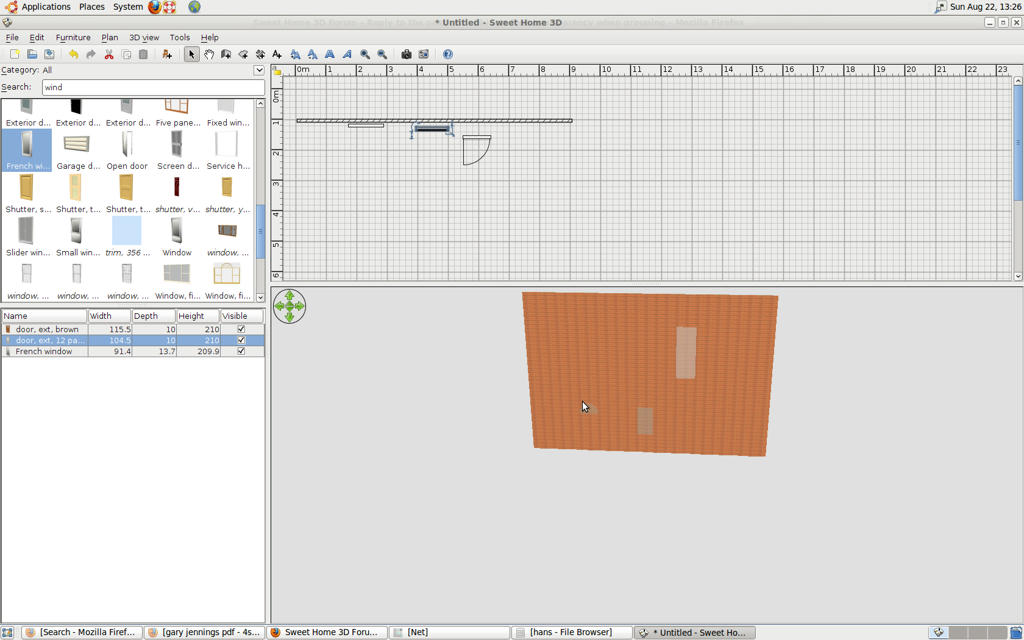
The other problem has something to do with refreshing the screen. When I drag an inserted door out of the wall, the door disappears and only the glass window in the door remains visible. When I do a right-click and (without selecting anything) a left-click, the screen refreshes correctly.
Hans
Thank you VERY VERY much for this new feature. The longer the wait, the sweeter the taste.
It works under Ubuntu as well. However... it seems a bit buggy.
The old bug is back: when I start v2.6 and try to load the file you provided, the program crashes immediately. Every time. I have to insert an object in the first instance of SH3D before I can open the file as a second instance.
The other problem has something to do with refreshing the screen. When I drag an inserted door out of the wall, the door disappears and only the glass window in the door remains visible. When I do a right-click and (without selecting anything) a left-click, the screen refreshes correctly.
Hans
Re: Objects lose transparency when grouping
Thank you for your feedback Hans. [:)]
I didn't succeed to reproduce the two bugs you mentioned. Could you check if it happens with version 2.5 run with Java Web Start too, please?
Does the second bug happen also when there's only one window in the wall?
[Edited the message to fix the link]
I didn't succeed to reproduce the two bugs you mentioned. Could you check if it happens with version 2.5 run with Java Web Start too, please?
Does the second bug happen also when there's only one window in the wall?
[Edited the message to fix the link]
Emmanuel Puybaret, Sweet Home 3D creator
Re: Objects lose transparency when grouping
Emmanuel:
The link you gave also is for v2.6, so I can't test it.
The problem with the disappearing door can be reproduced even with nothing inserted. See the screenshot.
Edit
I cannot reproduce this behaviour under Windows Vista.
Hans
The link you gave also is for v2.6, so I can't test it.
The problem with the disappearing door can be reproduced even with nothing inserted. See the screenshot.
Edit
I cannot reproduce this behaviour under Windows Vista.
Hans
Re: Objects lose transparency when grouping
Sorry, I fixed it.The link you gave also is for v2.6, so I can't test it.
Then this still sounds as a driver problem... [:(]I cannot reproduce this behaviour under Windows Vista.
Emmanuel Puybaret, Sweet Home 3D creator
Who is online
Users browsing this forum: No registered users and 1 guest