sad High priority Everything red

This topic has been viewed 5360 times and has 8 replies
Thread status: Active
Still a problem with your graphic card? [img]http://www.sweethome3d.com/images/flags/en_small.gif[/img]
Post Reply New Topic
Schattenmann
Posts: 5
Joined: Sun Aug 29, 2010 4:37 pm

Everything red

Post by Schattenmann »

Just woke up this morning and jumped on the computer to keep working on a project. This program is really great, it's the first time I've ever used any software of this sort and its ease of use and intuitiveness has made the work really exciting. But, I have run on a problem that has dashed my spirits on the rocks.

I opened my project, and everything is red. Doors are big red cubes, the wall textures are red, the floor, windows, everything! The only thing that is not red is a chair rail moulding I imported, and even though it is red it has lost its form, instead of moulding it is just a rectangle shape.
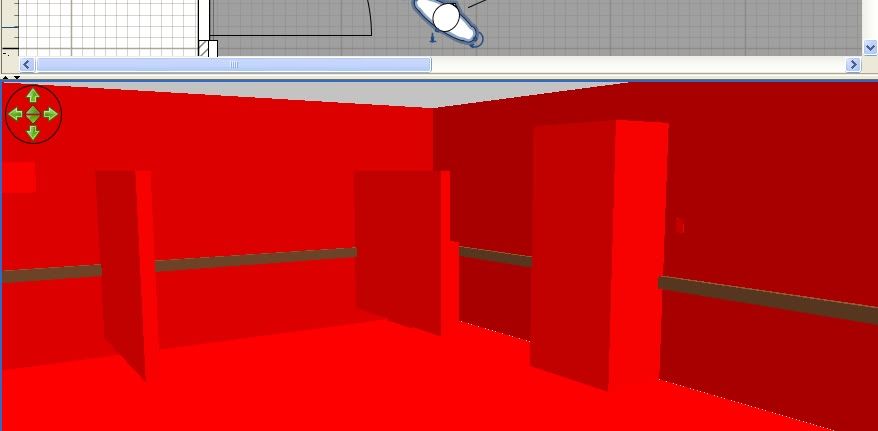
Image

What could have caused this?!

I have two versions of this room. I opened the other file and it is perfectly normal, even though it uses the same objects, textures, etc. (I created the room, saved the file, then saved later changes as a different file name two have two versions).
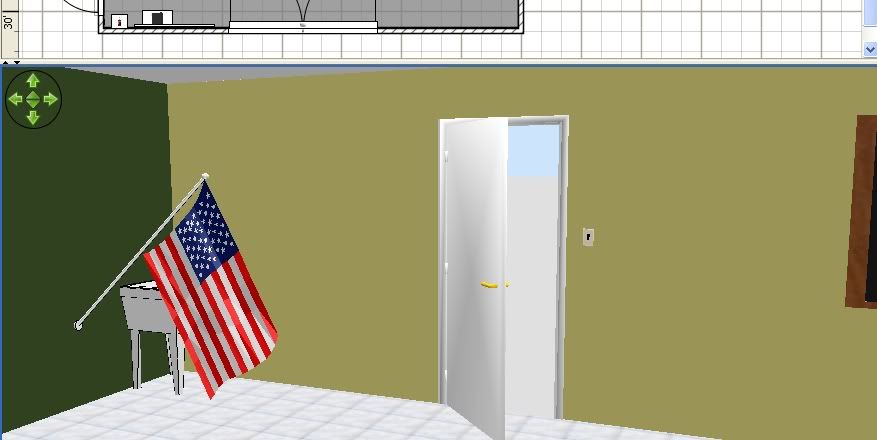
Image

Is there any way to recover the room? Has anyone else encountered this issue? I searched the FAQ and browsed this forum, but I didn't see anything similar.
Schattenmann
Posts: 5
Joined: Sun Aug 29, 2010 4:37 pm

Re: Everything red

Post by Schattenmann »

I forgot to include my version information.
I'm running Version 2.6 Java version 1.6.0_21 on Windows XP Professional version 2002 service pack 3
User avatar
whippetsleek
Posts: 121
Joined: Sat Jul 31, 2010 11:54 pm

Re: Everything red

Post by whippetsleek »

I'm not an expert, and others will likely give you a much better answer, but I had a similar problem when I accidently used a texture file that was too big, and my graphics card couldn't handle all the calculations so I had to increase the graphics RAM and crop down the size of the texture. Try updating your graphics driver if you know the graphics card you have.
Image
Schattenmann
Posts: 5
Joined: Sun Aug 29, 2010 4:37 pm

Re: Everything red

Post by Schattenmann »

I'm using the latest driver for my card.
User avatar
Puybaret
Posts: 9440
Joined: Mon Nov 07, 2005 12:00 pm
Country: Paris, France
Contact:

Re: Everything red

Post by Puybaret »

Did you save, quit Sweet Home 3D, and then open your file?
No error message?
Emmanuel Puybaret, Sweet Home 3D creator
Schattenmann
Posts: 5
Joined: Sun Aug 29, 2010 4:37 pm

Re: Everything red

Post by Schattenmann »

I'm trying to think of variables. I saved, but I did not close Sweet Home. I hit the hibernate button on my keyboard, and the computer blue-screened. Now that I remember the bluescreen, that may have caused the problem, but how?

The damaged project had already been saved and was open when the bluescreen occurred. The second project is not damaged and was not open when the bluescreen occurred.
User avatar
whippetsleek
Posts: 121
Joined: Sat Jul 31, 2010 11:54 pm

Re: Everything red

Post by whippetsleek »

Try shutting the computer down completely, or if you have a ram cleaner, run it. Sometimes errors will stay resident in the ram and keep giving you headaches. If you know your way around DOS, you can try a RAM dump and see what errors are there, or look at the error TXT that Windows usually sends to the TEMP folder. And I'm not sure, but I think Sweet Home has it's own console that will tell you error messages, but I think that would be an Puybaret answer. I've never looked into Java console messages.
Image
User avatar
Puybaret
Posts: 9440
Joined: Mon Nov 07, 2005 12:00 pm
Country: Paris, France
Contact:

Re: Everything red

Post by Puybaret »

A BSOD (Blue Screen of the Death) doesn't help for sure!
But it should be annoying only if it happens while you save a document.
Emmanuel Puybaret, Sweet Home 3D creator
Schattenmann
Posts: 5
Joined: Sun Aug 29, 2010 4:37 pm

Re: Everything red

Post by Schattenmann »

Well, I shut down completely last night, but the project is still all red. I've moved on using the second version of the project as a base to re-create the lost project, but Puybaret if there are any error logs I can forward to you let me know which ones and where to get them.
Post Reply New Topic

Who is online

Users browsing this forum: No registered users and 1 guest