biggrin My photos on the wall..

This topic has been viewed 24134 times and has 18 replies
Thread status: Active
Share your snapshots made with Sweet Home 3D here [img]http://www.sweethome3d.com/images/flags/en_small.gif[/img]
User avatar
kumax
Posts: 6
Joined: Sat Aug 28, 2010 9:36 am

Re: My photos on the wall..

Post by kumax »

Thanks for the nice comment! [:">]

___________

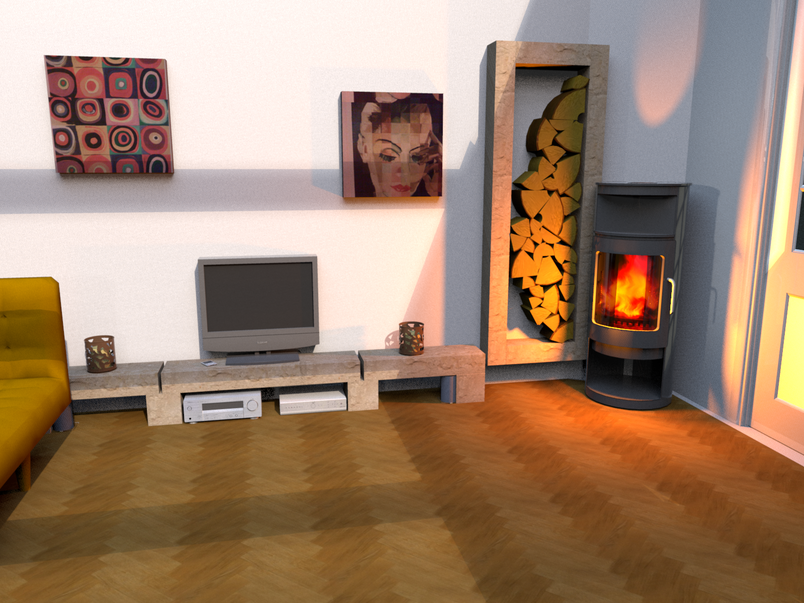
Another render for my another friend. Big photo print on the wall.

Image

I wish the quality of shadows and textures would be better but the floor is perfect!! [=D>] Thank you advanced photo render. [;)]
User avatar
Puybaret
Posts: 9440
Joined: Mon Nov 07, 2005 12:00 pm
Country: Paris, France
Contact:

Re: My photos on the wall..

Post by Puybaret »

Very nice. [:)]
I'm looking forward discovering the picture you'll submit to Sweet Home 3D contest. 6 days left before the end! [;)]
Emmanuel Puybaret, Sweet Home 3D creator
db4tech
Posts: 223
Joined: Mon May 03, 2010 5:10 pm
Country: UK

Re: My photos on the wall..

Post by db4tech »

Another great looking render! [:)]

What is it about the shadows that you'd like to change, the hardness? Also the textures?

db4tech
sanjoyp
Posts: 16
Joined: Tue Sep 28, 2010 11:54 am
Country: Scotland, UK
Contact:

Re: My photos on the wall..

Post by sanjoyp »

Hi sorry for the thread hijack. I am running in to problems with my photos I have made into paintings on the wall ? I have found that those taken from gifs are okay but when the jpg resolution is high 2000+ * 2000+ pixels I am unable to render. I get the dreaded red x, memory issue ?

This image has two boxes with customer textures which are iphone photos of paintings.

Image

Is it just lack of RAM ?
sanjoyp
Posts: 16
Joined: Tue Sep 28, 2010 11:54 am
Country: Scotland, UK
Contact:

Re: My photos on the wall..

Post by sanjoyp »

Which floor texture did you use in this photos it is exactly what I am after!

Image
User avatar
hansmex
Posts: 4027
Joined: Sat Sep 26, 2009 11:36 am
Country: Netherlands

Re: My photos on the wall..

Post by hansmex »

Sanjoy,

There's some kind of an upper limit to the size of texture you can use.This problem has been reported before (see this thread). The solution is to make your texture smaller.

A remark about texture size: If you make a render of 4000x3000 pixels and there's a picture on the wall (see the two pictures in your last post) then the size of the pictures on the wall is maybe 800x600 pixels. Why would you apply a texture of 2400x1800 pixels (or something similar) only to have it reduced in the final result to 800x600? It takes up a lot of processor time to calculate every pixel, but none of it shows as a better quality in the final result.

Hans
Hans

new website - under constuction
hansdirkse.info
sanjoyp
Posts: 16
Joined: Tue Sep 28, 2010 11:54 am
Country: Scotland, UK
Contact:

Re: My photos on the wall..

Post by sanjoyp »

Good point Hans, I was using the train of thought of not removing any detail I had and using the high res imaged. Will retry.

Cheers

Sanjoy
User avatar
kumax
Posts: 6
Joined: Sat Aug 28, 2010 9:36 am

Re: My photos on the wall..

Post by kumax »

Another great looking render! [:)]

What is it about the shadows that you'd like to change, the hardness? Also the textures?

db4tech
Not the hardness but the smoothness? I don't know how to say it, but I see some dots in the shadow and I would rather like to have it in one smooth surface. I think the thing which would solve my problem it's to render it in bigger resolution and than resize it to smaller picture. But the bigger resolution would kill my computer.. :-))

And the thing about textures.. I meant it would be nice to see some fabric texture of the sofa... for example. :)
User avatar
whippetsleek
Posts: 121
Joined: Sat Jul 31, 2010 11:54 pm

Re: My photos on the wall..

Post by whippetsleek »

Hi kumax... not sure about the shadows.. that would be puybarets or db4tech's area.. [:)] but when I want to get a fabric type texture, I used a smaller texture of between 256 x256 or 512x512, and make it the shades very distinct. Then I make the texture very small in the texture editor, like 1 inch sq. Here is an example..

Image

It used this texture at 4x4 inches

Image


This one is a little lighter

Image

and used this at 1x1

Image

And this is dark...

Image

and used this at 6x6 inches

Image


And those were great looking renders! [;)]
Image
Post Reply New Topic

Who is online

Users browsing this forum: No registered users and 1 guest