
Emmanuel,
It doesn't work on my Ubuntu PC: I tried it before writing my reply, and now tried it again... Maybe I'm doing something wrong?
Hans
Sweet Home 3D 3.0
This topic has been viewed 378590 times and has 134 replies
-
whippetsleek

- Posts: 121
- Joined: Sat Jul 31, 2010 11:54 pm
Re: Sweet Home 3D 3.0
Maybe I am misunderstanding your reply Hans, but my trouble is ... for example, I make a full circle of two segments like this..

And I select one side of the circle to split so that I can either paint it a different color, or delete the extra section I don't need..

And then when I split the wall, it ends up looking like this....

I can make many little walls to mimic the splitting, but I was wondering if there was a faster way to do it?
And I select one side of the circle to split so that I can either paint it a different color, or delete the extra section I don't need..
And then when I split the wall, it ends up looking like this....
I can make many little walls to mimic the splitting, but I was wondering if there was a faster way to do it?

Re: Sweet Home 3D 3.0
Tonight, I updated the current version to Beta 15, with the following bug fixes and enhancements:
- Used blackman-harris filter instead of gaussian in best quality rendering (thank you Hans for your great tests),
- Improved front clip distance in aerial view to ensure carpets and thin objects will be better rendered when seen from from far,
- Found an algorithm to approximate the shadow of 3D models with numerous vertices and ensure second rendering quality will go faster and won't fail,
- Improved viewpoint management to prevent storing two viewpoints at the same location or with the same name,
- Added a combo box at the second call of Store point of view dialog to let the user choose an existing point of view,
- Added some tool tips on Mirrored et Part of base plan check boxes in furniture modification dialog,
- Added colored light sources to default catalog,
- Made light sources not deformable (applicable only to light sources delivered from this beta version),
- Changed the indicator and the behavior at the bottom left of lights to change their power.

We're getting closer to version 3.0 now. [;)]
And to answer to a (quite) old question:
Does it work for other Linux users?
- Used blackman-harris filter instead of gaussian in best quality rendering (thank you Hans for your great tests),
- Improved front clip distance in aerial view to ensure carpets and thin objects will be better rendered when seen from from far,
- Found an algorithm to approximate the shadow of 3D models with numerous vertices and ensure second rendering quality will go faster and won't fail,
- Improved viewpoint management to prevent storing two viewpoints at the same location or with the same name,
- Added a combo box at the second call of Store point of view dialog to let the user choose an existing point of view,
- Added some tool tips on Mirrored et Part of base plan check boxes in furniture modification dialog,
- Added colored light sources to default catalog,
- Made light sources not deformable (applicable only to light sources delivered from this beta version),
- Changed the indicator and the behavior at the bottom left of lights to change their power.
We're getting closer to version 3.0 now. [;)]
And to answer to a (quite) old question:
Hans, maybe the shortcut Ctrl + Enter is associated to something else in your system?It doesn't work on my Ubuntu PC: I tried it before writing my reply, and now tried it again... Maybe I'm doing something wrong?
Does it work for other Linux users?
Emmanuel Puybaret, Sweet Home 3D creator
Re: Sweet Home 3D 3.0
Emmanuel,
You're amazing! Busy with work and still you find time for a new beta. Do you ever sleep at all?
I saw a typo: in 3D view it says Got to point of view, that's 1 letter too many.
With CTRL+ENTER, are you referring to drawing round walls? I can do that but with CTRL+CLICK 2nd POINT and then drag.
I'll try and test-drive this version in the next few days.
Hans
You're amazing! Busy with work and still you find time for a new beta. Do you ever sleep at all?
I saw a typo: in 3D view it says Got to point of view, that's 1 letter too many.
With CTRL+ENTER, are you referring to drawing round walls? I can do that but with CTRL+CLICK 2nd POINT and then drag.
I'll try and test-drive this version in the next few days.
Hans
Re: Sweet Home 3D 3.0
Thank you Hans for your feedback. [:)]
My work outside is over now, so I have time to finish programming this version 3.0.
Then, I'll have to start an other job, but that's an other story...
My work outside is over now, so I have time to finish programming this version 3.0.
Then, I'll have to start an other job, but that's an other story...
Emmanuel Puybaret, Sweet Home 3D creator
Re: Sweet Home 3D 3.0
Here's the Beta 16 with the following new features and bug fixes:
- Recovered auto saved files at program launch to let user review them after a crash. I reproduced the auto save / auto recover behavior of MS Word in Sweet Home 3D. Please try if it works correctly, by simply crashing the program and relaunching it.
- Added Arc extent spinner to Wall modification dialog to adjust round wall after its creation.
- Added Unchanged / Mat / Shiny radio boxes to Furniture modification dialog to control furniture shininess.
- Placed by default the compass at the left of the plan for existing homes (thank you Hans for this suggestion).
- Kept a free zone at the furniture center of small pieces to be able to move them without deselecting them first.
- Took into account light furniture angle to place correctly the light sources it contains.
- Reviewed 3D normals in the furniture models of the default catalog to ensure these pieces render correctly (I'm still astonished that nobody complained about that one during all the past years!)
- Added the five following lights to the default catalog (I felt that new users who didn't install any SH3F files yet, wouldn't understand the purpose of lights if they had only light sources!).

Floor uplight
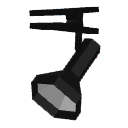
Spot light

Pendant lamp

Work lamp

Wall uplight
This will probably be one of the latest beta version with new features. I may add mouse wheel zoom on cursor if it isn't too difficult and fix a few minor bugs, but globally, I feel we have now a pretty nice version 3.0 within reach. [:)]
Thus, it's going to be translators' turn and I'll try to improve help files to describe how to create photos and videos with lights.
Thank you for your support
- Recovered auto saved files at program launch to let user review them after a crash. I reproduced the auto save / auto recover behavior of MS Word in Sweet Home 3D. Please try if it works correctly, by simply crashing the program and relaunching it.
- Added Arc extent spinner to Wall modification dialog to adjust round wall after its creation.
- Added Unchanged / Mat / Shiny radio boxes to Furniture modification dialog to control furniture shininess.
- Placed by default the compass at the left of the plan for existing homes (thank you Hans for this suggestion).
- Kept a free zone at the furniture center of small pieces to be able to move them without deselecting them first.
- Took into account light furniture angle to place correctly the light sources it contains.
- Reviewed 3D normals in the furniture models of the default catalog to ensure these pieces render correctly (I'm still astonished that nobody complained about that one during all the past years!)
- Added the five following lights to the default catalog (I felt that new users who didn't install any SH3F files yet, wouldn't understand the purpose of lights if they had only light sources!).
Floor uplight
Spot light
Pendant lamp
Work lamp
Wall uplight
This will probably be one of the latest beta version with new features. I may add mouse wheel zoom on cursor if it isn't too difficult and fix a few minor bugs, but globally, I feel we have now a pretty nice version 3.0 within reach. [:)]
Thus, it's going to be translators' turn and I'll try to improve help files to describe how to create photos and videos with lights.
Thank you for your support
Emmanuel Puybaret, Sweet Home 3D creator
Re: Sweet Home 3D 3.0
Emmanuel,
Just gave the beta 16 a short test drive. First impression is VERY good!
- The auto recovery now works like a charm: it opened all 50 or so recovery files for review! HAHAHA The good news is, that it then deletes the temporary file, so that the recovery directory doesn't clog up with old files. Great! I now have the purple pond file I had intended for the design contest. [:)]
- Arc extend modifier: great!
- Unchanged, matt, shiny: great!
- Repositioned compass: GREAT! (I have the habit to start my designs at > 0,0 <, so this is very welcome.
- Free zone: have to find out more about that one.
- 3D normals: I'm not sure what you mean, or what that is. However, maybe later tonight or tomorrow I may succeed in making a cube with a "normal" texture. I think I finally found out how to apply a texture correctly.
- Lights: great! I noticed all existing lights in the library also have a power switch!
I noticed one minor thing: I remember db4tech telling some time ago that he introduced a new routine for Q2 rendering, that did away with the banding. A quick render I did a few minutes ago, again showed a lot of banding. Maybe it's accidental, I'd have to investigate more.
Hans
Just gave the beta 16 a short test drive. First impression is VERY good!
- The auto recovery now works like a charm: it opened all 50 or so recovery files for review! HAHAHA The good news is, that it then deletes the temporary file, so that the recovery directory doesn't clog up with old files. Great! I now have the purple pond file I had intended for the design contest. [:)]
- Arc extend modifier: great!
- Unchanged, matt, shiny: great!
- Repositioned compass: GREAT! (I have the habit to start my designs at > 0,0 <, so this is very welcome.
- Free zone: have to find out more about that one.
- 3D normals: I'm not sure what you mean, or what that is. However, maybe later tonight or tomorrow I may succeed in making a cube with a "normal" texture. I think I finally found out how to apply a texture correctly.
- Lights: great! I noticed all existing lights in the library also have a power switch!
I noticed one minor thing: I remember db4tech telling some time ago that he introduced a new routine for Q2 rendering, that did away with the banding. A quick render I did a few minutes ago, again showed a lot of banding. Maybe it's accidental, I'd have to investigate more.
Hans
Re: Sweet Home 3D 3.0
Hello,
Finally, I managed to make a box with the texture correctly applied on all sides.
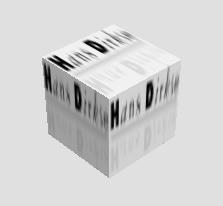
Unfortunately, you cannot apply a texture to this box from within SH3D, because then the textures are applied incorrectly again. So, you have to manually edit the OBJ and MTL file to change the image.
Hans
Finally, I managed to make a box with the texture correctly applied on all sides.
Unfortunately, you cannot apply a texture to this box from within SH3D, because then the textures are applied incorrectly again. So, you have to manually edit the OBJ and MTL file to change the image.
Hans
- Attachments
-
- box_w_logo.zip
- (29.91 KiB) Downloaded 1552 times

Re: Sweet Home 3D 3.0
When I opened this beta version, 4 recovered files came up. I just closed the first 3 that I didn't want then I kept the one open that I wanted to work with.
Will it be doing this by default when you first start it up? The files it recovered were, I think, simply closed because I was done with them.
I played with the lights some more and found that I was able to turn on the already existing lights. Anyway, it's much better looking now.
Nice work Emmanuel!
Will it be doing this by default when you first start it up? The files it recovered were, I think, simply closed because I was done with them.
I played with the lights some more and found that I was able to turn on the already existing lights. Anyway, it's much better looking now.
Nice work Emmanuel!
- Attachments
-
- kitchenlights-beta16.jpeg (172.15 KiB) Viewed 645233 times
-
- SH3Dkitchenbeta16lighting.png (163.46 KiB) Viewed 2923436 times
-
- kitchen-beta16.png (349.08 KiB) Viewed 641182 times
Re: Sweet Home 3D 3.0
Well, I'm super-eager to try the 3.0 beta, but I can't seem to install it. [:(] Java Web Start loads it, but always ends with the error: "Unable to launch the application." Uninstalling through the Java console and reinstalling does no good.
SW3D v2.6 still runs (and uninstalls and reinstalls) correctly.
Is there any particular information about the error detail or my system that you might need to pinpoint the problem?
SW3D v2.6 still runs (and uninstalls and reinstalls) correctly.
Is there any particular information about the error detail or my system that you might need to pinpoint the problem?
Who is online
Users browsing this forum: No registered users and 1 guest