sad High priority Is there any way we can turn on the anti aliasing features?

This topic has been viewed 8177 times and has 13 replies
Thread status: Active
Still a problem with your graphic card? [img]http://www.sweethome3d.com/images/flags/en_small.gif[/img]
User avatar
hansmex
Posts: 4027
Joined: Sat Sep 26, 2009 11:36 am
Country: Netherlands

Re: Is there any way we can turn on the anti aliasing features?

Post by hansmex »

Tanvir,

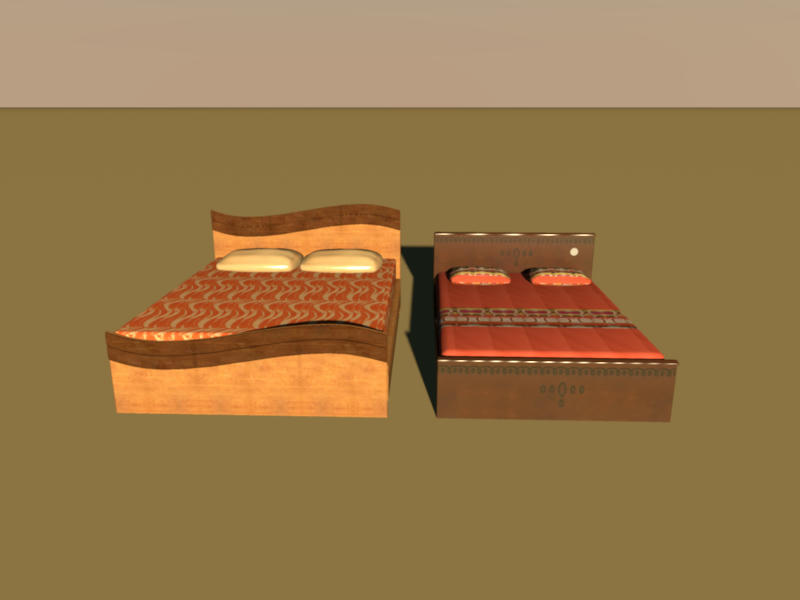
Your models give crisp and sharp objects in the 3D preview.
When I render an image in high quality, the result is also excellent.
I can't see any jagged lines.

However, the images for the textures have been badly chosen. The wood textures are far too big (2487x1500 pixels) and may cause problems. I propose you reduce these images to approx. 512x512 pixels. On the other hand, some of the other images are too small, e.g. the blanket on the left bed.

I hope this answers your question.

Hans
Image
Hans

new website - under constuction
hansdirkse.info
User avatar
TanvirAlam
Posts: 10
Joined: Wed Feb 02, 2011 10:31 am

Re: Is there any way we can turn on the anti aliasing features?

Post by TanvirAlam »

You are right it gives excellent result if you do rendering in in high quality. but I want it with out rendering! in the 3D preview. I will make all my texture image 512X512. in the 3d preview it shows the Jagged lines. how can I solve that.
User avatar
hansmex
Posts: 4027
Joined: Sat Sep 26, 2009 11:36 am
Country: Netherlands

Re: Is there any way we can turn on the anti aliasing features?

Post by hansmex »

Tanvir,

pre·view
   [font=courier new]/ˈpriˌvyu/
[pree-vyoo[/font] ]
–noun
1. an earlier or previous view.
2. an advance showing of a motion picture, play, etc., before its public opening.
3. an advance showing of brief scenes in a motion picture, television show, etc., for purposes of advertisement.
4. anything that gives an advance idea or impression of something to come.

@4: That means that a high quality rendering is meant to be high quality. A preview is a preview and may be low(er) quality. That includes jagged lines.

Hans
Hans

new website - under constuction
hansdirkse.info
User avatar
TanvirAlam
Posts: 10
Joined: Wed Feb 02, 2011 10:31 am

Re: Is there any way we can turn on the anti aliasing features?

Post by TanvirAlam »

Nicely explained! Thank you! it explains it all!
Post Reply New Topic

Who is online

Users browsing this forum: No registered users and 1 guest