I also save the camera positions. My work flow is to store all camera positions using the low pixel rendering and do the full pixel rendering afterwards. Since the rendering takes up to an hour and I will not let the laptop run over night it is easier to start the next day from the menu. You should keep the plug in menu entry.
Other texts are also affected.
Photo-video rendering plug-in
This topic has been viewed 841151 times and has 225 replies
-
Waldemar.Hersacher
- Posts: 61
- Joined: Sat Jan 06, 2024 8:39 am
- Country: Germany
Re: Photo-video rendering plug-in
MSI GP60, Linux Mint 21.3 Virginia base: Ubuntu 22.04 jammy, SH3D 7.5 with Photo-video rendering 2.8
Re: Photo-video rendering plug-in
After noting that the plug-in actions were not accessible by right-clicking in the 3D view even if they had been added to this menu, your remark and that of Puybaret concerning the use of a standard user confirms that the current menu is maintained.
This is an inherent behavior of Sweet Home 3D.I have positioned the visitor in a door. In 3D View I could look into the room but the photo was complete black.
EnkoNyito
Re: Photo-video rendering plug-in
PhotoVideoRendering-2.7 plug-in
The ApplicationPlugin_en.properties template file is included in the zipped folder.
- initialization with Sweet Home 3D default rendering settings
- basic components common to Sweet Home 3D
- dynamic translation after language change (except menu)
- German translation by Waldemar Hersacher
The ApplicationPlugin_en.properties template file is included in the zipped folder.
EnkoNyito
-
chipster123
- Posts: 1
- Joined: Sat Aug 12, 2023 11:27 am
- Country: USA
Re: Photo-video rendering plug-in
How do i get the "Create photos at points of view" multi-photo interface to allow selecting the time of day to use in the render? I have tried sliding the selector to level 3 and level 4 and no advanced settings show up like they do for single photo option.
Re: Photo-video rendering plug-in
The "Create photos at points of view" panel allows you to automatically create photos from previously stored points of view with the date, time and the chosen rendering engine.
So you need to set these settings in the "Create photo" panel first before storing the desired points of view.
So you need to set these settings in the "Create photo" panel first before storing the desired points of view.
EnkoNyito
-
Dmitriy_the_Wombat

- Posts: 2
- Joined: Sun Feb 25, 2024 1:48 pm
- Country: Germany
Re: Photo-video rendering plug-in
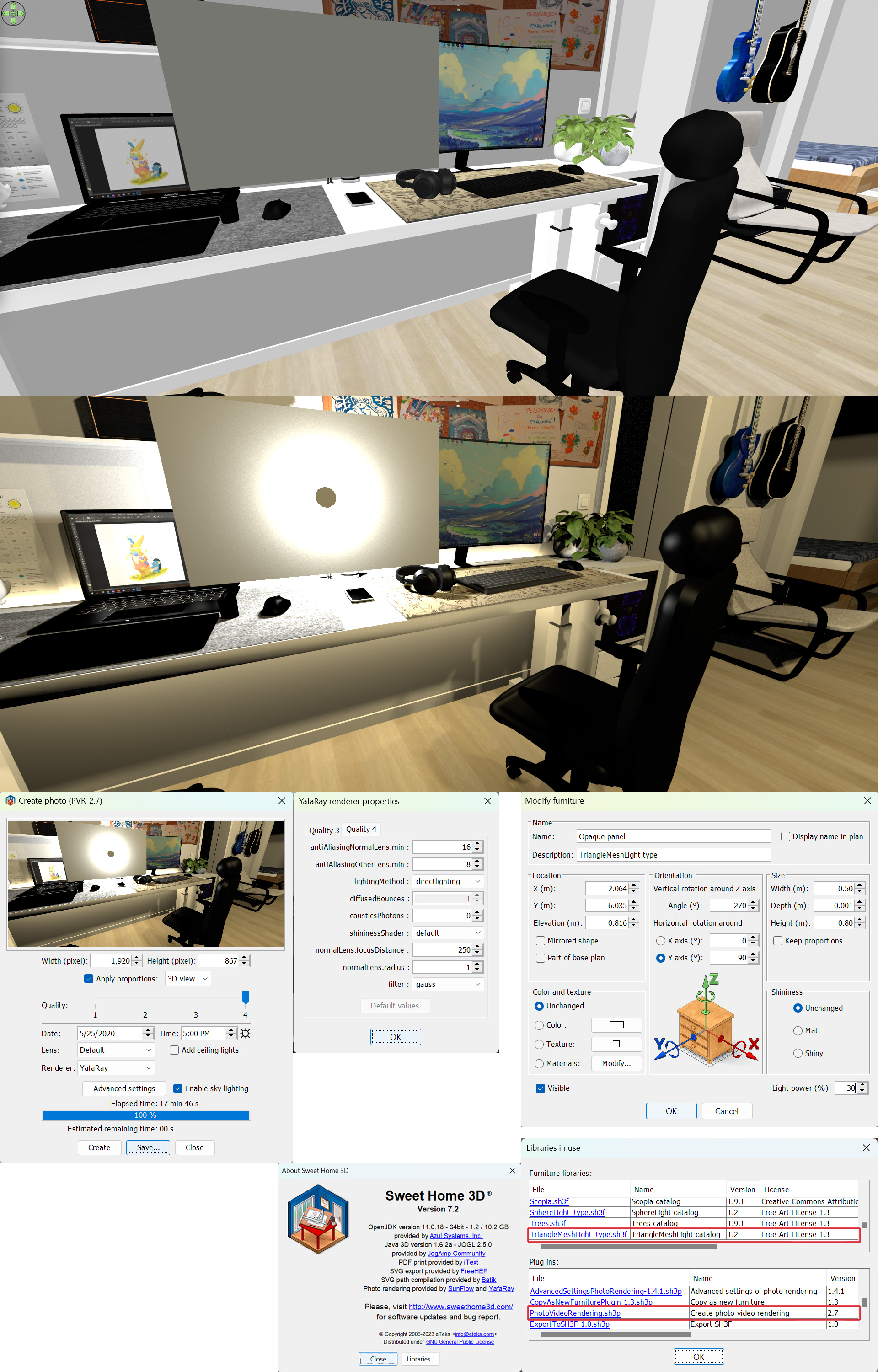
Hello! Sorry if I am writing in a wrong section of forum, but I have some problems with Light Panels plugin, Photo-video rendering plug-in or both of them. I have tried to use Light panel to highlight screens of my devices but for some reasons Light Panels not worked as I expected, It lights like panel highlighted with normal bulb not like evenly illuminated panel. Maybe there is a problem with incompatibility of different versions of plugins and SweetHome3D version. Or maybe I am doing something wrong ))) Example of render and all important info about system, plugins and render settings are on my screenshot. Many thanks in advance for any help ))
-
captaincook

- Posts: 403
- Joined: Fri Oct 20, 2017 3:16 pm
- Country: France
Re: Photo-video rendering plug-in
Bonjour.
Je ne sais pas si ça répond à votre question et si ça peut vous aider à résoudre votre problème.
L'image ci-dessous montre un écran TV éteint et éclairé par un panneau non visualisable permanent, puissance lumineuse réglée à 9%.
https://ibb.co/84v0qz9

Je ne sais pas si ça répond à votre question et si ça peut vous aider à résoudre votre problème.
L'image ci-dessous montre un écran TV éteint et éclairé par un panneau non visualisable permanent, puissance lumineuse réglée à 9%.
https://ibb.co/84v0qz9
Re: Photo-video rendering plug-in
@Dmitriy_the_Wombat
Since Sweet Home 3D 7.0, light panels are available in the LightShapes library by Emmanuel Puybaret (Invisible light panel) and the OtherLightTypes-1.5 library by myself (Unviewable panel - permanent).
These can be used with Sweet Home 3D's default photo panel and photo plug-in.
Consider uninstalling older versions of libraries if they are not replaced automatically.
Since Sweet Home 3D 7.0, light panels are available in the LightShapes library by Emmanuel Puybaret (Invisible light panel) and the OtherLightTypes-1.5 library by myself (Unviewable panel - permanent).
These can be used with Sweet Home 3D's default photo panel and photo plug-in.
Consider uninstalling older versions of libraries if they are not replaced automatically.
EnkoNyito

Re: Photo-video rendering plug-in
I'm joining, I'm having the same problem and I'm looking for a solution too.
Rendering with light bodies. In the designs I made a few years ago, the light panels appear strangely on the render images, whether visible or invisible, or of any shape, a small ball of light or a dark circle appears in the middle in each case. Of course, the sh3d version changed in the meantime. Now 7.2 and the latest plugins.

https://www.dropbox.com/scl/fi/gmgj75b57qihr84q7075j/AD-Jersey-2021_Light-anomalia.png?rlkey=mmdhuh9t55y34m23gc2w7n85h&dl=0
What can I do like this?
1. Should I go back to version 6.6 (on one of my PCs), but I don't remember what light kit is needed?
2. Should I replace the lighting bodies one by one with the new verzo lights (light panels), which is not a small job?
3. Or something else?
Now I'm at a loss, is there a good solution for this? Thank you!
Rendering with light bodies. In the designs I made a few years ago, the light panels appear strangely on the render images, whether visible or invisible, or of any shape, a small ball of light or a dark circle appears in the middle in each case. Of course, the sh3d version changed in the meantime. Now 7.2 and the latest plugins.
https://www.dropbox.com/scl/fi/gmgj75b57qihr84q7075j/AD-Jersey-2021_Light-anomalia.png?rlkey=mmdhuh9t55y34m23gc2w7n85h&dl=0
What can I do like this?
1. Should I go back to version 6.6 (on one of my PCs), but I don't remember what light kit is needed?
2. Should I replace the lighting bodies one by one with the new verzo lights (light panels), which is not a small job?
3. Or something else?
Now I'm at a loss, is there a good solution for this? Thank you!
-
Dmitriy_the_Wombat
- Posts: 2
- Joined: Sun Feb 25, 2024 1:48 pm
- Country: Germany
Re: Photo-video rendering plug-in
@enkonyito
Many Thanks! Newer version of Lights library (1.5) finally solved my problem )))
Many Thanks! Newer version of Lights library (1.5) finally solved my problem )))
Who is online
Users browsing this forum: No registered users and 1 guest