Congratulations, very nice. Thanks. The settings explanation in configureSunflowRenderingEngine.pdf from thread,6122 is quite necessary for me to grasp the advanced settings. If you consider updating it, do not hesitate to spell out in some more detail what the different settings mean. Even if I could find out for myself, some of the options slow down the rendering process quite a bit - and then it can be hard to find out when a setting is worth the trouble. But that is a detail, very nice work.
ok
Photo-video rendering plug-in
This topic has been viewed 841607 times and has 225 replies

Re: Photo-video rendering plug-in
@enkonyito
Can the dark level options be included in the resizable?
It would be nice if it could [:)]

Can the dark level options be included in the resizable?
It would be nice if it could [:)]
Re: Photo-video rendering plug-in
@bdfd
Maybe I should display the current version in the Photo-video rendering menu?
@okh
@Ceciliabr

To install the plug-in and replace the old version, simply double-click on the PhotoVideoRendering.sh3p file included in the PhotoVideoRendering-1.4.1.zip folder.I don't see anything :
1. in the options menu
2. in librairies list
3. but plugin is in the good sub-directory (green Arrow)
An idea ?
Maybe I should display the current version in the Photo-video rendering menu?
@okh
It is true that this document on the setting of the SunFlow rendering engine is a bit dated and that an update would be necessary following the understanding of the interaction between certain parameters (managed by the plug-in).The settings explanation in configureSunflowRenderingEngine.pdf from thread,6122 is quite necessary for me to grasp the advanced settings. If you consider updating it, do not hesitate to spell out in some more detail what the different settings mean.
@Ceciliabr
The minimum night brightness (dark level 2) is included since version 1.4 of the plug-in.Can the dark level options be included in the resizable?
It would be nice if it could
EnkoNyito
-
bdfd

- Posts: 2614
- Joined: Sat Mar 29, 2014 7:17 am
- Country: LILLE, Les Hauts de France, Western Europa
Re: Photo-video rendering plug-in
@enkonyito : YES !To install the plug-in and replace the old version, simply double-click on the PhotoVideoRendering.sh3p file included in the PhotoVideoRendering-1.4.1.zip folder.
Maybe I should display the current version in the Photo-video rendering menu?
It was the GOOD method. [=D>]
I did an extraction by double-click from the zipped file... and after a double-click from the sh3p file by explorer... [:((]
but I have to leave the default PVR to see the new plugin... [:D]
Evil progresses when good people do nothing!
---
SH3D 7.1 and nothing else - W11 64b in 4K
---
SH3D 7.1 and nothing else - W11 64b in 4K
Re: Photo-video rendering plug-in
Have tried the rendering plugin some more and really like the way it looks/feels/behaves. Maybe especially that the interface is clean and easy, but with a button for the advanced settings.
Thanks again for nice work.
ok
Actually, there may be nothing wrong with the document. I suspect that in my case I may be the shortcoming as I am not patient enough to find out more about the terminology [:)]..document on the setting of the SunFlow rendering engine is a bit dated and that an update would be necessary...
Thanks again for nice work.
ok
Re: Photo-video rendering plug-in
@enkonyito
That's fine, but how about the selectable options?
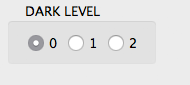
Is it possible?
Cec
The minimum night brightness (dark level 2) is included since version 1.4 of the plug-in.
That's fine, but how about the selectable options?
Is it possible?
Cec
Re: Photo-video rendering plug-in
@Ceciliabr
By default, the dark level 2 is chosen but it is possible to have the dark level 0 (at night hours) by selecting diffusedBounces = 0.
If you still want the selectable dark level option, I can make this beta test version of the plug-in resizable.
In the public version of the plug-in, the selectable dark level option has been removed in favor of code integration. This allows to have a simple and practical interface.That's fine, but how about the selectable options?
By default, the dark level 2 is chosen but it is possible to have the dark level 0 (at night hours) by selecting diffusedBounces = 0.
If you still want the selectable dark level option, I can make this beta test version of the plug-in resizable.
EnkoNyito
Re: Photo-video rendering plug-in
Update of the document "Configure the SunFlow rendering engine ".
This version 2 describes the parameters and their interactions, with examples of rendering and an indication of the duration.
This version 2 describes the parameters and their interactions, with examples of rendering and an indication of the duration.
EnkoNyito

Re: Photo-video rendering plug-in
Thank you, Enko!!!
This may be useful for many people.
H
This may be useful for many people.
H
Re: Photo-video rendering plug-in
it is possible to have the dark level 0 (at night hours) by selecting diffusedBounces = 0.
Perfect! Then that's all I need [:)]
Cec
Who is online
Users browsing this forum: No registered users and 1 guest