Update !Bdfd, the compass shown in Sweet Home 3D plan doesn’t show any angle.
Wrong, remember this with the option 'update compass' :
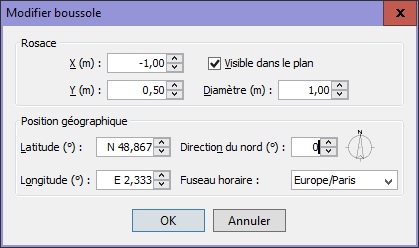
I repeat for newbies : It's good with sh3d.
[;)]
.

Update !Bdfd, the compass shown in Sweet Home 3D plan doesn’t show any angle.
Very useful!!!Beta 9

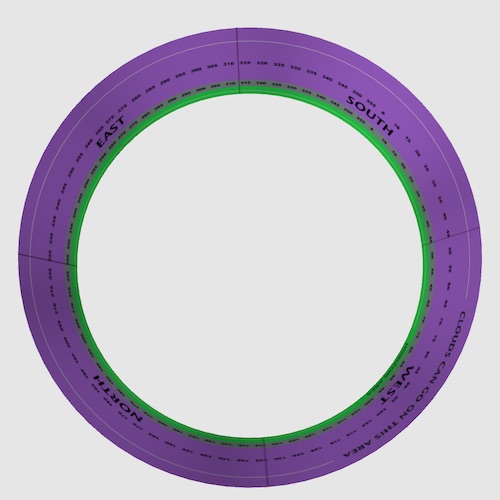
I think that is what Cec kindly tried to explain in the Azure home thread (8828) = view of Virtual visitor. Totally in sync with recent research and 2014 Nobel prize in medicine. Do you hold the map with North up or align it with the terrain...? While I see it can be a bit confusing with Virtual visitor looking South, Sky texture defaulting to East (with Compass unchanged), I reallyn do not think it matters much... she designed show a zero angle at South rather at North....
Cecilia, even if it's not so important, is there any reason for that?
Yes.Cecilia's Horizontal_Scale.sh3d test and other sky textures showing angles that she designed show a zero angle at South rather at North. Cecilia, even if it's not so important, is there any reason for that?
Cool!But note that from version 6.0, you can spread a 360° texture along two walls attached to each other with an arc extent of 180°, by setting an X offset of 50% on the texture of one of the two walls (see example attached to this post).
But 0.1 is not far from zeromeaning that the width of the texture applied on a curved wall is correct only for walls with a thickness equal to 0 (something that can't happen)

The vertical Y offset is available for all textures except for the sky texture.Will there also be a vertical offset for wall textures?
YGYL, the fact that a polyline is displayed in the 3D view is actually stored in an [font=courier new]elevation[/font] attribute which value can't be set in the user interface at this moment (but you can try it in the Home.xml entry), because I can't think of an application of a polyline with an elevation > 0 which would float in the air. Give me some real examples and I'll study them.


Users browsing this forum: No registered users and 1 guest


