Hi,
I noted that 6.2 slows down my PC during renderings (Q3 and Q4).
But since the delivery of 6.3, my PC slowed down sharply during renderings, the other tasks are as fast as a snail... [:((]
Have you made the same observation?
If yes, why ?
Nothing else new to install.
I do not even imagine with a processor smaller than mine!!! [:D]
Regards,
bdfd
 6.3 very greedy
This topic has been viewed 8438 times and has 11 replies
-
bdfd

- Posts: 2614
- Joined: Sat Mar 29, 2014 7:17 am
- Country: LILLE, Les Hauts de France, Western Europa
6.3 very greedy
Evil progresses when good people do nothing!
---
SH3D 7.1 and nothing else - W11 64b in 4K
---
SH3D 7.1 and nothing else - W11 64b in 4K

Re: 6.3 very greedy
Nothing changed on the rendering part.
An explanation could come from an increase of the RAM used by Sweet Home 3D because you used 3D models with small repetitive parts that the program couldn’t correctly handle before. These models will generate a lot of faces to render and require more RAM.
If the RAM use in the About dialog box looks close to the maximum set, you should consider increasing the maximum as explained in the FAQ.
An explanation could come from an increase of the RAM used by Sweet Home 3D because you used 3D models with small repetitive parts that the program couldn’t correctly handle before. These models will generate a lot of faces to render and require more RAM.
If the RAM use in the About dialog box looks close to the maximum set, you should consider increasing the maximum as explained in the FAQ.
Emmanuel Puybaret, Sweet Home 3D creator
-
bdfd
- Posts: 2614
- Joined: Sat Mar 29, 2014 7:17 am
- Country: LILLE, Les Hauts de France, Western Europa
Re: 6.3 very greedy
How did you do to include yarafay ? [:p]Nothing changed on the rendering part.
...
Here is a vision of my configuration:
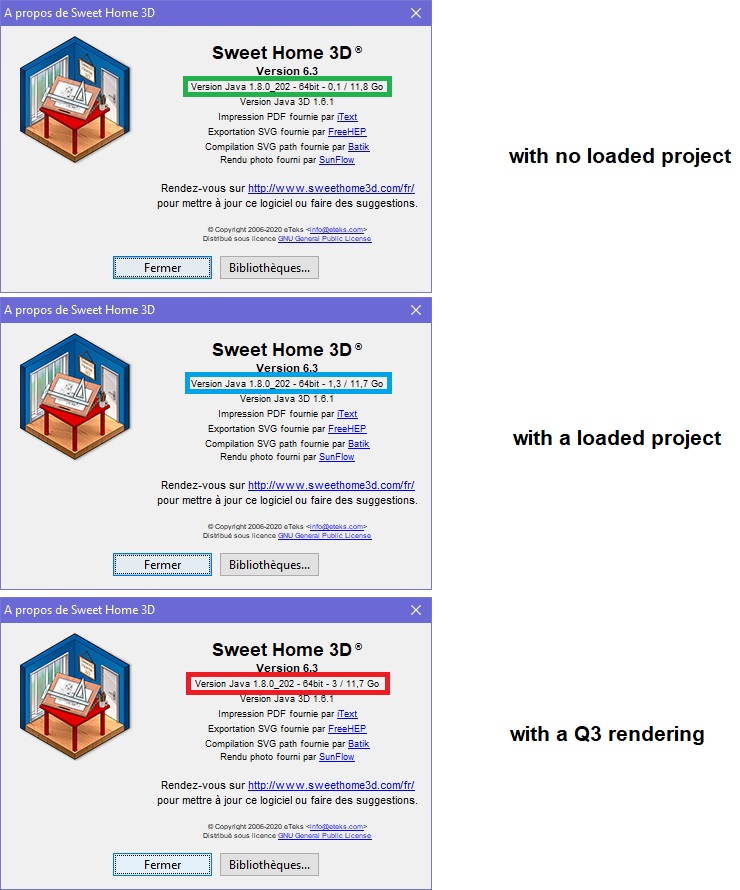
As you can see the part of RAM is not a problem on my PC.
It's only the part of occupation at 100% of the processor during a long time of the rendering...
Wait after other returns.
[;)]
.
Evil progresses when good people do nothing!
---
SH3D 7.1 and nothing else - W11 64b in 4K
---
SH3D 7.1 and nothing else - W11 64b in 4K
Re: 6.3 very greedy
YafaRay rendering is still a plug-in which didn't require some modification of the program itself, and I haven't changed this plug-in since its first version.
SunFlow renderer hasn't been changed since September 2018 (if you don't trust me, see here).
Would you be kind enough to reinstall the previous version and check if the rendering really runs faster?
SunFlow renderer hasn't been changed since September 2018 (if you don't trust me, see here).
Would you be kind enough to reinstall the previous version and check if the rendering really runs faster?
Emmanuel Puybaret, Sweet Home 3D creator
-
bdfd
- Posts: 2614
- Joined: Sat Mar 29, 2014 7:17 am
- Country: LILLE, Les Hauts de France, Western Europa
Re: 6.3 very greedy
OK, TY for the link.Would you be kind enough to reinstall the previous version and check if the rendering really runs faster?
But this was not the good question.[:D]
I never said that renderings had lower speed, only that the PC had entirely lower reaction.
so I installed version 6.1a again.
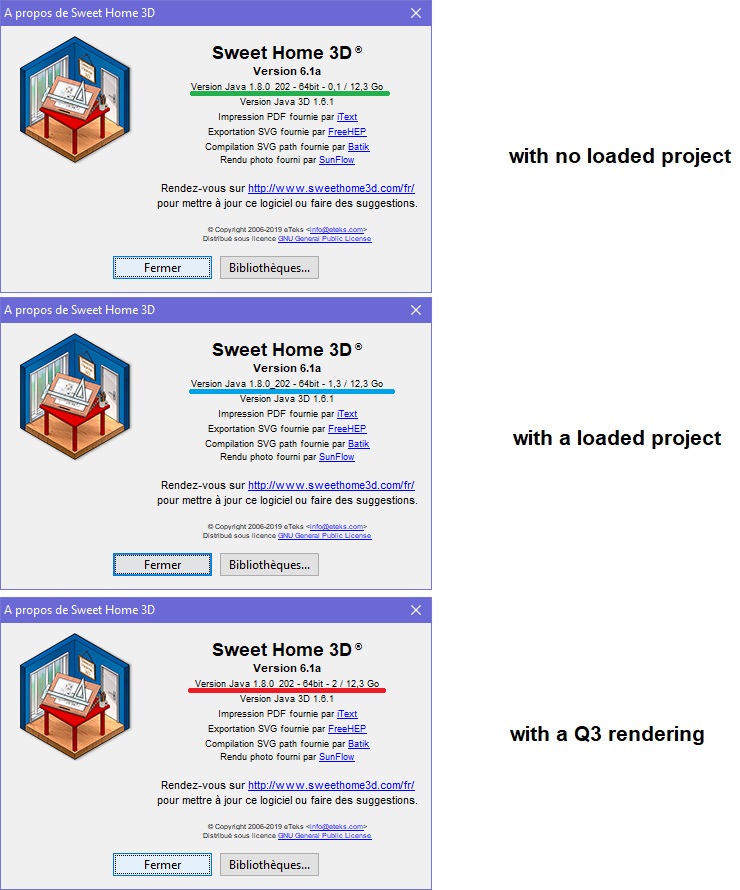
First observation: the amount of total RAM used is different and upper in the same situations.
Second: The given results of the RAM are different (with the same project during renderings) !
Third: Task manager said that the processor occupies only 92% instead of 100% with the other versions 6.2 and 6.3 .
Conclusion: A 8% difference is huge for a processor ...
I see and only report facts!
Something changed and weighed down sh3d 6.2 & 6.3 [:((]
What are new added functions (in 6.2 & 6.3) which give lower reactions ?
=> Can you see for yourself the problem ?
=> Can you give us the options to activate or not these functions?
.
Evil progresses when good people do nothing!
---
SH3D 7.1 and nothing else - W11 64b in 4K
---
SH3D 7.1 and nothing else - W11 64b in 4K
Re: 6.3 very greedy
There were no changes in Java / Java 3D / SunFlow in recent versions, so it's quite mysterious.
Emmanuel Puybaret, Sweet Home 3D creator
-
bdfd
- Posts: 2614
- Joined: Sat Mar 29, 2014 7:17 am
- Country: LILLE, Les Hauts de France, Western Europa
Re: 6.3 very greedy
Did you see for yourself the problem ?...so it's quite mysterious.
=> becareful, 2 possible answers ! [:D]
Example: launch a Q3 or Q4 rendering and try to launch 'task manager' or paintbrush... and wait...
[:((]
.
Evil progresses when good people do nothing!
---
SH3D 7.1 and nothing else - W11 64b in 4K
---
SH3D 7.1 and nothing else - W11 64b in 4K
Re: 6.3 very greedy
My daily system is macOS, not Windows. I regularly test Sweet Home 3D under Windows with a Parallels Desktop virtual machine, but I don't think this is a good environment to make reliable performances tests.
If recent versions use more CPU, do they at least render faster?
If recent versions use more CPU, do they at least render faster?
Emmanuel Puybaret, Sweet Home 3D creator
-
waltrothfuss
- Posts: 5
- Joined: Tue May 12, 2020 5:23 pm
- Country: USA
Re: 6.3 very greedy
I have installed 6.3 on a Lenovo ThinkCentre with an AMD Ryzen Pro 9 3900 12-core processor, 24 cores hyperthreading, and 32 GB ram, running Linux Mint 19.3 with all updates and Kernel 5.0.0-32-generic x86-64. I downloaded a fresh copy of Sweet Home 6.3 from the Download page and put it in /usr/share/sweethome. When rendering any 3D image it takes up 100% of all CPUs. The Help/About screen shows java version 1.8.0_202-64bit- 0.1/1.8GB. The system monitor shows that less than 4GB of ram total is being used. How is it possible to increase the amount of memory used? I have looked for the script mentioned in the FAQ ("Under Linux, edit SweetHome3D script, update the maximum memory in the option -Xmx1024m (using for example -Xmx2g for 2 GB), save the script, then relaunch Sweet Home 3D") to check if it is set for 2GB, but cannot find it. The memory usage with just the program loaded and nothing else except this Firefox shows 3.9GB of 31.4 used with a CPU load of about 5% for all CPUs, and when rendering, CPU load goes to 100% for all and the memory load is only 4.0GB. Any thoughts? Is this the best I can hope for?
-
waltrothfuss
- Posts: 5
- Joined: Tue May 12, 2020 5:23 pm
- Country: USA
Re: 6.3 very greedy
Re my question about the -Xmx1042m location, I found it and it was already set for 2g as in "-Xmx2g". So, it appears that 100% cpu usage is really the best I can expect from this system when rendering, and it can only use 2GB of the available RAM. Is there really no better way to make use of the RAM?
Who is online
Users browsing this forum: No registered users and 1 guest