Good evening everybody,
i use sh3d for about a half year now and i tried to build some furniture for now. Could someone tell me a simple way to make doors and windows openable, if the obj files were made with sh3d? Could this be made with ArtOfIllusions? I tried it with AOI and Blender, but Blender for example is such a complex tool, that i did not get achieed it. I also searched for good video tutorials, but even with them i did not get it work.
Would someone be so nice to help me?
Thank you for your support.
how to make a door or window openable
This topic has been viewed 8199 times and has 4 replies

Re: how to make a door or window openable
Sorry, there's no simple way, you have to name some parts of the 3D model, respecting these explanations. Looking at all the examples provided in the link should help you though.
Emmanuel Puybaret, Sweet Home 3D creator
-
SEBERRIDER
- Posts: 7
- Joined: Sun Feb 23, 2020 6:22 am
Re: how to make a door or window openable
Hi Emmanuel,
thank you very much for the link. I read it and got through.
So the next question now is how to create the quarter circle at the box in the 2D view.
And another question: Is it possible to hide shapes in the modify furniture dialog?
For both topics i searched the forum, but i couldn't find a suitable answer.
Thank you.
thank you very much for the link. I read it and got through.
So the next question now is how to create the quarter circle at the box in the 2D view.
And another question: Is it possible to hide shapes in the modify furniture dialog?
For both topics i searched the forum, but i couldn't find a suitable answer.
Thank you.
-
SEBERRIDER
- Posts: 7
- Joined: Sun Feb 23, 2020 6:22 am
Re: how to make a door or window openable
Hello,
now i found this thread: http://www.sweethome3d.com/support/foru ... hread,2006 so i do not need an answer for this question any more.
Thank you.
now i found this thread: http://www.sweethome3d.com/support/foru ... hread,2006 so i do not need an answer for this question any more.
Thank you.
Re: how to make a door or window openable
And to hide some parts, you can make invisible its material in the furniture materials dialog box.
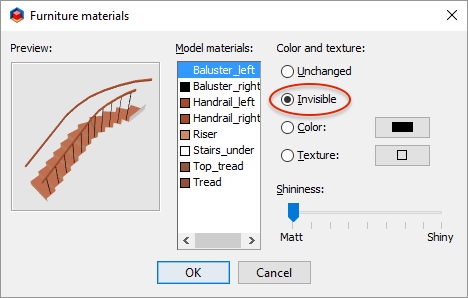
But you may have to reorganize your materials list to be able to hide only the geometries you want.
But you may have to reorganize your materials list to be able to hide only the geometries you want.
Emmanuel Puybaret, Sweet Home 3D creator
Who is online
Users browsing this forum: No registered users and 1 guest