Repeated model

This topic has been viewed 7317 times and has 5 replies
Thread status: Active
Features you would like to see [img]http://www.sweethome3d.com/images/flags/en_small.gif[/img]
Post Reply New Topic
User avatar
harbinger
Posts: 87
Joined: Thu Feb 27, 2014 4:48 pm
Country: Clearwater, FL, US

Repeated model

Post by harbinger »

One of the ways to reduce the time it takes to place furniture (including fixtures and structural components) would be to introduce the idea of model repetition, auto-duplicated models (furniture) from a source component.
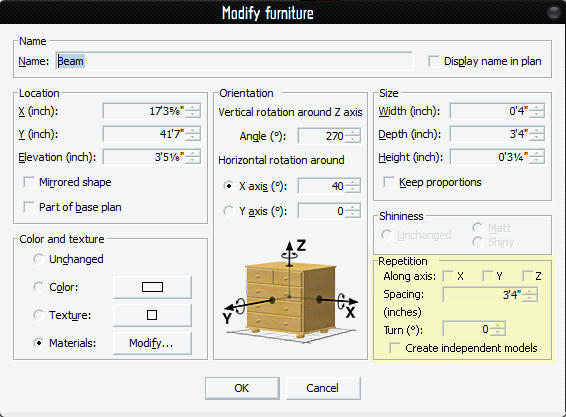
For example, let's say you had beams you wanted to array across the ceiling. A user would be able to place a single beam at the first of the series, then open the "Modify Furniture" dialog. Along with the standard existing functions, there would be an extra section called Repetition, such as this:
Image

One could repeat the furniture model along the X, Y, and/or Z axis (but not independently), assign the spacing along those axes, and even turn each successive model by so many degrees.

Normally the repeated furniture models would not be editable, in that whatever the SOURCE model dictated in its Repetition attributes, determines the look and placement of the child models. If one wanted to create new , independent models and disengage them from the source model, they could check the "Create independent models" box.

The advantage to linking the child models to the parent model, is that you could change any attribute of the parent furniture model, and the rest would be changed as well, including texture, height and width, and initial orientation.

This feature would make it easy to create custom or unique stairs, ballistrades for balcony railing, beaming (support or decorative), and lighting arrays, to name a few.
Mike53
Posts: 678
Joined: Sat Jan 06, 2018 1:02 am
Country: UK

Re: Repeated model

Post by Mike53 »

Hi Harbinger, i think what you refer to already exists, do a search for Dorin's "multiple paste" plug in, and give it a try
Mike53
Posts: 678
Joined: Sat Jan 06, 2018 1:02 am
Country: UK

Re: Repeated model

Post by Mike53 »

Mike53
Posts: 678
Joined: Sat Jan 06, 2018 1:02 am
Country: UK

Re: Repeated model

Post by Mike53 »

Something i think would be handy, which is sort of related, is to enable modification of multiple walls, currently selecting more than one wall limits the mods you can do, it would be good to change height, slope or arc too.
This maybe should have been posted as a separate wish, not sure.
User avatar
Puybaret
Posts: 9440
Joined: Mon Nov 07, 2005 12:00 pm
Country: Paris, France
Contact:

Re: Repeated model

Post by Puybaret »

You can already change more than a wall at a time: just select multiple walls then choose the Plan > Modify walls menu item. This works even if the selection contains items which are not walls.
Emmanuel Puybaret, Sweet Home 3D creator
User avatar
harbinger
Posts: 87
Joined: Thu Feb 27, 2014 4:48 pm
Country: Clearwater, FL, US

Re: Repeated model

Post by harbinger »

Thanks guys!
I found the plug-in you were referring to and got it to work after some figuring out how to use it. It's not intuitive, and it's clunky, because you have to copy the item first. But it does distribute the models in the way that I envisioned.
However I would still like to see a more intuitive and integrated approach to the problem. Until our esteemed developer comes up with a solution, this will have to do.

Thanks guys for all your help and the links! 😁
Post Reply New Topic

Who is online

Users browsing this forum: No registered users and 1 guest