Glare effect

This topic has been viewed 16571 times and has 12 replies
Thread status: Active
Discuss anything here [img]http://www.sweethome3d.com/images/flags/en_small.gif[/img]
User avatar
Ceciliabr
Posts: 637
Joined: Sun Jul 07, 2013 3:41 pm
Country: Copenhagen, Denmark
Contact:

Glare effect

Post by Ceciliabr »

“The glare effect that comes from watching a bright light, is a result of imperfect eyesight. “

“On photographs, this effect comes from using cheap optics.”


Searching the web for info about how to create a 3D glare effect, these are two of the “facts” that popped up.
Nevertheless, a lot of people are evidently requesting this effect, and there are also some programs that can offer this effect, like Blender and 3DS Max.
I like this effect, maybe because my eyesight has always been a bit weak.

I have made an earlier attempt to achieve this effect, and I have gotten some comments about it.
In a project I have been working on recently, I wanted to give myself another chance to make the effect a bit better than what I managed the last time.
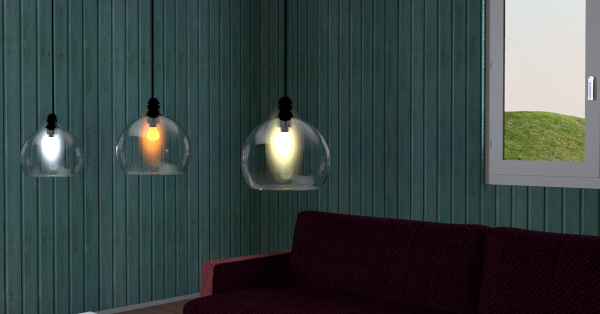
I wanted to create an open glass sphere lamp, with a bulb inside that had a glare effect.
I ended up creating this:

Image


Apart from the glass sphere lamp, the model consist of a bulb shaped object plus two textured boxes forming a cross. And then I have placed four sphere lights like this:
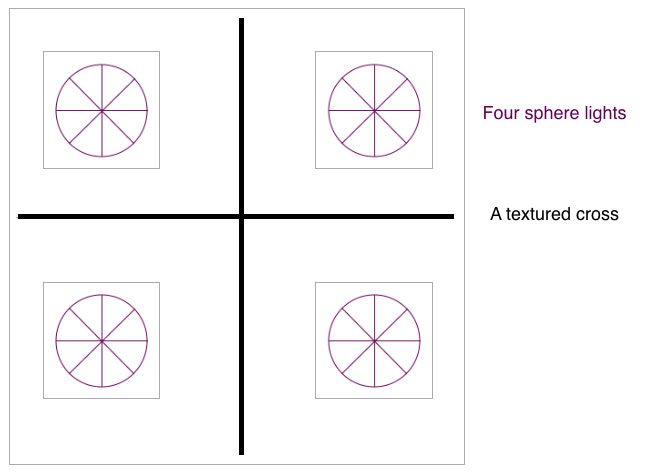
Image


The cross is there to make sure that the glare is not lost when using other camera angles.
I ended up using a cross instead of a cylinder because the cylinder created some weird reflections on the inside of the lamp, and also made it difficult to light up both the bulb
and the glare at the same time.
Modifying the transparent .png texture used to create the glare effect, will of course make the effect stronger or weaker,
and changing the intensity and colour of the sphere lights will also make some changes:
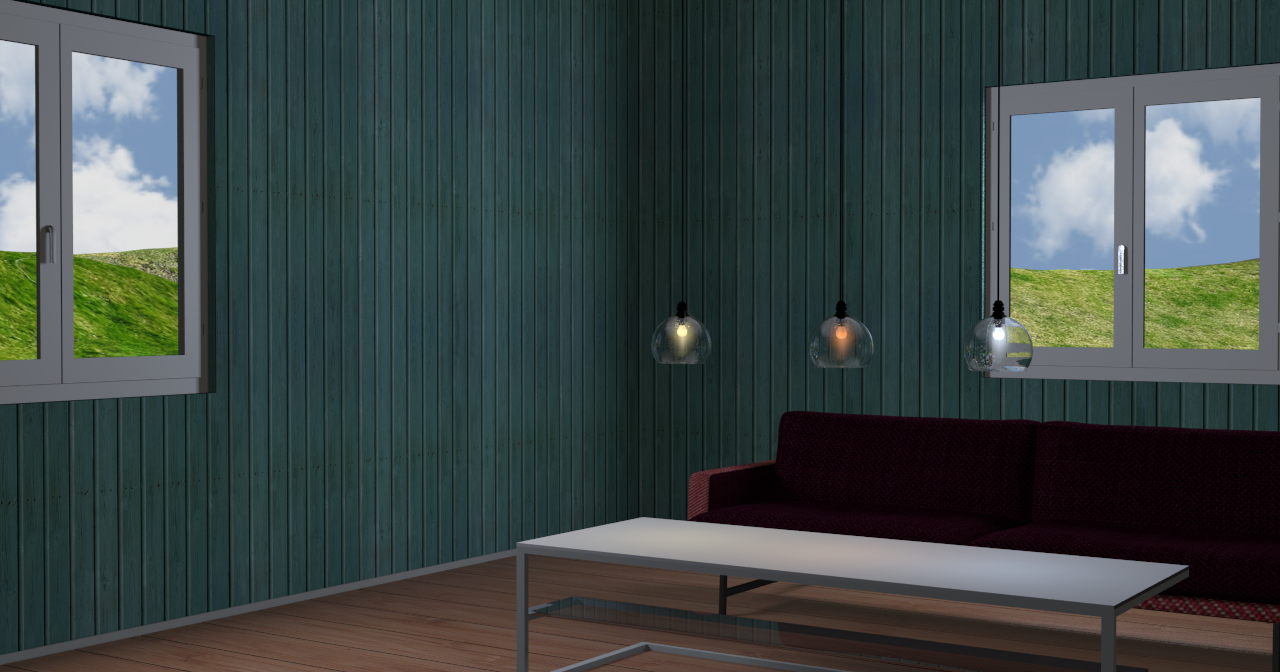
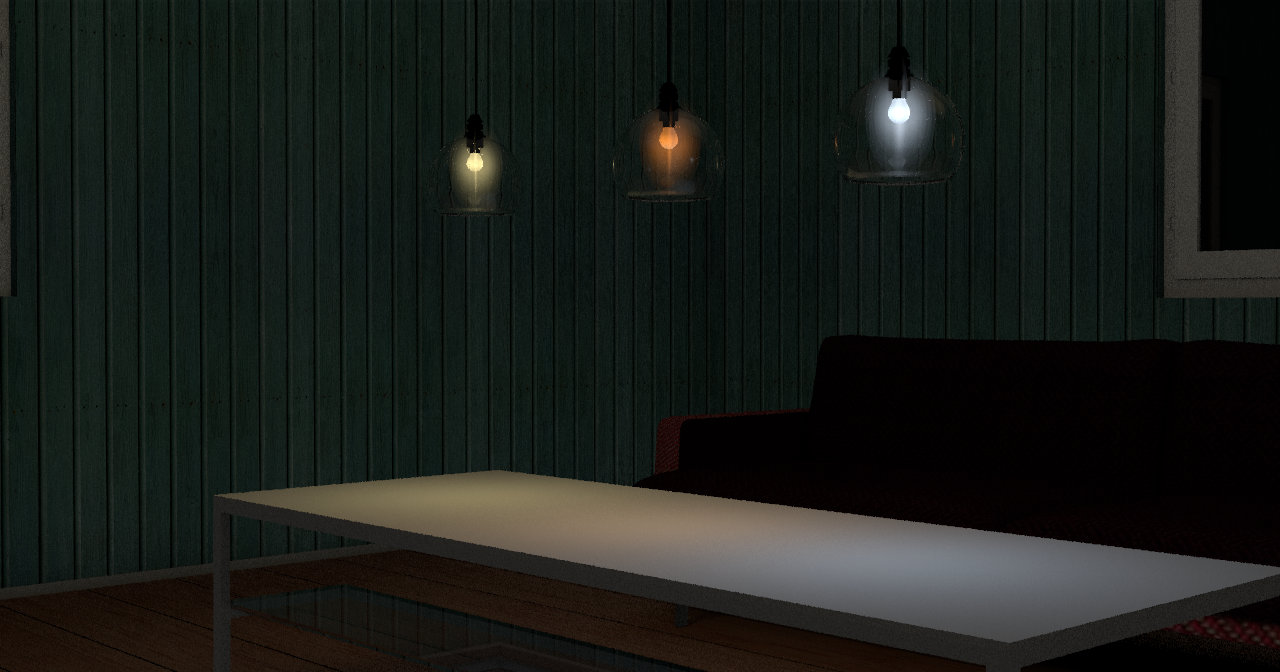
Image


Image


If I had taken the time ( and effort ) to teach myself how to create these light sources inside an object, I could have made this into a nice model.
But I’m too lazy ( and too busy), and besides I would never find out how to change the colour of the light sources.
Maybe someone else in here knows how to do this?

Anyway, if anyone wants to use this lamp goup ( or parts of it ), be my guest! All the elements can be made invisible, so it’s fully customisable.

The project file is here. http://ceciliabr.com/Glare/GlareProject.sh3d


Cecilia
User avatar
harbinger
Posts: 87
Joined: Thu Feb 27, 2014 4:48 pm
Country: Clearwater, FL, US

Re: Glare effect

Post by harbinger »

Well whatever the effects of the project, these models are excellent and should be included in our standard furniture library. Did you render this with sh3d?
User avatar
Ceciliabr
Posts: 637
Joined: Sun Jul 07, 2013 3:41 pm
Country: Copenhagen, Denmark
Contact:

Re: Glare effect

Post by Ceciliabr »

Thank you!
Yes, I rendered this with SH3D using Enkonyito's beautiful plugin: PVR 1.9

Download the PVR 1.9 plugin and my project file, and you can render exactly the same image.

If you want to use the lamp model, just create a group including the lights, and copy/paste it to your project


Cecilia
enkonyito
Posts: 607
Joined: Thu May 28, 2015 4:52 pm

Re: Glare effect

Post by enkonyito »

If I had taken the time ( and effort ) to teach myself how to create these light sources inside an object, I could have made this into a nice model.
But I’m too lazy ( and too busy), and besides I would never find out how to change the colour of the light sources.
Maybe someone else in here knows how to do this?
To do this you have to use the furniture library editor to create your library of lights.
Then edit the PluginFurnitureCatalog.properties file present in the .sh3f to add the properties of light sources to integrate as here.
As with Sweet Home 3D default light sources, you will need to create as much object as you want light color.

Enko
EnkoNyito
User avatar
Xiste
Posts: 269
Joined: Fri Apr 18, 2014 10:22 pm
Country: Oslo, Norway
Contact:

Re: Glare effect

Post by Xiste »

Nice!
People should really download your project file, not just for the lamp model, but to study your effective, and yet simple, lighting technique.
Mike53
Posts: 678
Joined: Sat Jan 06, 2018 1:02 am
Country: UK

Re: Glare effect

Post by Mike53 »

Agree with Xiste 100%, always download what Cec kindly shares, not only to see how she achieves the quality, but because she also shares some excellent textures and objects, which i unashamedly steal [;)] and then say thx.
enkonyito
Posts: 607
Joined: Thu May 28, 2015 4:52 pm

Re: Glare effect

Post by enkonyito »

Comparative rendering at night. (unviewable panel above the ground and group of fireglow light source)

Image

Image
EnkoNyito
User avatar
Ceciliabr
Posts: 637
Joined: Sun Jul 07, 2013 3:41 pm
Country: Copenhagen, Denmark
Contact:

Re: Glare effect

Post by Ceciliabr »

Thank you Enko!

Just a few words:

These lamps are meant as decortative elements rather than stand-alone light sources.
Since there are four light sources inside, the intensity has to be quite low for the effect to appear "natural".


5% intensity:
Image
I think this is a bit too much, but it can work with the fireglow version.

2% intensity
Image
This is my preferred setting.

Cecilia
VeroniQ
Posts: 886
Joined: Tue Mar 03, 2015 9:01 am
Country: France

Re: Glare effect

Post by VeroniQ »

Many thanks, Cecilia. I love this lights and lamps. Are they free to use?
User avatar
Ceciliabr
Posts: 637
Joined: Sun Jul 07, 2013 3:41 pm
Country: Copenhagen, Denmark
Contact:

Re: Glare effect

Post by Ceciliabr »

Are they free to use?
Absolutely free!
And not only that:
Enko has created an sh3f library containing all 3 lamps with different coloured lights ( as used in the 2 above images) and will shortly make them available for anyone to download as fully functional lamps.


Cecilia
Post Reply New Topic

Who is online

Users browsing this forum: No registered users and 1 guest