Preventing 'smeared' textures?

This topic has been viewed 4541 times and has 2 replies
Thread status: Active
Looking for a particular 3D model or texture? [img]http://www.sweethome3d.com/images/flags/en_small.gif[/img]
Post Reply New Topic
User avatar
harbinger
Posts: 87
Joined: Thu Feb 27, 2014 4:48 pm
Country: Clearwater, FL, US

Preventing 'smeared' textures?

Post by harbinger »

I started using Art of Illusion to create the models I need, but I'm having a problem with textures.

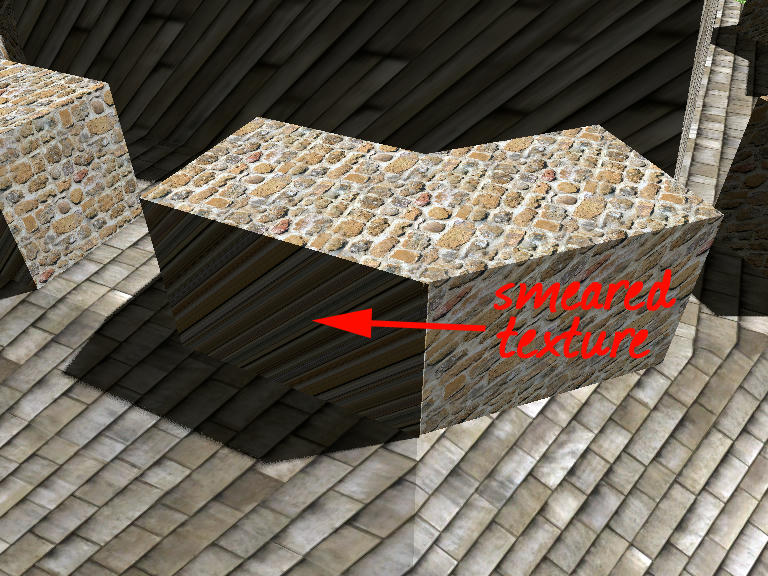
Does anyone know what you have to do to prevent textures from sliding or smearing on a face, like this?:

Image
User avatar
Puybaret
Posts: 9440
Joined: Mon Nov 07, 2005 12:00 pm
Country: Paris, France
Contact:

Re: Preventing 'smeared' textures?

Post by Puybaret »

This can avoided when texture coordinates are set on a 3D model and you modify textures with the Material modification dialog box.
Otherwise you could also use a thin box for that part.
Emmanuel Puybaret, Sweet Home 3D creator
User avatar
harbinger
Posts: 87
Joined: Thu Feb 27, 2014 4:48 pm
Country: Clearwater, FL, US

Re: Preventing 'smeared' textures?

Post by harbinger »

You're right. I found out that in order to avoid this you MUST apply a texture to that face before exporting to OBJ.

If anyone is using AoI, make sure if you apply a texture (rather than a material), do not set it to Projection. This will smear the texture you applied on certain faces of the outgoing model.
(I've not begun using Materials, so I dont know of the settings there...)
Post Reply New Topic

Who is online

Users browsing this forum: No registered users and 1 guest