Round room

This topic has been viewed 5378 times and has 4 replies
Thread status: Active
How can I do this? [img]http://www.sweethome3d.com/images/flags/en_small.gif[/img]
Post Reply New Topic
mousewhite
Posts: 3
Joined: Sat Oct 31, 2020 10:29 am

Round room

Post by mousewhite »

I created a round wall and I just can't make a room :(
Double click doesn't work!
The multifaceted room does not suit.
User avatar
Puybaret
Posts: 9440
Joined: Mon Nov 07, 2005 12:00 pm
Country: Paris, France
Contact:

Re: Round room

Post by Puybaret »

Please keep you file and send it to [url=mailto:[email protected]]me[/url] so I can check if this is a bug.
Emmanuel Puybaret, Sweet Home 3D creator
mousewhite
Posts: 3
Joined: Sat Oct 31, 2020 10:29 am

Re: Round room

Post by mousewhite »

Sent a file with a small example by mail.
User avatar
Puybaret
Posts: 9440
Joined: Mon Nov 07, 2005 12:00 pm
Country: Paris, France
Contact:

Re: Round room

Post by Puybaret »

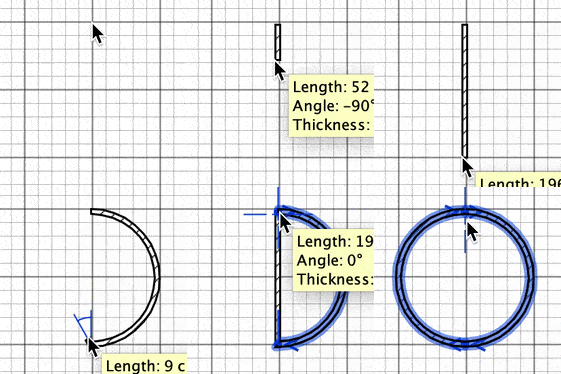
The space inside the walls isn't closed.

Pressing the Ctrl key (alt / option key under macOS) when you click at each wall end while drawing 2 walls, it's pretty fast to draw a closed round space.

Image
Emmanuel Puybaret, Sweet Home 3D creator
mousewhite
Posts: 3
Joined: Sat Oct 31, 2020 10:29 am

Re: Round room

Post by mousewhite »

Yes, this is my fault. I set the coordinates from the wall properties edit menu. Zooming in, I saw a gap. By removing it with the mouse, I was able to create a circular room. True, in the figure it is displayed multifaceted, but in the general view it is round.
Post Reply New Topic

Who is online

Users browsing this forum: No registered users and 2 guests