Hi,
I drew the external walls from the floor plan. Then I created the rooms with internal walls. Now I find myself with massive gaps which are not nice to look at.
Here is what I'm talking about: https://ibb.co/PMsczB2.
It's an old house, so some walls are very thick (60/70cm).
Also, as you can see form the pic the thickness is not consistent.
Continuously changing the wall thickness wasn't very convenient.
In summary, is there a way to fill the space in between?
The only alternative I can think of (to fix this after the fact) is to set the wall thickness to something average (eg 25cm) and draw layers and layers of walls filling the gaps. It should work, I just thought it's not a very elegant solution.
Thanks in advance for any suggestions.
Regards,
Andrea
fill space in between internal/external walls
This topic has been viewed 3835 times and has 5 replies
Re: fill space in between internal/external walls
You could try this
Create a level 5mm below the height of your wall with the floor thickness set to 5mm
draw walls to fill in the gaps
create a texture, something like "Paint" draw black diagonal lines on it
import the texture and use it as the floor texture
remember to un-check the box's for area and ceilings when modifying the room.
Here is a very quick attempt
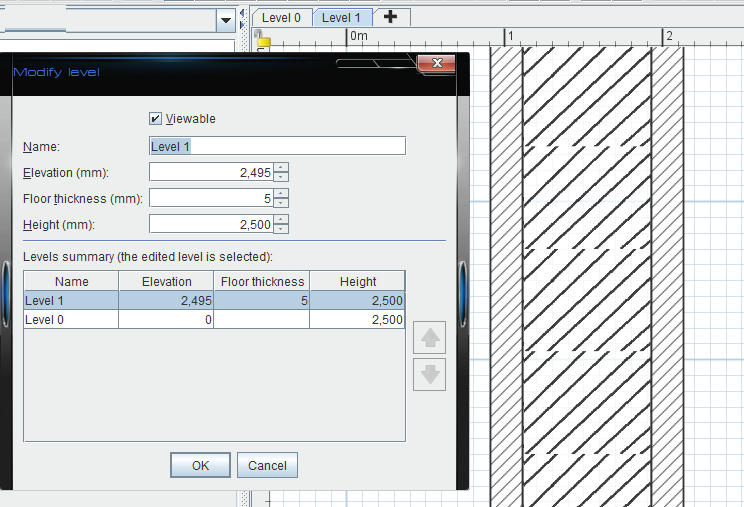
Create a level 5mm below the height of your wall with the floor thickness set to 5mm
draw walls to fill in the gaps
create a texture, something like "Paint" draw black diagonal lines on it
import the texture and use it as the floor texture
remember to un-check the box's for area and ceilings when modifying the room.
Here is a very quick attempt
Re: fill space in between internal/external walls
Hi Mike53,
If I understand what you suggest correctly, walls will still be empty in the 3D view though.
Thanks for your input.
Regards,
Andrea
If I understand what you suggest correctly, walls will still be empty in the 3D view though.
Thanks for your input.
Regards,
Andrea
Re: fill space in between internal/external walls
am I right that there is no other way then? :-/
Re: fill space in between internal/external walls
Give it a try with any colour or texture applied to the "room" then check the 2 and 3d views

Re: fill space in between internal/external walls
And why not simply drawing an additional thick wall to fill the space. Walls with the same pattern which overlap are drawn in the plan as it was only one wall.
You could also look at this tip.
You could also look at this tip.
Emmanuel Puybaret, Sweet Home 3D creator
Who is online
Users browsing this forum: No registered users and 2 guests