Window opening directions

This topic has been viewed 5750 times and has 7 replies
Thread status: Active
Looking for a particular 3D model or texture? [img]http://www.sweethome3d.com/images/flags/en_small.gif[/img]
Post Reply New Topic
k005
Posts: 60
Joined: Sat Aug 06, 2022 1:23 pm
Country: TURKEY

Window opening directions

Post by k005 »

Hi All !

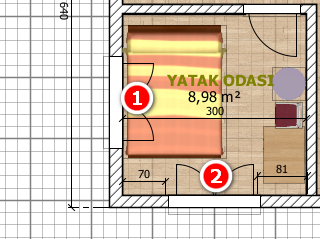
Can we turn off window opening directions in Plan?

Thank you.


Image
User avatar
Puybaret
Posts: 9440
Joined: Mon Nov 07, 2005 12:00 pm
Country: Paris, France
Contact:

Re: Window opening directions

Post by Puybaret »

You'll have to modify the furniture library SH3F file where these windows come from, removing the properties starting by [font=courier new]doorOrWindowSash[/font] from the PluginFurnitureCatalog.properties file found in the SH3F file (see also this thread)
For the windows in the default catalog, change the same properties in the DefaultFurnitureCatalog.properties file found in Furniture.jar file. This file can be found in the installation folder of Sweet Home 3D.
If you want to turn off this drawing from a plug-in, it's not possible.
Emmanuel Puybaret, Sweet Home 3D creator
k005
Posts: 60
Joined: Sat Aug 06, 2022 1:23 pm
Country: TURKEY

Re: Window opening directions

Post by k005 »

Understood. Thank you.
User avatar
Keet
Posts: 1807
Joined: Fri Apr 08, 2022 7:13 am
Country: Netherlands

Re: Window opening directions

Post by Keet »

I don't know why you would want to erase the display of the opening but there is a workaround to achieve this.

Export the door or window and import it again as door or window. Since it now doesn't come from the furniture library it also doesn't have the extra properties to display the opening. Make sure you give it a recognizable name because it will look the same as the original furniture but without the display of the opening in the 2D view.
Dodecagon.nl
1300+ 3D models, manuals, and projects
k005
Posts: 60
Joined: Sat Aug 06, 2022 1:23 pm
Country: TURKEY

Re: Window opening directions

Post by k005 »

The reason why I don't want the opening direction is that I'm confusing it with the opening directions of the doors... and we didn't specify the opening direction for the windows many years ago when we were drawing with a rapido pen...


* Now if I do as you have done, what automatic division does the wall do?
shoulders
Posts: 24
Joined: Wed Oct 12, 2022 4:00 pm
Country: United Kingdom

Re: Window opening directions

Post by shoulders »

This is a useful method if you want to use windows to make a conservatory but without all of the window openings.
User avatar
Keet
Posts: 1807
Joined: Fri Apr 08, 2022 7:13 am
Country: Netherlands

Re: Window opening directions

Post by Keet »

This is a useful method if you want to use windows to make a conservatory but without all of the window openings.
If you are creating your own custom conservatory I wouldn't use windows. Just create glass walls using boxes and glass. Your model will be smaller and without the unneeded opening displays.

To create glass use a box the size of the glass you need. Export the box and name it "Glass.obj". Edit the Glass.obj and Glass.mtl files like this:

Edit the Glass.obj file and replace "usemtl bottom", "usemtl top", "usemtl left", "usemtl right", "usemtl back", and "usemtl front" with "usemtl Glass". This should result in having 6 times "usemtl Glass" in the Glass.obj file.
Save the file.

Edit the Glass.mtl file and remove everything under the top comment lines (#), then insert this block of code:

Code: Select all

newmtl Glass
illum 2
Ka 0.0 0.0 0.0
Kd 0.009412 0.009412 0.009412
Ks 0.039062 0.039062 0.039062
Ns 1.960784
Ni 1.45
d 0.5
Save the file.

Import the Glass.obj file and you have a Glass object that you can resize to any format. You can still change the color of the glass.

You can use this same glass object for any other furniture you create that needs glass. You now also know how to change a property in existing furniture to glass.
Dodecagon.nl
1300+ 3D models, manuals, and projects
shoulders
Posts: 24
Joined: Wed Oct 12, 2022 4:00 pm
Country: United Kingdom

Re: Window opening directions

Post by shoulders »

thanks Keet, I will have a look at this method.
Post Reply New Topic

Who is online

Users browsing this forum: No registered users and 1 guest
