Door with two different sides
This topic has been viewed 8598 times and has 11 replies

Door with two different sides
Hello I am looking for an interior door (if possible that can be opened) with 2 sides of different color / texture

Re: Door with two different sides
Several options:
• Create your own door
• If you're lucky the door you like exports with separated groups. This would make separating front and back a lot easier. See the How-To listed below.
• If you're not that lucky you need something like Blender to separate the front and back materials.
• This thread explains how to add deformations (opening the door)
Here is a How-To to change material names:
https://dodecagon.nl/Docs/ChangeMateria ... _Names.pdf
https://dodecagon.nl/Docs/ChangeMateria ... _files.zip
• Create your own door
• If you're lucky the door you like exports with separated groups. This would make separating front and back a lot easier. See the How-To listed below.
• If you're not that lucky you need something like Blender to separate the front and back materials.
• This thread explains how to add deformations (opening the door)
Here is a How-To to change material names:
https://dodecagon.nl/Docs/ChangeMateria ... _Names.pdf
https://dodecagon.nl/Docs/ChangeMateria ... _files.zip
Dodecagon.nl
1300+ 3D models, manuals, and projects
1300+ 3D models, manuals, and projects

Re: Door with two different sides
The catalog proposes a front door with materials different for its two sides, but you’re right there’s no interior door with similar ability.
I could create one based on an existing model. Which one in the library would you prefer it looks like?
I could create one based on an existing model. Which one in the library would you prefer it looks like?
Emmanuel Puybaret, Sweet Home 3D creator
Re: Door with two different sides
Thank you.
If you could create one based on the classic "door" by eTeks it will be perfect
https://www.sweethome3d.com/searchModel ... eTeks+door
If you could create one based on the classic "door" by eTeks it will be perfect
https://www.sweethome3d.com/searchModel ... eTeks+door
Re: Door with two different sides
You'll find the door in the library DoorWithTwoSides.sh3f.
Hope it has enough materials to create the arrangement you want to achieve.
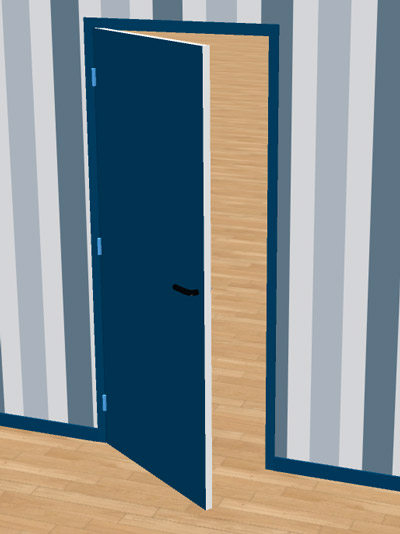
Hope it has enough materials to create the arrangement you want to achieve.
Emmanuel Puybaret, Sweet Home 3D creator
Re: Door with two different sides
Oh oh! Thank you Emmanuel, most useful!
Re: Door with two different sides
@ Puybaret
Wahooo ! thank you it is exactly what i was looking for ! [=D>]
I will definitely use it very often.
Everything is perfect, thank you again for your help [:D]
Wahooo ! thank you it is exactly what i was looking for ! [=D>]
I will definitely use it very often.
Everything is perfect, thank you again for your help [:D]

Re: Door with two different sides
Hi! Thank you very much for this post! In addition to a door with changeable sides, I've been looking for a sidelight with different colored sides/textures. I'm a newbie to Blender and have been struggling to figure this out. Here's any example:

I'm trying to make it so the sidelights are able to be a different texture than the front door both on the front and the back. What I'm ultimately trying to do is make my front door red on the exterior with dark brown/charcoal exterior sidelights but the interior portion of the door white with white sidelights (like the example).
Appreciate any help you could provide with this.
I'm trying to make it so the sidelights are able to be a different texture than the front door both on the front and the back. What I'm ultimately trying to do is make my front door red on the exterior with dark brown/charcoal exterior sidelights but the interior portion of the door white with white sidelights (like the example).
Appreciate any help you could provide with this.
Re: Door with two different sides
Do you have a 3D model for this? If you do, upload it to a filehost like mediafire and post the download link here. That way we can download it and fix the different textures/material names for you.
There is also a manual on dodecagon.nl that explains how to change material names but it requires manual editing of the OBJ and MTL files of the model. This example might be a bit challenging for a first try.
There is also a manual on dodecagon.nl that explains how to change material names but it requires manual editing of the OBJ and MTL files of the model. This example might be a bit challenging for a first try.
Dodecagon.nl
1300+ 3D models, manuals, and projects
1300+ 3D models, manuals, and projects
Re: Door with two different sides
Sure! Here is a mediafire link containing the 3d model I've been trying to edit. It is in dae format (if that matters)mediafire link I'm not married to this particular model, so if there's anything specifically frustrating about editing it, I have a few alternate options I can share if needed.
I have a basic understanding of how to edit mtl and obj files in notepad to correct filenames, if that helps. [:))]
I have a basic understanding of how to edit mtl and obj files in notepad to correct filenames, if that helps. [:))]
Who is online
Users browsing this forum: No registered users and 1 guest