Hi,
I am building my first house ever, a prefabricated house, for my family. I cannot find this kind of roof on the library. How can I build and add it to my library? Thank you very much.
My roof : https://i.postimg.cc/JzCDyBwq/2024-09-04-145844.jpg
How can I import or find this kind of roof like this?
This topic has been viewed 4281 times and has 9 replies


Re: How can I import or find this kind of roof like this?
I doubt that you can find such a specific roof but fortunately it's easy to create in Sweet Home 3D.
Look at the side of the roof as if it was the top of a wall.
Draw a wall in the 2D pane that matches the side of the roof. Set the height of the walls to the width of the roof. You can curve a wallpart by dragging the little arrow in the center of that wallpart or by modifying the wallpart and manually set the curve on the bottom right of the Modify Wall dialog.
When you have the walls exactly like the "roof turned on its side" set a texture on it. Any texture will do for now. Setting the texture before export results in a much better alignment of the texture than setting it after export/import.
Export the walls (select the walls, menu "3D view", "Export to OBJ format"). Give it a sensible name like "Roof".
Import the Roof object by dragging the .obj file into the 2D pane or import through the menu.
You can now tilt the roof in the Modify Object dialog to its correct position and export/import again.
The roof will have strange material names for a roof. Go to dodecagon.nl and in the Manuals section you will find a PDF manual and example project about how to change the material names.
Good luck!
Look at the side of the roof as if it was the top of a wall.
Draw a wall in the 2D pane that matches the side of the roof. Set the height of the walls to the width of the roof. You can curve a wallpart by dragging the little arrow in the center of that wallpart or by modifying the wallpart and manually set the curve on the bottom right of the Modify Wall dialog.
When you have the walls exactly like the "roof turned on its side" set a texture on it. Any texture will do for now. Setting the texture before export results in a much better alignment of the texture than setting it after export/import.
Export the walls (select the walls, menu "3D view", "Export to OBJ format"). Give it a sensible name like "Roof".
Import the Roof object by dragging the .obj file into the 2D pane or import through the menu.
You can now tilt the roof in the Modify Object dialog to its correct position and export/import again.
The roof will have strange material names for a roof. Go to dodecagon.nl and in the Manuals section you will find a PDF manual and example project about how to change the material names.
Good luck!
Dodecagon.nl
1300+ 3D models, manuals, and projects
1300+ 3D models, manuals, and projects
-
captaincook

- Posts: 403
- Joined: Fri Oct 20, 2017 3:16 pm
- Country: France
Re: How can I import or find this kind of roof like this?
Bonjour,
Pour compléter le message de Keet, notamment sur l'utilisation de murs, je vous envoie des images de ce que j'ai fait pour essayer de vous aider aussi.
La première image montre comment j'ai réalisé un premier élément du toit comprenant la partie supérieure et celle intermédiaire à partir de deux murets aux dimensions différentes (rouge et bleu).
Ces deux murets ont ensuite été exportés en un objet (toit 2) et ré importé dans la bonne position.
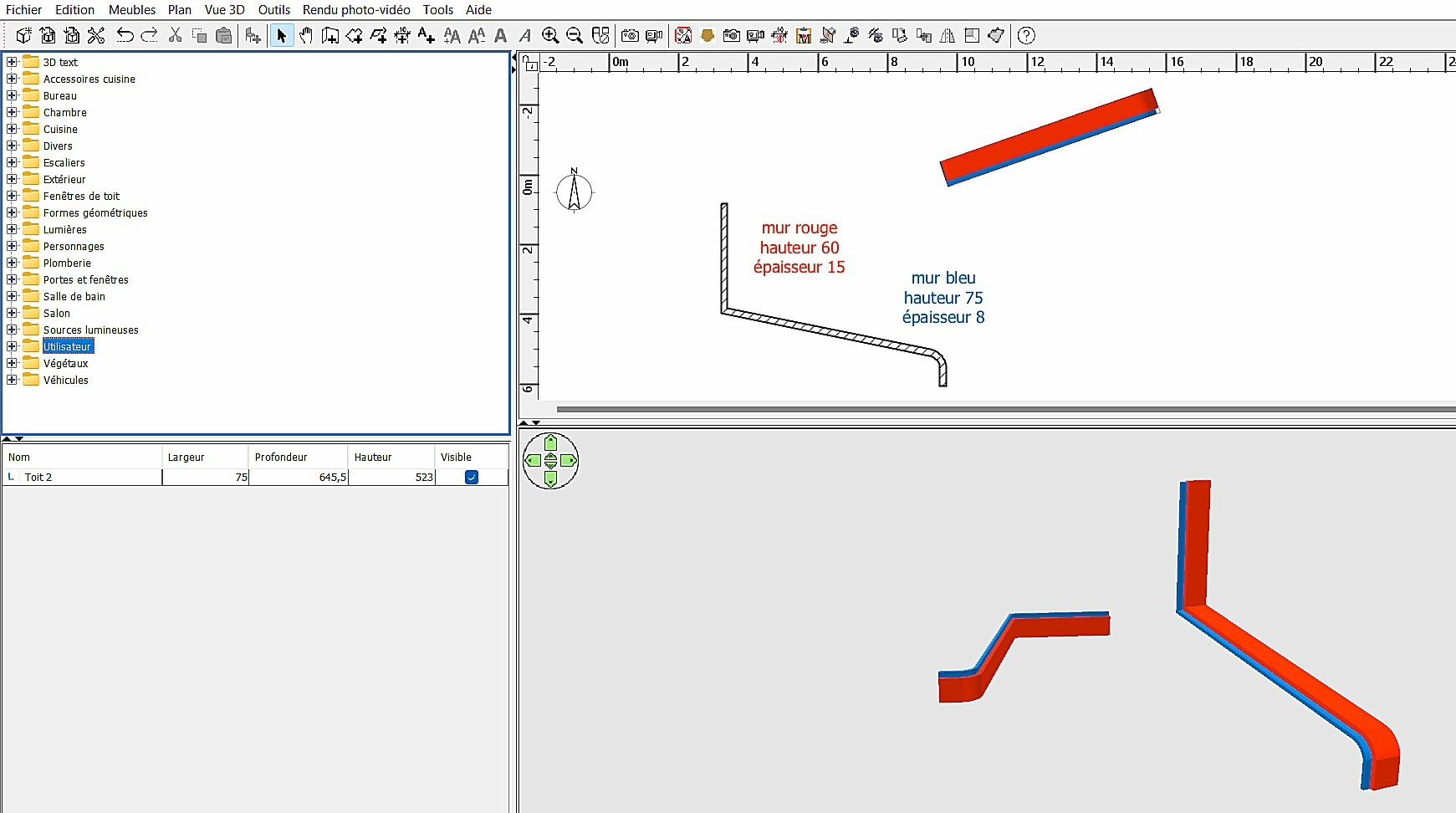
Je me suis ensuite servi de l'outil multiplier (nombre de multiplication =14 et décalage X=75 cm) pour obtenir un toit complet.
A noter que j'ai appliqué la fonction "miroir de forme" à l'élément le plus à gauche. L'ensemble a ensuite été converti en objet (tout en bleu à droite de l'image).

Il va de soi que les dimensions que j'ai utilisées sont purement arbitraires, ne connaissant pas celles du toit que vous voulez créer.
Amusez vous bien.
Pour compléter le message de Keet, notamment sur l'utilisation de murs, je vous envoie des images de ce que j'ai fait pour essayer de vous aider aussi.
La première image montre comment j'ai réalisé un premier élément du toit comprenant la partie supérieure et celle intermédiaire à partir de deux murets aux dimensions différentes (rouge et bleu).
Ces deux murets ont ensuite été exportés en un objet (toit 2) et ré importé dans la bonne position.
Je me suis ensuite servi de l'outil multiplier (nombre de multiplication =14 et décalage X=75 cm) pour obtenir un toit complet.
A noter que j'ai appliqué la fonction "miroir de forme" à l'élément le plus à gauche. L'ensemble a ensuite été converti en objet (tout en bleu à droite de l'image).
Il va de soi que les dimensions que j'ai utilisées sont purement arbitraires, ne connaissant pas celles du toit que vous voulez créer.
Amusez vous bien.
Re: How can I import or find this kind of roof like this?
You keep amazing me with creative and inventive alternative solutions.
A very good enhancement with the multiplied colored parts. Textures often produce problems with walls and your method completely avoids that. Kudos!
[French]
Vous continuez à m'étonner avec des solutions alternatives créatives et inventives.
Une très bonne amélioration avec les parties colorées multipliées. Les textures posent souvent des problèmes avec les murs et votre méthode évite complètement ce problème. Bravo !
A very good enhancement with the multiplied colored parts. Textures often produce problems with walls and your method completely avoids that. Kudos!
[French]
Vous continuez à m'étonner avec des solutions alternatives créatives et inventives.
Une très bonne amélioration avec les parties colorées multipliées. Les textures posent souvent des problèmes avec les murs et votre méthode évite complètement ce problème. Bravo !
Dodecagon.nl
1300+ 3D models, manuals, and projects
1300+ 3D models, manuals, and projects
-
captaincook
- Posts: 403
- Joined: Fri Oct 20, 2017 3:16 pm
- Country: France
Re: How can I import or find this kind of roof like this?
Merci beaucoup pour votre message, Keet.
Mais j'en apprends aussi énormément grâce à vous et à d'autres utilisateurs passionnés sur ce forum.
Ce qui rend à mes yeux Sweet Home si attrayant.
Mais j'en apprends aussi énormément grâce à vous et à d'autres utilisateurs passionnés sur ce forum.
Ce qui rend à mes yeux Sweet Home si attrayant.
Re: How can I import or find this kind of roof like this?
Hi Keet, I really appreciated your help. I will follow your instruction  Thank you very much and have a great weekend.
Regards,
Hoc Nguyen from Vietnam.
Thank you very much and have a great weekend. Regards,
Hoc Nguyen from Vietnam.
I doubt that you can find such a specific roof but fortunately it's easy to create in Sweet Home 3D.
Look at the side of the roof as if it was the top of a wall.
Draw a wall in the 2D pane that matches the side of the roof. Set the height of the walls to the width of the roof. You can curve a wallpart by dragging the little arrow in the center of that wallpart or by modifying the wallpart and manually set the curve on the bottom right of the Modify Wall dialog.
When you have the walls exactly like the "roof turned on its side" set a texture on it. Any texture will do for now. Setting the texture before export results in a much better alignment of the texture than setting it after export/import.
Export the walls (select the walls, menu "3D view", "Export to OBJ format"). Give it a sensible name like "Roof".
Import the Roof object by dragging the .obj file into the 2D pane or import through the menu.
You can now tilt the roof in the Modify Object dialog to its correct position and export/import again.
The roof will have strange material names for a roof. Go to dodecagon.nl and in the Manuals section you will find a PDF manual and example project about how to change the material names.
Good luck!
Re: How can I import or find this kind of roof like this?
Hi captaincook,
I really appreciated your help, especially with the included images, it help me understanding more clearly. Thank you very much for your help. Wish you have a great weekend.
Regards,
Hoc Nguyen from Vietnam.
I really appreciated your help, especially with the included images, it help me understanding more clearly. Thank you very much for your help. Wish you have a great weekend.
Regards,
Hoc Nguyen from Vietnam.
Bonjour,
Pour compléter le message de Keet, notamment sur l'utilisation de murs, je vous envoie des images de ce que j'ai fait pour essayer de vous aider aussi.
La première image montre comment j'ai réalisé un premier élément du toit comprenant la partie supérieure et celle intermédiaire à partir de deux murets aux dimensions différentes (rouge et bleu).
Ces deux murets ont ensuite été exportés en un objet (toit 2) et ré importé dans la bonne position.
Je me suis ensuite servi de l'outil multiplier (nombre de multiplication =14 et décalage X=75 cm) pour obtenir un toit complet.
A noter que j'ai appliqué la fonction "miroir de forme" à l'élément le plus à gauche. L'ensemble a ensuite été converti en objet (tout en bleu à droite de l'image).
Il va de soi que les dimensions que j'ai utilisées sont purement arbitraires, ne connaissant pas celles du toit que vous voulez créer.
Amusez vous bien.
Re: How can I import or find this kind of roof like this?
Dear captaincook,
I cannot rotate the wall just like you did.
The difference: https://i.postimg.cc/s2yvS86Y/2024-09-07-113455.jpg
Thank you for your respond.
I cannot rotate the wall just like you did.
The difference: https://i.postimg.cc/s2yvS86Y/2024-09-07-113455.jpg

Thank you for your respond.
-
captaincook
- Posts: 403
- Joined: Fri Oct 20, 2017 3:16 pm
- Country: France
Re: How can I import or find this kind of roof like this?
Bonjour nthkmf.
C'est normal.
Ce que vous voyez côté gauche, ce sont encore des murs mais ils ont ensuite été exportés au format objet.
Et donc côté droit, c'est l'objet obtenu que vous pouvez orienter comme vous le souhaitez.
C'est normal.
Ce que vous voyez côté gauche, ce sont encore des murs mais ils ont ensuite été exportés au format objet.
Et donc côté droit, c'est l'objet obtenu que vous pouvez orienter comme vous le souhaitez.
-
captaincook
- Posts: 403
- Joined: Fri Oct 20, 2017 3:16 pm
- Country: France
Re: How can I import or find this kind of roof like this?
Re bonjour.
Pour m'occuper, je me suis amusé à recréer ce toit mais avec une toute autre méthode.

A partir de petites surfaces crées grâce à des petits murs, j'ai obtenu des sections représentant une petite partie du profil complet du toit (parties épaisses et parties fines) que j'ai ensuite mises bout à bout pour obtenir la longueur complète.
Ne restait plus qu'à régler les largeurs de chaque partie du toit complet et voici le résultat final.
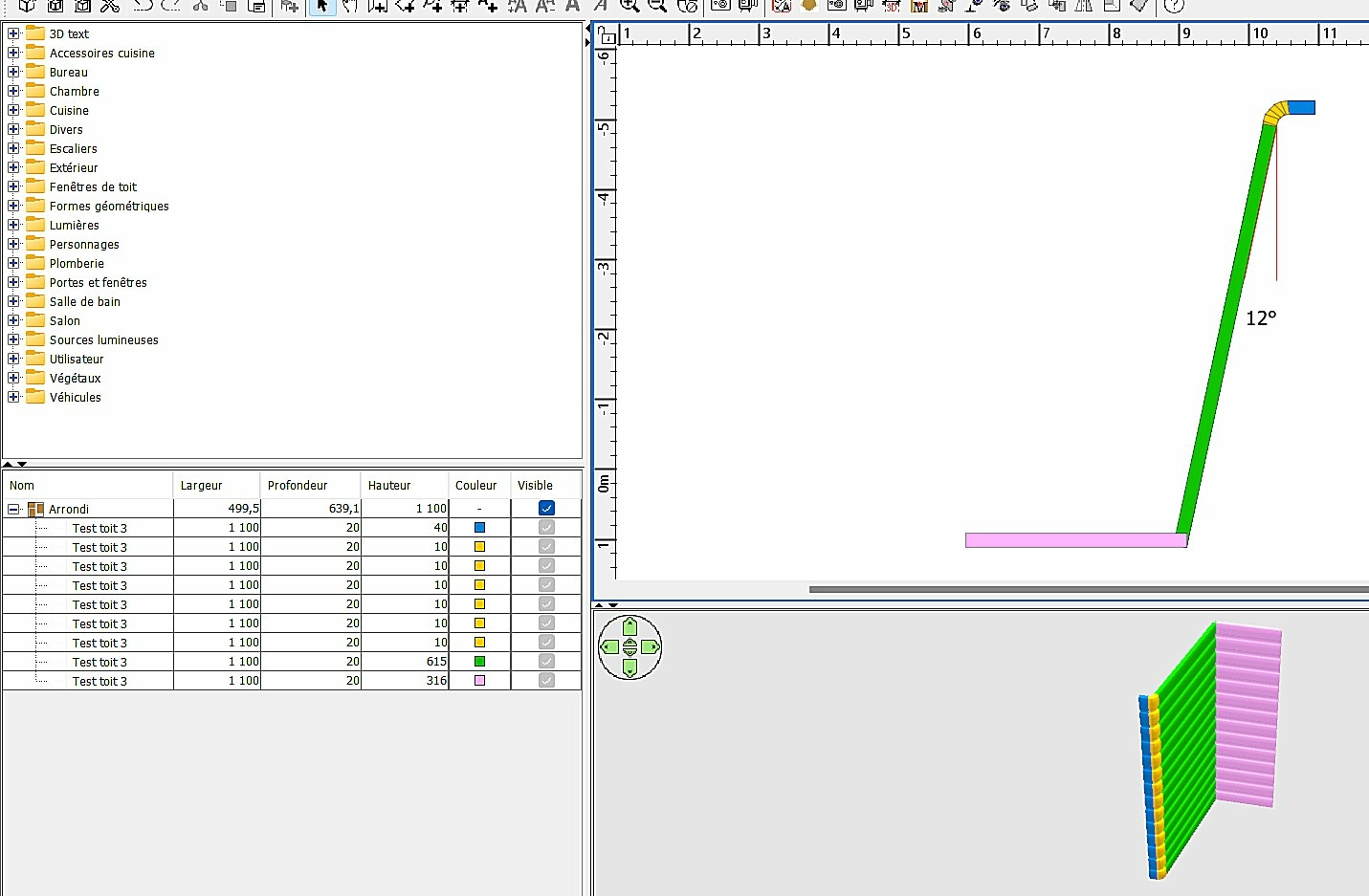

A comparer avec la méthode précédente qui me plaisait moins ( à droite sur l'image ci dessous).

Bon week-end à toutes et tous.
Pour m'occuper, je me suis amusé à recréer ce toit mais avec une toute autre méthode.
A partir de petites surfaces crées grâce à des petits murs, j'ai obtenu des sections représentant une petite partie du profil complet du toit (parties épaisses et parties fines) que j'ai ensuite mises bout à bout pour obtenir la longueur complète.
Ne restait plus qu'à régler les largeurs de chaque partie du toit complet et voici le résultat final.
A comparer avec la méthode précédente qui me plaisait moins ( à droite sur l'image ci dessous).
Bon week-end à toutes et tous.
Who is online
Users browsing this forum: No registered users and 2 guests