Hello,
I'm desiging a two-levelled house with sh3d by importing second layer as OBJ on top of the first layer.
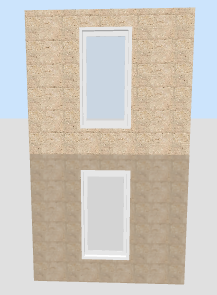
But one annoying issue is, wall texture imported in OBJ file look differnt in 3D view, meaning even you align first-floor wall perfectly to another piece of imported second-floor wall, they don't appear as one piece. This happens when you apply a texture to the walls, not an issue if you apply color to the walls.
Any idea how to solve this problem?
BTW, after rendering, wall texture will look same, but it's still quite annoying since it's the 3D view that you work on most time.
P.S.
I prepared one example picture, but seems this board doesn't support uploading images directly.
same texture appears different after imported as OBJ
This topic has been viewed 8813 times and has 3 replies

Re: same texture appears different after imported as OBJ
Yafeng:
You can use www.mediafire.com or a similar service to upload your file and/or picture and give us a link to it.
Hans
You can use www.mediafire.com or a similar service to upload your file and/or picture and give us a link to it.
Hans

Re: same texture appears different after imported as OBJ
Yafeng, I see what you mean. Textures applied to walls, floors, ceilings, ground and furniture aren't managed the same way as the ones read from OBJ files.
Please, fill a bug report. I'll try to fix it.
Please, fill a bug report. I'll try to fix it.
- Attachments
-
- Textures.sh3d
- (41.93 KiB) Downloaded 608088 times
Emmanuel Puybaret, Sweet Home 3D creator
Re: same texture appears different after imported as OBJ
Good, thanks for the information. A bug is reported about this.
Who is online
Users browsing this forum: No registered users and 1 guest