Advanced Rednerung Plugin: What means NORTH?

This topic has been viewed 4506 times and has 2 replies
Thread status: Active
How can I do this? [img]http://www.sweethome3d.com/images/flags/en_small.gif[/img]
Post Reply New Topic
ong
Posts: 4
Joined: Tue Dec 29, 2009 9:14 am
Contact:

Advanced Rednerung Plugin: What means NORTH?

Post by ong »

Hi

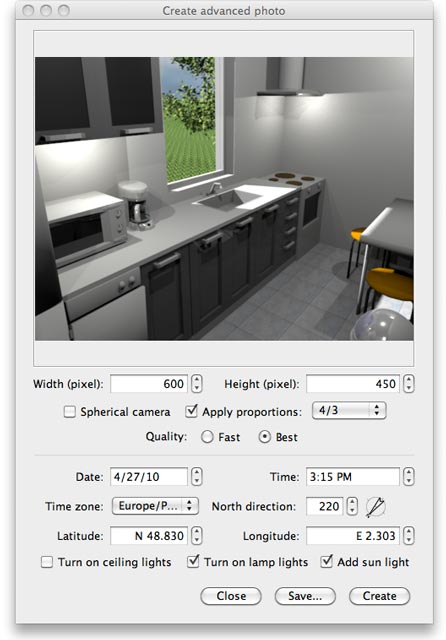
I have a question, concerning the new (great!) advanced rendering plug in (http://www.sweethome3d.eu/blog/2010/04/ ... ug_in.html):

Image

The setting of the "North direction" - what does it mean:
a) Is "north" relativ to the actual view (in the picture behind the "viewer") or
b) is "north" relativ to the canvas - meaning, that if "north direction" is set to 0 degrees it's on the top margin of the canvas?

It would help me if you could point out in my example below: What value would I need to set for north in the plugin if the (actual) north is where my arrow points):

image below larger and in better quality

Image
User avatar
Puybaret
Posts: 9440
Joined: Mon Nov 07, 2005 12:00 pm
Country: Paris, France
Contact:

Re: Advanced Rednerung Plugin: What means NORTH?

Post by Puybaret »

You should enter 26 in North direction field, it's the closest integer value to 25.8.

The direction of the compass drawn beside the North direction field should indicate the same North direction as in your plan. As the default value is 0, that means that North direction is by default towards the top of the screen.
Emmanuel Puybaret, Sweet Home 3D creator
ong
Posts: 4
Joined: Tue Dec 29, 2009 9:14 am
Contact:

Re: Advanced Rednerung Plugin: What means NORTH?

Post by ong »

Hi

thanks.

I was unsure as it could have been like this - which I understand is NOT: Since you would need to turn it counterclockwise 360-26 = 334 ?

Olaf
Post Reply New Topic

Who is online

Users browsing this forum: No registered users and 2 guests