This topic has been viewed 5380 times and has 2 replies
Thread status:
How can I do this? [img]http://www.sweethome3d.com/images/flags/en_small.gif[/img]
hansmex
Posts: 4027 Joined: Sat Sep 26, 2009 11:36 amCountry: Netherlands
Post
by hansmex Mon May 10, 2010 7:38 pm
Hello:
I tried to use the Export plugin, but I get an error message on my Windows Vista laptop.
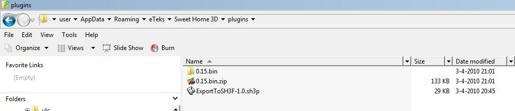
The plugin is saved in a directory as shown below:
The error message is show below:
What am I doing wrong?
How can I solve this?
How can I get this plugin to work?
I also tried the plugin on my Ubuntu Lucid 10.04 PC and there it works flawlessly.
Thanks for any help!
Hans
Puybaret
Posts: 9440 Joined: Mon Nov 07, 2005 12:00 pmCountry: Paris, France
Contact:
Post
by Puybaret Mon May 10, 2010 9:15 pm
Sorry for the problem.
Emmanuel Puybaret, Sweet Home 3D creator
hansmex
Posts: 4027 Joined: Sat Sep 26, 2009 11:36 amCountry: Netherlands
Post
by hansmex Mon May 10, 2010 11:08 pm
Emmanuel:
Users browsing this forum: No registered users and 2 guests