
i'm using create advanced photo and the render always stops at light I put.
here's the image:
http://www.4shared.com/photo/TYRDZCHh/2_online.html
I also attach the file
http://www.4shared.com/file/_BKWgpwS/3_online.html
is there anybody can help me why the render is stop?
advanced photo stop renderring
This topic has been viewed 5848 times and has 5 replies

Re: advanced photo stop renderring
Yudi:
I had a look at your model and noticed a few things.
1 - When rendering "fast" there was no problem, only when using "best".
2 - The "Schneider" sign doesn't render correctly on my computer (Ubuntu with SH3D 2.5): The sign is black and the lettering is black as well. The letters are visible because they have a speckled edge. This suggests to me that you used a GIF as texture and that there is a (slight?) problem with the transparency.
3 - When making all walls and all furniture white, your model rendered without a problem using the "best" setting.
There have been some reports that there is a problem using large size textures. I also read that it is preferable to have textures with sizes that are a multiple of 2, e.g. 512x512 or 128x256 pixels.
You may try to change some of your textures and see if this solves your problem.
Hans
I had a look at your model and noticed a few things.
1 - When rendering "fast" there was no problem, only when using "best".
2 - The "Schneider" sign doesn't render correctly on my computer (Ubuntu with SH3D 2.5): The sign is black and the lettering is black as well. The letters are visible because they have a speckled edge. This suggests to me that you used a GIF as texture and that there is a (slight?) problem with the transparency.
3 - When making all walls and all furniture white, your model rendered without a problem using the "best" setting.
There have been some reports that there is a problem using large size textures. I also read that it is preferable to have textures with sizes that are a multiple of 2, e.g. 512x512 or 128x256 pixels.
You may try to change some of your textures and see if this solves your problem.
Hans

Re: advanced photo stop renderring
There's still a problem in version 2.5 with some furniture models when they contain huge texture coordinates. I fixed it in the current beta. As the beta version can't run the advanced photo plug-in, please check if the bug is fixed by creating a photo with the best quality option.
Emmanuel Puybaret, Sweet Home 3D creator
Re: advanced photo stop renderring
I don't think it's just the texture.
This also happens when I render a high resolution
take a look at
http://www.4shared.com/photo/HnKqWT9w/5_online.html
http://www.4shared.com/file/cmNZJzMt/4_online.html
This also happens when I render a high resolution
take a look at
http://www.4shared.com/photo/HnKqWT9w/5_online.html
http://www.4shared.com/file/cmNZJzMt/4_online.html
Re: advanced photo stop renderring
Yudi:
I did a few more tests on your design. Here are the results:
1 - I started with version 2.5 and used the "normal" advanced plug-in (not Phong or Uber). Picture size reduced to 400x212 pixels. All renders with view set to "virtual visitor".
1a - First I tried your file as downloaded, setting "fast". Result is that the render did NOT finish. Therefor, I did not try with setting "best".
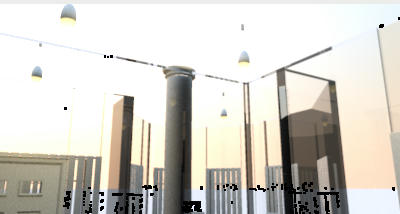
1b - I changed all walls and all furniture to white, so I can see whether the problem lies with a texture or with a model. With everything set to white, the model rendered without problem, as you can see below.
1c - There are a lot of small black spots in the render. I'm not sure what causes these spots, but I think there has been a post about this "unwanted feature".
25-adv-best
2 - Reading Emmanuel's comment, I also did a few renders with version 2.6, the standard "create photo" setting, size 400x212 pixels, virtual visitor.
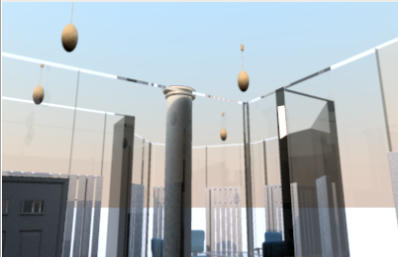
2a - Without changing walls or furniture the render completed without any problem, as you can see below.
26-best
Conclusion:
a - Indeed, version 2.6 seems to solve a few problems with textures. As soon as there will be a "real" 2.6 (or 2.7 or 2.8) you can use that version to make high quality renders using the plug-ins.
b - As long as you have to use version 2.5 you will have to investigate which texture(s) is(are) causing the problem(s).
Hans
I did a few more tests on your design. Here are the results:
1 - I started with version 2.5 and used the "normal" advanced plug-in (not Phong or Uber). Picture size reduced to 400x212 pixels. All renders with view set to "virtual visitor".
1a - First I tried your file as downloaded, setting "fast". Result is that the render did NOT finish. Therefor, I did not try with setting "best".
1b - I changed all walls and all furniture to white, so I can see whether the problem lies with a texture or with a model. With everything set to white, the model rendered without problem, as you can see below.
1c - There are a lot of small black spots in the render. I'm not sure what causes these spots, but I think there has been a post about this "unwanted feature".
25-adv-best
2 - Reading Emmanuel's comment, I also did a few renders with version 2.6, the standard "create photo" setting, size 400x212 pixels, virtual visitor.
2a - Without changing walls or furniture the render completed without any problem, as you can see below.
26-best
Conclusion:
a - Indeed, version 2.6 seems to solve a few problems with textures. As soon as there will be a "real" 2.6 (or 2.7 or 2.8) you can use that version to make high quality renders using the plug-ins.
b - As long as you have to use version 2.5 you will have to investigate which texture(s) is(are) causing the problem(s).
Hans
Re: advanced photo stop renderring
thank you Hans, you do me a great favor
i'll wait for the final version of 2.6
i'll wait for the final version of 2.6
Who is online
Users browsing this forum: No registered users and 1 guest