Bug in the way rooms are filled?

This topic has been viewed 3653 times and has 2 replies
Thread status: Active
Still a problem with your graphic card? [img]http://www.sweethome3d.com/images/flags/en_small.gif[/img]
Post Reply New Topic
User avatar
hansmex
Posts: 4027
Joined: Sat Sep 26, 2009 11:36 am
Country: Netherlands

Bug in the way rooms are filled?

Post by hansmex »

Emmanuel,

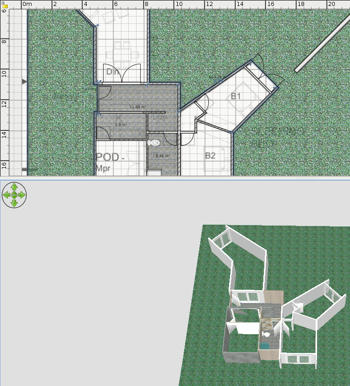
In earlier versions of SH3D it was possible to give a room two colours by leaving the central part blank. I have noticed that this isn't possible anymore. Can we have that feature back? Or is it just me who's doing something wrong?

Hans

Image
Hans

new website - under constuction
hansdirkse.info
User avatar
Puybaret
Posts: 9440
Joined: Mon Nov 07, 2005 12:00 pm
Country: Paris, France
Contact:

Re: Bug in the way rooms are filled?

Post by Puybaret »

It's more like a bug but from my first attempts it existed on older version too.
The workaround is to create two rooms that join each other at two opposite places. If you need more details, just ask...
Emmanuel Puybaret, Sweet Home 3D creator
User avatar
hansmex
Posts: 4027
Joined: Sat Sep 26, 2009 11:36 am
Country: Netherlands

Re: Bug in the way rooms are filled?

Post by hansmex »

Emmanuel:

I searched a bit, and found these two posts / threads.

http://www.sweethome3d.com/support/forum/viewthread_thread,1655
http://www.sweethome3d.com/support/forum/viewthread_thread,1441

The first post is an example you made yourself, showing two ways of making a multi-coloured room. Maybe it's a bug caused by some form of "code regression" ? When I load that file, it doesn't display correctly anymore.

Hans
Hans

new website - under constuction
hansdirkse.info
Post Reply New Topic

Who is online

Users browsing this forum: No registered users and 2 guests