Small change to render dialogue

This topic has been viewed 5500 times and has 1 replies
Thread status: Active
Features you would like to see [img]http://www.sweethome3d.com/images/flags/en_small.gif[/img]
Post Reply New Topic
User avatar
hansmex
Posts: 4027
Joined: Sat Sep 26, 2009 11:36 am
Country: Netherlands

Small change to render dialogue

Post by hansmex »

Emmanuel,

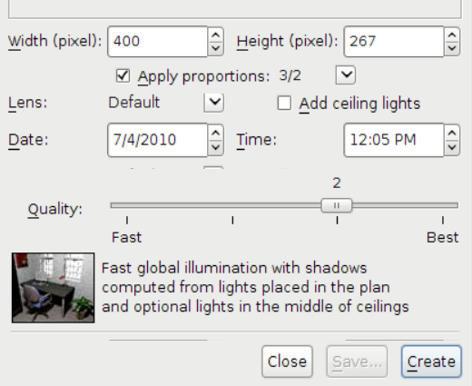
For some time I have found the render dialogue slightly counter-intuitive, especially the order and way the options are presented. I take the liberty to suggest a small modification that IMHO improves this.

Image

Ideally the "lens" and "add ceiling lights" options are interchanged, so that the two check-boxes line up.

Hans

PS: This was done in my word processor, and I couldn't make the check-boxes to line up properly.
Hans

new website - under constuction
hansdirkse.info
User avatar
Puybaret
Posts: 9440
Joined: Mon Nov 07, 2005 12:00 pm
Country: Paris, France
Contact:

Re: Small change to render dialogue

Post by Puybaret »

I chose to layout the new options at bottom because they are not available at the two lowest quality level. Thus, the quality slider is always at the same place when the options are displayed or hidden between quality 2 and 3, and the user can keep on using it without moving the mouse pointer.

Emmanuel Puybaret, Sweet Home 3D creator
Post Reply New Topic

Who is online

Users browsing this forum: No registered users and 1 guest