
Adapt level interface

This topic has been viewed 4127 times and has 1 replies
Thread status: Active
Features you would like to see [img]http://www.sweethome3d.com/images/flags/en_small.gif[/img]
Post Reply New Topic
User avatar
hansmex
Posts: 4027
Joined: Sat Sep 26, 2009 11:36 am
Country: Netherlands

Adapt level interface

Post by hansmex »

Ever since the introduction of Levels, I've found the level interface very confusing.
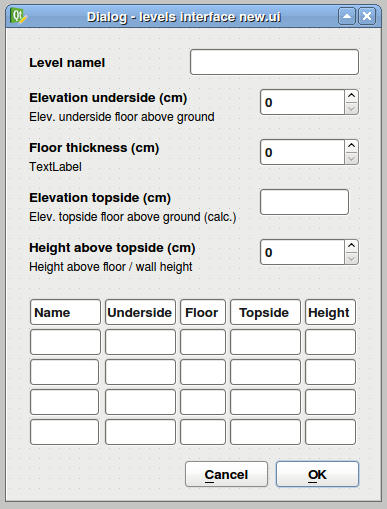
Therefore, I propose a slightly modified interface, as shown below.
Image

1 - Elevation underside
This is the height above ground level where the floor starts.
2 - Floor thickness
No explanation needed here. Except the wish that floors can have a thickness of 0 (zero) and be absent.
3 - Elevation topside
This is the sum of 1 and 2, and should be calculated by the program. It serves mainly as information for the user.
4 - Height above topside
This is the height of the level. In practice, this will be the height of most walls on that level.

In my view this is a more straightforward and easier to understand solution than the one currently used.

Hans
Hans

new website - under constuction
hansdirkse.info
kbon
Posts: 6
Joined: Mon Aug 06, 2012 6:20 pm
Country: DE

Re: Adapt level interface

Post by kbon »

This is a nice suggestion, as it took me quite a while (and few experiments) to figure out the meanings and behaviour of the level settings :)

Additional suggestion:
* "Elevation topside" should be modifyable as well, as
* 1,2 and 3 are all related to each other. Why not allowing modification of 3 and automatic adaption of 1 or 2? To figure out which one should be adapted,
* add radio-buttons in front of 1,2,3 where only one of them can be selected. The selected field would be "static", the others dynamic.
Or, if the radio-button stuff is too complicated and vulnerable for errors, let only 1 and 3 affect each other, i.e. changing one would automatically calculate the other depending on floor height.

Example:
I know my Floor has 25cm thickness. I set it, and put it as "static". Now it wouldn't matter which field (1 or 3) I set, the other would be automatically adapted instantly. This would make it more flexible to modify the fields.

One more aspect, that I still don't quite understand about the levels: The "Height above topside" would be the same as the currently available "Height". What use does that field have, except the automatic calculation of a new added level? As far as I can see, none!? It doesn't set any restrictions or anything else. Right? ^^
Post Reply New Topic

Who is online

Users browsing this forum: No registered users and 2 guests