 Can't Open Home
This topic has been viewed 5585 times and has 5 replies
Can't Open Home
I have been working on a project for a few days now and it suddenly will not open. I know I saved it properly before I closed my laptop, and it would not open when I restarted, and displays the message Can't Open Home: "<file name>" I have tried looking in the AppData folder for a working saved copy, but no luck. I do not know if my file got corrupted, but I could use some help. I am running Windows 8.1 on an HP Stream 11 (2.16 GHz Intel Celeron Processor, 2GB RAM, 32 GB Hard drive, & an additional 64 GB SD card where I keep my 3d home program and saved files) I can open other homes without issue, but I have lost the most recent one I was working on, and was really enjoying how it was turning out. Can you help me recover it?

Re: Can't Open Home
Please, [url=mailto:[email protected]]send me[/url] your file. I'll try to recover it.
Emmanuel Puybaret, Sweet Home 3D creator
Re: Can't Open Home
Thank you, I just sent it to you.
Re: Can't Open Home
Sorry kcrafton, your file can't be repaired. It's full of zeros i.e. it contains no usable data and I don't think it's a direct issue in the program (see this thread in French).
It's not the first time I've seen this issue, but as nobody reported it during the past months, I hoped it would have been fixed. What version of Java do you use (see About dialog box)?
It's not the first time I've seen this issue, but as nobody reported it during the past months, I hoped it would have been fixed. What version of Java do you use (see About dialog box)?
Emmanuel Puybaret, Sweet Home 3D creator
Re: Can't Open Home
I saved this file in several locations, because this has happened to me once before. Can I try to send you another copy that I saved in a sub-folder on my desktop? I do not believe I have Java installed at all on this machine, because I use the Chrome web browser, and it no longer supports java script.
Re: Can't Open Home
The second file you sent has the same issue (a file full of zeros). [:(]
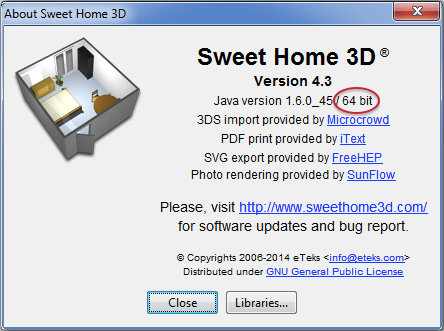
Sweet Home 3D always run with Java, and if you didn't notice, this is probably because you use Sweet Home 3D installer version which embeds a private copy of Java. Please, choose Help > About Sweet Home 3D menu item and report here the versions you use, like in the following capture which shows version 4.3 for Sweet Home 3D and 1.6.0_45 for Java:
Sweet Home 3D always run with Java, and if you didn't notice, this is probably because you use Sweet Home 3D installer version which embeds a private copy of Java. Please, choose Help > About Sweet Home 3D menu item and report here the versions you use, like in the following capture which shows version 4.3 for Sweet Home 3D and 1.6.0_45 for Java:
Emmanuel Puybaret, Sweet Home 3D creator
Who is online
Users browsing this forum: No registered users and 2 guests