Hi,
I am using sw3d to plan my new home and I really like it: I am doing quite a good job.
I only have a couple of problems with dimensions.
First, when I create a dimension (with magnetism on), magnetism doesn't work very well: I find it hard to stick to the exact position of the beginning of a wall. Is it possible to control, in some way, the "amount" of magnetism?
Second, if I create a dimension for a wall and then I resize the wall, the dimension doesn't resize with the wall, so I have to resize the dimension as well (or create a new one). Am I missing something?
Thank you
Problems with dimensions
This topic has been viewed 4193 times and has 6 replies
Re: Problems with dimensions
SH3D user's guide says:
http://www.sweethome3d.com/userGuide.jsp#otherFeatures
Move the mouse pointer on the border of a piece of furniture, the wall side or the room side you want to measure, double-click to accept the temporary dimension draw in the plan, then click a third time after choosing the size of its extension lines.
http://www.sweethome3d.com/userGuide.jsp#otherFeatures
-
edmond_dantes
- Posts: 5
- Joined: Wed Jul 06, 2016 9:07 am
Re: Problems with dimensions
@alaX
Yes, I am aware of this. What I am referring to is creating a dimension between a wall and, say, a door: in this case if I am on the wall the above method produces the dimension of the whole wall, not just the portion I am looking for.
Yes, I am aware of this. What I am referring to is creating a dimension between a wall and, say, a door: in this case if I am on the wall the above method produces the dimension of the whole wall, not just the portion I am looking for.

Re: Problems with dimensions
You could try keyboard mode by pressing <enter> key and type exact values of the dimension line.
About your second point, dimension lines are not bound to the object they measure. So if the size of that object changes, the dimension line won't change.
About your second point, dimension lines are not bound to the object they measure. So if the size of that object changes, the dimension line won't change.
Emmanuel Puybaret, Sweet Home 3D creator
Re: Problems with dimensions
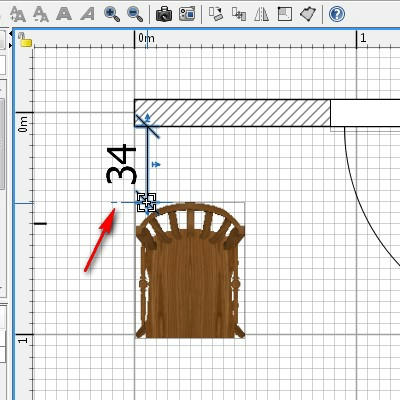
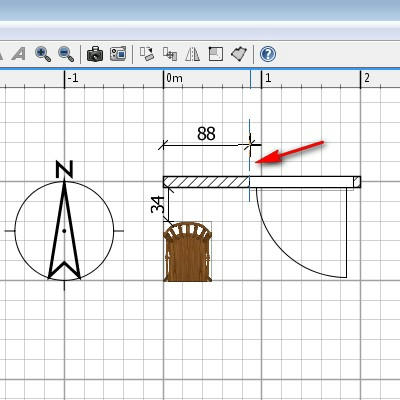
A thin blue dashed line shows up when selected(active) end point of dimension line meets/crosses/reaches some object. Perhaps it should be more noticeable - sometimes I can barely see it (especially if it overlaps another line, border...). Is that not exact enough for you?
-
edmond_dantes
- Posts: 5
- Joined: Wed Jul 06, 2016 9:07 am
Re: Problems with dimensions
As you say, it is barely noticeable. Moreover, it is very sensitive: it is enough to move the mouse of just one pixel and you miss it.
Maybe I just need to practice using it.
Maybe I just need to practice using it.

Re: Problems with dimensions
It does take a little practice, and patience. [:)]
Zooming in as close as you can and still see both points helps too.
Zooming in as close as you can and still see both points helps too.
Hawk
Who is online
Users browsing this forum: No registered users and 2 guests