Hello
I need to be change the length of existing dimensions precisely from the keyboard. Please can someone advise how to do this?
How to change existing dimension precisely from keyboard
This topic has been viewed 6196 times and has 2 replies

Re: How to change existing dimension precisely from keyboard
1. Install AdvancedEditing plug-in.
2. Use the Resize... icon or
Menu Edit -> Resize...
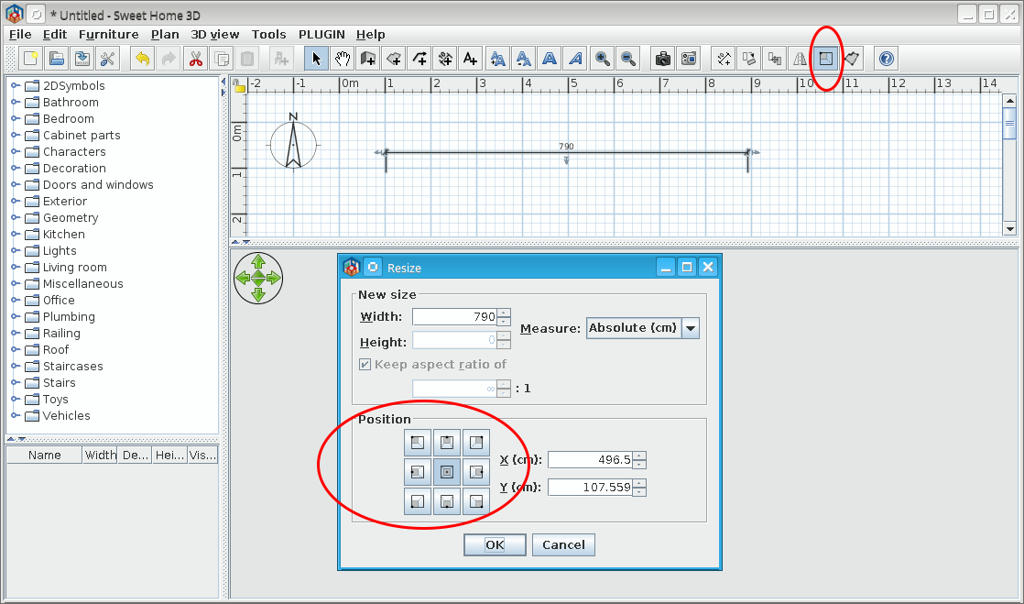
2. Use the Resize... icon or
Menu Edit -> Resize...
A computer program does what you tell it to do, not what you want it to do. Murphy's Law
When all else fails, read the instructions. Murphy's Law
If you don't like "AS IS", DIY. Dorin's law
When all else fails, read the instructions. Murphy's Law
If you don't like "AS IS", DIY. Dorin's law
Re: How to change existing dimension precisely from keyboard
Wonderful, thank you very much
Who is online
Users browsing this forum: No registered users and 1 guest