
For your information, I released Sweet Home 3D 5.6 tonight.
It's a maintenance release that fixes some bugs and regressions listed here.
Many thanks to the users who reported them [:)]
Sweet Home 3D 5.6
This topic has been viewed 54475 times and has 10 replies
Sweet Home 3D 5.6
Emmanuel Puybaret, Sweet Home 3D creator
Re: Sweet Home 3D 5.6
hello,
I have an issue with my update.
I have a file made in the 5.5, that I cant open entirely with the 5.6.
Nothing appear on my floorplan screen and the grid disapeared too.
Can you help me please, and sorry for my bad english.
I have an issue with my update.
I have a file made in the 5.5, that I cant open entirely with the 5.6.
Nothing appear on my floorplan screen and the grid disapeared too.
Can you help me please, and sorry for my bad english.
Re: Sweet Home 3D 5.6
Try to reinstall Sweet Home 3D 5.5 and check if you can open your file. If it's not the case, that must be an other issue.
Emmanuel Puybaret, Sweet Home 3D creator

Re: Sweet Home 3D 5.6
When opening a project after upgrading to 5.6 from 5.2, I noticed a side effect of this enhancement:Version 5.5, September 6, 2017
Made doors and windows always cut out the both sides of the walls to which they are added.
We can no longer make custom cut-outs in walls, like making a niche - or, as in my case;
create a basin for a kitchen sink – since any insert will cut clean thru the entire wall.
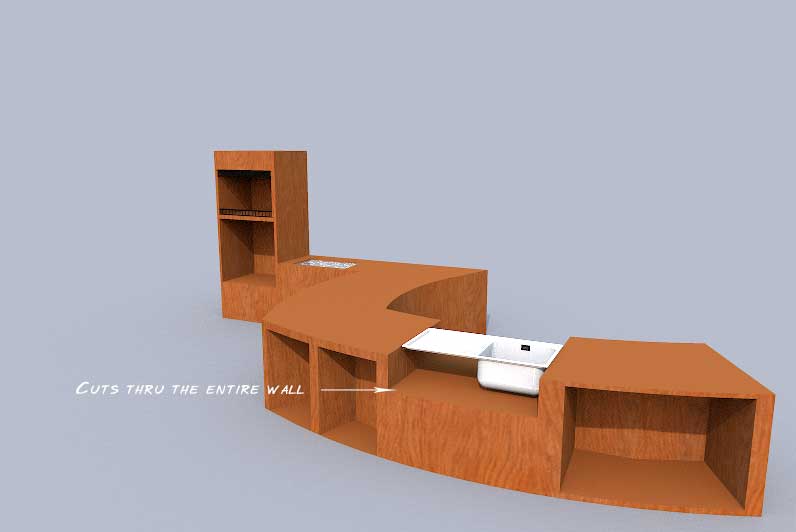
The illustration shows the old project ( 5.2 ) opened in v 5.6. The old cut-outs are not affected, but it's impossible to make new ones.
Just mentioning - in case you were unaware...
cec
-
bdfd

- Posts: 2614
- Joined: Sat Mar 29, 2014 7:17 am
- Country: LILLE, Les Hauts de France, Western Europa
Re: Sweet Home 3D 5.6
Hi,
Today, windows 10 fall creators update : downloaded and installed
SH3D 5.6 : tested OK...
[:)]
Today, windows 10 fall creators update : downloaded and installed
SH3D 5.6 : tested OK...
[:)]
Evil progresses when good people do nothing!
---
SH3D 7.1 and nothing else - W11 64b in 4K
---
SH3D 7.1 and nothing else - W11 64b in 4K
Re: Sweet Home 3D 5.6
As explained here:
This is exactly what you experienced, the niches you created with transparent boxes with Sweet Home 3D 5.2 are still here when you open your file in Sweet Home 3D 5.6, but the new ones created from the catalog (not the ones copied - pasted from the existing file) always cut out the both sides of walls. If you don't want this behavior, use a service hatch setting its material to transparent. You may still use the transparent box like in previous versions only if you include it in a sh3f file and set its [font=courier new]doorOrWindowWallCutOutOnBothSides#[/font] property to [font=courier new]false[/font] in the [font=courier new]PluginFurnitureCatalog.properties[/font] file, like in the DiggingInvisibleBox.sh3f file attached to this post.Doors and windows now always cut out both sides of straight or round walls when they are parallel or tangent to them [...] To avoid changes in your existing designed plans, this feature will work only for newly added doors and windows, except for service hatches that will continue to dig walls if they partly cover the wall thickness.
- Attachments
-
- DiggingInvisibleBox.sh3f
- (8.35 KiB) Downloaded 2201 times
Emmanuel Puybaret, Sweet Home 3D creator
Re: Sweet Home 3D 5.6
5.6 now takes over an hour to render approx 70 pieces of furniture. Same on 5.5.
There has been several Win 10 updates since I last used Sweet Home.
Any ideas on how to fix the VERY slow rendering of the furniture?
Thanks
There has been several Win 10 updates since I last used Sweet Home.
Any ideas on how to fix the VERY slow rendering of the furniture?
Thanks
Re: Sweet Home 3D 5.6
If by "render", you mean creating a photo at one of the two best quality levels, nothing was recently changed in the program that could slow down this operation.
Maybe you added many lights, chose a larger size for the image or you could also check if increasing the max memory used by Sweet Home 3D will improve the rendering.
Maybe you added many lights, chose a larger size for the image or you could also check if increasing the max memory used by Sweet Home 3D will improve the rendering.
Emmanuel Puybaret, Sweet Home 3D creator
Re: Sweet Home 3D 5.6
Hi Puybaret,
Thanks for the reply.
I mean when I load an existing plan and the placed furniture images are just rectangles. Slowly over like an hour, the correct furniture images load.
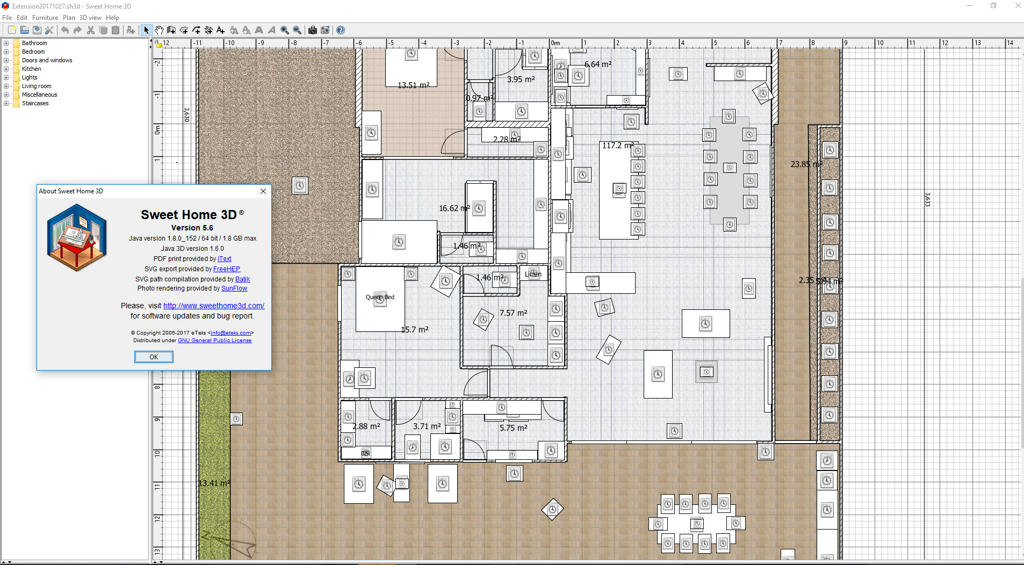
How do I attach a screenshot as your image attach requires a link?
Thanks
Thanks for the reply.
I mean when I load an existing plan and the placed furniture images are just rectangles. Slowly over like an hour, the correct furniture images load.
How do I attach a screenshot as your image attach requires a link?
Thanks
Who is online
Users browsing this forum: No registered users and 1 guest