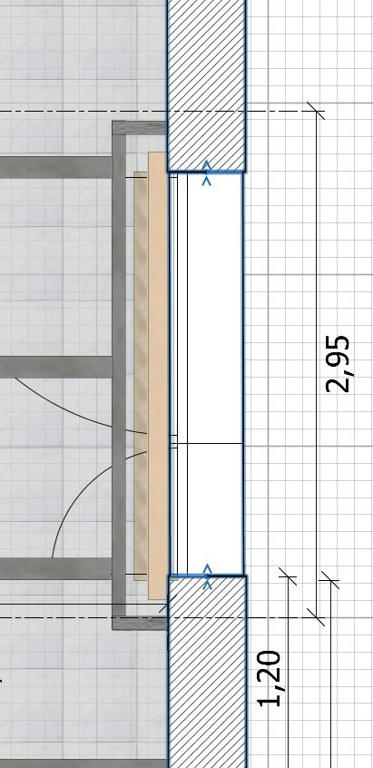
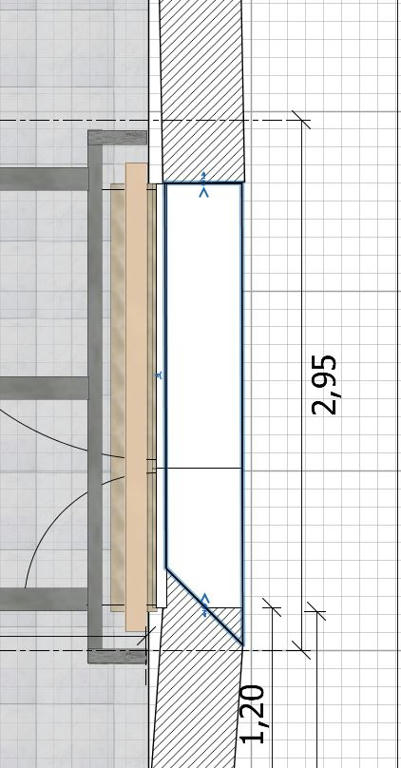
during building my house in SH3D I figured out a problem I have no idea how to solve. As you can see in the attached picture one of my consists of three seperate walls, because the middle wall must have a different texture than the other two walls.
Later I needed to change the thickness of the middle wall, because it has no outer bricks. So I changed its thickness, but due to the midpoint strategy of the programm the thickness was reduced from both sides, which is not desired. So I wanted to move the wall so that the inner part is in line with the inner part of the other two walls. Bit this is not possible, because they move together with the middle wall (see pictures).
Is there any way to disconnect walls after they have been connected or is there another way how to solve this situation?
Thank you very much Puybaret and okh, both works very well on a different example
I read so many of the tutorials but not the one, you mentioned.
But now I have a related question:
I solved my problem as well (but less comfortbable) by completely deleting the middle wall and creating a new one w/o connecting it to the other two walls.
Now I wanted to check your advice and reconnect the three walls, but this does not work. After connecting I still can move the middle wall independently from the other two. Why this? How does the wall connect option work?