
Until we have a stairs generator for me are more useful this two additional tools:
1. Multiple paste... or Paste special...
-Select an object or more
variant a
-Edit->Multiple paste...
-An popup dialog "How many copy?"
-Insert an number (>0)->"OK"
or
variant b
-Edit->Paste special...
-An popup dialog with few entries
--"How many copy?"
--"Distance on x, y, z"
-Insert the desire numbers (>0)(for axes in cm)->"OK"
result an numbers of objects inserted in the plan.
In this way I don't need to ctrl+v for 50 or 374 times to insert the same object (steps for staircase or chairs on a theater)
2. Distribute on high (on z axes)
-Select and modify the elevation of an object to maximum need
-Select the (previously created) objects (>=3)
-Right click->Align and distribute...->Distribute on high
With this two new option is more easy to create staircases but not only.
Multiple paste & Distribute on high (on z axes)
This topic has been viewed 5402 times and has 4 replies
Multiple paste & Distribute on high (on z axes)
A computer program does what you tell it to do, not what you want it to do. Murphy's Law
When all else fails, read the instructions. Murphy's Law
If you don't like "AS IS", DIY. Dorin's law
When all else fails, read the instructions. Murphy's Law
If you don't like "AS IS", DIY. Dorin's law
Re: Multiple paste & Distribute on high (on z axes)
Message in a Bottle -The Police - 1979
As I say "If You don't like it AS IS than DIY".
I've start to write an plug-in for this but I encounter a problem:
Look at the screenshot:
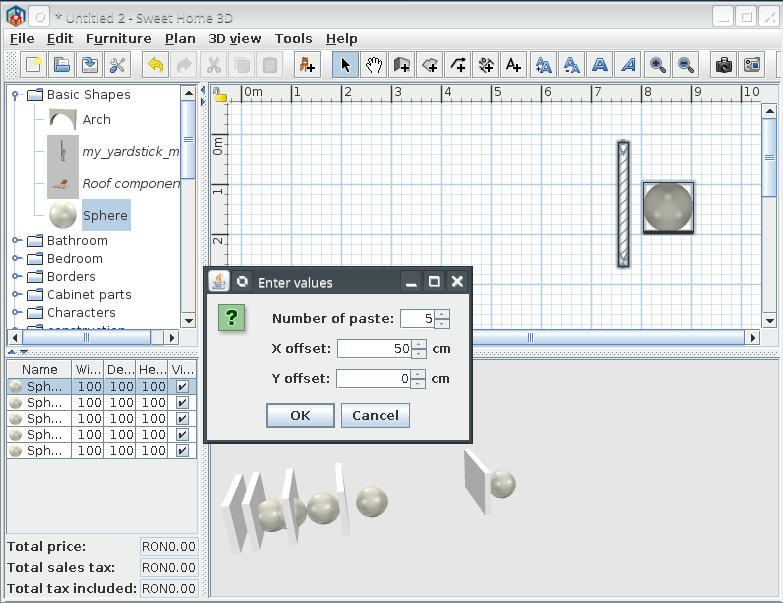
The items are added in 3D and in Furniture list but only the last are draw in 2D.
If I save the file and reopen the items are there but is not what I want or expect.
Here is the code responsible for this:
I mess something but I don't know what.
I've catch my ears and maybe someone read this and drop me an lifeline [:(]
As I say "If You don't like it AS IS than DIY".
I've start to write an plug-in for this but I encounter a problem:
Look at the screenshot:
The items are added in 3D and in Furniture list but only the last are draw in 2D.
If I save the file and reopen the items are there but is not what I want or expect.
Here is the code responsible for this:
Code: Select all
UndoableEditSupport undoSupport = plugin.getUndoableEditSupport();
 		undoSupport.beginUpdate();
 //		HomeView view = plugin.getHomeController().getView();
 		float dx = 0;
 		float dy = 0;
 		int step = (int) stepsField.getValue();
 		float Xo = (float) xField.getValue();
 		float Yo = (float) yField.getValue();
 		for (int p = 1; p <= step; p++) {
 			dx += Xo;
 			dy += Yo;
 			// Attempt add/move items
 			plugin.getHomeController().getPlanController().addItems(items);
 			plugin.getHomeController().getPlanController().moveItems(items, dx, dy);
 			 // Attempt to use drop or paste
 //			plugin.getHomeController().drop(items, null, dx, dy);
 //			plugin.getHomeController().paste(items);
 	 		}
 		undoSupport.postEdit(new AbstractUndoableEdit() {
I've catch my ears and maybe someone read this and drop me an lifeline [:(]
A computer program does what you tell it to do, not what you want it to do. Murphy's Law
When all else fails, read the instructions. Murphy's Law
If you don't like "AS IS", DIY. Dorin's law
When all else fails, read the instructions. Murphy's Law
If you don't like "AS IS", DIY. Dorin's law

Re: Multiple paste & Distribute on high (on z axes)
Each item added to home must be unique, and you have to duplicate the items you want to add, for example using their [font=courier new]clone[/font] method. To ensure that future redos work correctly, they should be cloned only once, and not in the [font=courier new]redo[/font] method.
Emmanuel Puybaret, Sweet Home 3D creator
Re: Multiple paste & Distribute on high (on z axes)
Thank You, Emmanuel!
You find my bottle very quickly. [>:D<]
I remove (comment) my undo method => same result.
I change clipboard whit selected => same result.
I'll try to change the principle from "for" to "wile" or other kind of.
Maybe I'll find a way to convince SH3D to take care to all items I insert.
Nothing is impossible but not all are easy.
The computer MUST do what I need. [/:)]
You find my bottle very quickly. [>:D<]
I remove (comment) my undo method => same result.
I change clipboard whit selected => same result.
I'll try to change the principle from "for" to "wile" or other kind of.
Maybe I'll find a way to convince SH3D to take care to all items I insert.
Nothing is impossible but not all are easy.
The computer MUST do what I need. [/:)]
A computer program does what you tell it to do, not what you want it to do. Murphy's Law
When all else fails, read the instructions. Murphy's Law
If you don't like "AS IS", DIY. Dorin's law
When all else fails, read the instructions. Murphy's Law
If you don't like "AS IS", DIY. Dorin's law
Re: Multiple paste & Distribute on high (on z axes)
I finally convince SH3D to accept my opinion.
The Paste special...(multiple Ctrl.+v) are working somehow.
Now I tray the distribute elevation.
Off course Murphy' Law are present:
solving a bug I generate other 3 and discover another 5.
Well, I don't have time to be bored.
The Paste special...(multiple Ctrl.+v) are working somehow.
Now I tray the distribute elevation.
Off course Murphy' Law are present:
solving a bug I generate other 3 and discover another 5.
Well, I don't have time to be bored.
A computer program does what you tell it to do, not what you want it to do. Murphy's Law
When all else fails, read the instructions. Murphy's Law
If you don't like "AS IS", DIY. Dorin's law
When all else fails, read the instructions. Murphy's Law
If you don't like "AS IS", DIY. Dorin's law
Who is online
Users browsing this forum: No registered users and 1 guest