Select Hide Utility plug-in

This topic has been viewed 17878 times and has 14 replies
Thread status: Active
Questions about extending features and developing plug-ins [img]http://www.sweethome3d.com/images/flags/en_small.gif[/img]
User avatar
dorin
Posts: 824
Joined: Thu Apr 24, 2014 9:14 am
Country: Vatra Dornei, Suceava, Romania

Select Hide Utility plug-in

Post by dorin »

I've start learning java two month ago and this is my first script with 90% of my contribution, so don't expect too much.
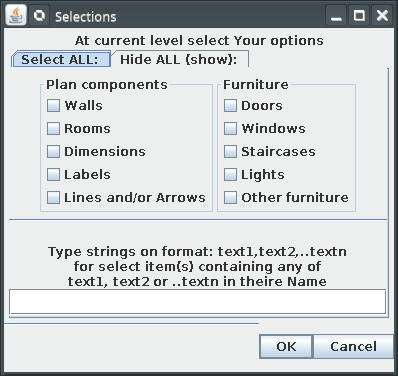
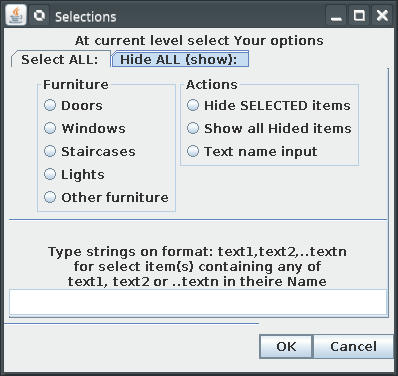
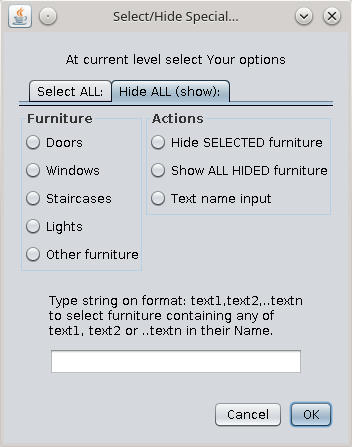
After install You will find an entry under Menu Edit->Select special...
This plug-in let You to:
- make complex selection at current level and then copy/delete/paste or
- hide selected and so on.
Hope the interface are self explained.
PROBLEMS:
1. Conflict with Utility2Plugin; can't coexist so chose one.
2. I've don't know (yet) how to implement correctly the UNDO-REDO action. In this version, undo (only for hide/show section) work acceptable BUT redo didn't!
3. That's being said I recommend to test on an test-file or backup.
Image Image
The plug-in with sources and licence GPL included could be find here Select Hide Plugin or at Source Forge
A computer program does what you tell it to do, not what you want it to do. Murphy's Law
When all else fails, read the instructions. Murphy's Law
If you don't like "AS IS", DIY. Dorin's law
User avatar
Puybaret
Posts: 9440
Joined: Mon Nov 07, 2005 12:00 pm
Country: Paris, France
Contact:

Re: Select Hide Utility plug-in

Post by Puybaret »

Congratulations for your first plug-in [:)]

It's great that your plug-in provides some missing selection features and I've been wondering myself for a while how adding some Select all walls, Select all rooms, etc menu items could be useful.
About searching furniture by name, it coud be nice to look for the furniture inside groups and subgroups. If programming a recursive method is too complicated, you could also use the getAllFurniture method in [font=courier new]HomeFurnitureGroup[/font] class.
About searching windows, it looks like you search them from their name, but then it will work only if the furniture name contains "window" word, making this option misleading compared to the Doors option which selects all doors and windows.

And why did you choose to provide two different actions (selecting and hiding/showing) in one dialog box with tabs? I wonder if it would be clearer to program two menu different items...
Emmanuel Puybaret, Sweet Home 3D creator
User avatar
dorin
Posts: 824
Joined: Thu Apr 24, 2014 9:14 am
Country: Vatra Dornei, Suceava, Romania

Re: Select Hide Utility plug-in

Post by dorin »

Thank you, Emmanuel!
For someone who just start to learn java is a honor!
But "retourner à nos moutons".
1. About
And why did you choose to provide two different actions (selecting and hiding/showing) in one dialog box with tabs? I wonder if it would be clearer to program two menu different items...
In my mind was to kip the sweethome3d as simple as possible; I don't want to pollute the menu more than necessary.
I get inspiration from LibreOffice where is Paste special... entry and than a lot of option (only for those who want).
When you have all the plugins installed and have more than 12~15 entry in one menu it's like you need to read Shakespeare again and again.
2.
I've been wondering myself for a while how adding some Select all walls, Select all rooms, etc menu items could be useful

I don't think so. For the standard program You have already implement the basic option. Who need more could install plugins.
3.
About searching furniture by name, it coud be nice to look for the furniture inside groups and subgroups
Indeed, me or someone else will try to improve it.
My fault is I don't make fully tests and this (and maybe others) I missed it.
4.
If programming a recursive method is too complicated, you could also use the getAllFurniture method in HomeFurnitureGroup class

For me everything is complicated and if is not, I made it to be.
Anyway is not the single problem; I have to implement internationalization, the redo action etc.
5.
About searching windows, it looks like you search them from their name, but then it will work only if the furniture name contains "window" word, making this option misleading compared to the Doors option which selects all doors and windows

Is true, but I don't find a specific criteria to make difference between door, window or service hatch wile all are the same and I don't want to select/hide all.
The same situation are for staircase and for lamps.
A stair without cutOutShape or a lamp without light are like all other furniture and I don't find a bather way to identify them.

6.(and the last) This plugin and the next few are part of my learning java curve. Now I've start a fight whit another useless plugin which don't want to work as I want.
As usual I've made the final (graphic interface) but I don't manage yet to make it functional.
I don't give up even if I need to start from "Hello java World" part which I skip it like many others [B-)]

A computer program does what you tell it to do, not what you want it to do. Murphy's Law
When all else fails, read the instructions. Murphy's Law
If you don't like "AS IS", DIY. Dorin's law
User avatar
bdfd
Posts: 2614
Joined: Sat Mar 29, 2014 7:17 am
Country: LILLE, Les Hauts de France, Western Europa

Re: Select Hide Utility plug-in

Post by bdfd »

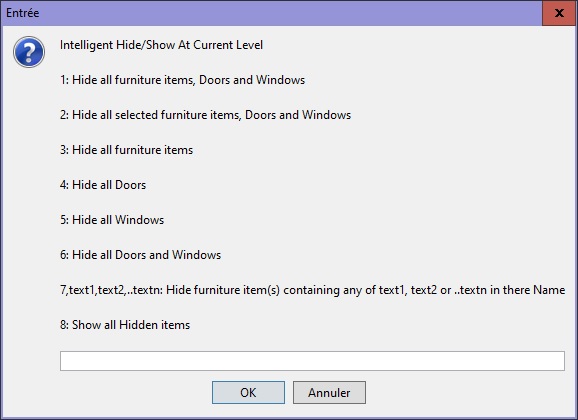
...
Image
The plug-in with sources and licence GPL included could be find here Select Hide Plugin ...
Hi dorin,

After followed the link and installed the given plugin, I have this :
Image

Why ? [:D]

More, with this version, option 5 doesn't work.

TY for your return.
Regards.
.
Evil progresses when good people do nothing!
---
SH3D 7.1 and nothing else - W11 64b in 4K
User avatar
dorin
Posts: 824
Joined: Thu Apr 24, 2014 9:14 am
Country: Vatra Dornei, Suceava, Romania

Re: Select Hide Utility plug-in

Post by dorin »

New version (1.1)
Accordingly with Murphy's Low when try to prove something is the moment when fail.
I've try show to a friend how it work and I've make some choices on plug-in.
Result = nothing!; nothing select; nothing hide; no errors.
After few attempts I realize I want to make actions on objects that not exist at selected level (not belong to it).
That's being said I've add few messages to inform user what's going on.
Maybe I don't cover all possible situations but You will see.
I update also on Source Forge .
A computer program does what you tell it to do, not what you want it to do. Murphy's Law
When all else fails, read the instructions. Murphy's Law
If you don't like "AS IS", DIY. Dorin's law
User avatar
dorin
Posts: 824
Joined: Thu Apr 24, 2014 9:14 am
Country: Vatra Dornei, Suceava, Romania

Re: Select Hide Utility plug-in

Post by dorin »

New version 1.2 and on Source Forge
-add localization (now only French);
-add icon
A computer program does what you tell it to do, not what you want it to do. Murphy's Law
When all else fails, read the instructions. Murphy's Law
If you don't like "AS IS", DIY. Dorin's law
User avatar
dorin
Posts: 824
Joined: Thu Apr 24, 2014 9:14 am
Country: Vatra Dornei, Suceava, Romania

Re: Select Hide Utility plug-in

Post by dorin »

New version 1.3
- solve door selection
Also on Source Forge
A computer program does what you tell it to do, not what you want it to do. Murphy's Law
When all else fails, read the instructions. Murphy's Law
If you don't like "AS IS", DIY. Dorin's law
User avatar
dorin
Posts: 824
Joined: Thu Apr 24, 2014 9:14 am
Country: Vatra Dornei, Suceava, Romania

Re: Select Hide Utility plug-in

Post by dorin »

New version 1.4
  • -rewritten from scratch
  • -fix a bug to prevent selection of hided items from hided levels
  • -modify how doors and windows are treated:
    door if elevation < 6 cm
    and
    window if elevation >=6 cm
  • -add search and selection in group of furniture thanks to:
    @Puybaret for pointing me to the right direction AND
    @Enko Nyito from who I stole the code
  • -add icon on toolbar (a green square)

Note: The plugin became active only if the plan window are selected
Also on Source Forge
A computer program does what you tell it to do, not what you want it to do. Murphy's Law
When all else fails, read the instructions. Murphy's Law
If you don't like "AS IS", DIY. Dorin's law
User avatar
hansmex
Posts: 4027
Joined: Sat Sep 26, 2009 11:36 am
Country: Netherlands

Re: Select Hide Utility plug-in

Post by hansmex »

Maybe we need a clear description how this works.
The only thing I have achieved, is copying the selected items a 100 times.

H
Hans

new website - under constuction
hansdirkse.info
User avatar
dorin
Posts: 824
Joined: Thu Apr 24, 2014 9:14 am
Country: Vatra Dornei, Suceava, Romania

Re: Select Hide Utility plug-in

Post by dorin »

New version 1.5
-fix undo/redo for hide/show action; for select action I consider is useless
-modify a little the icon; I've add an "S" on it; is visible also on toolbar
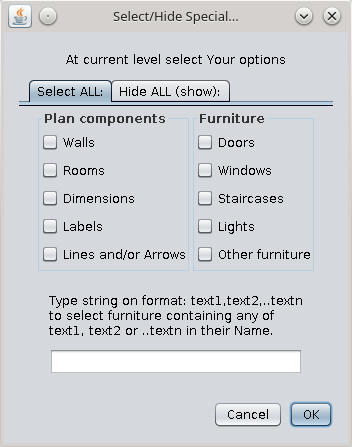
Image
To remember how should look:
Image Image

As usual have a kind of translation in french.
Also on Source Forge
A computer program does what you tell it to do, not what you want it to do. Murphy's Law
When all else fails, read the instructions. Murphy's Law
If you don't like "AS IS", DIY. Dorin's law
Post Reply New Topic

Who is online

Users browsing this forum: No registered users and 1 guest