deselect...
This topic has been viewed 4989 times and has 7 replies
deselect...
Is there a way of deselecting an object, without selecting another, other than scrolling to the edge of a plan to find an empty space to click it?

Re: deselect...
You can click on the object or use a selection rectangle with shift key. You may also choose the object you want to deselect listed in the Toggle selection menu where you right click while pressing shift key.
See also Sweet Home 3D shortcuts.
See also Sweet Home 3D shortcuts.
Emmanuel Puybaret, Sweet Home 3D creator
Re: deselect...
These seems to be ways to select an item, if i have an item selected how do i deselect it?
Re: deselect...
what is a "selection rectangle", what is the "toggle selection" menu?
Re: deselect...
This is a very basic selection option available in almost all programs! Press the mouse in a place where there's no selectable item, drag the mouse while keeping the mouse button pressed, and release the mouse button elsewhere: all the plan items that intersect the rectangle with opposite corners matching the place where you pressed the mouse button and the place where you released it, will be selected.what is a "selection rectangle"?
Pressing the Shift key during this selection operation will toggle the selection state of the items in the rectangle.
It's the name of the menu that will be displayed if you press Shift and right click on an object. Try it!what is the "toggle selection" menu?
Emmanuel Puybaret, Sweet Home 3D creator
Re: deselect...
Thank you mate, used these many times, never realised they had names, learn something new everyday, if this carries on i will have lots more to forget [:(]
Still does not answer how to deselect an item without selecting something else.
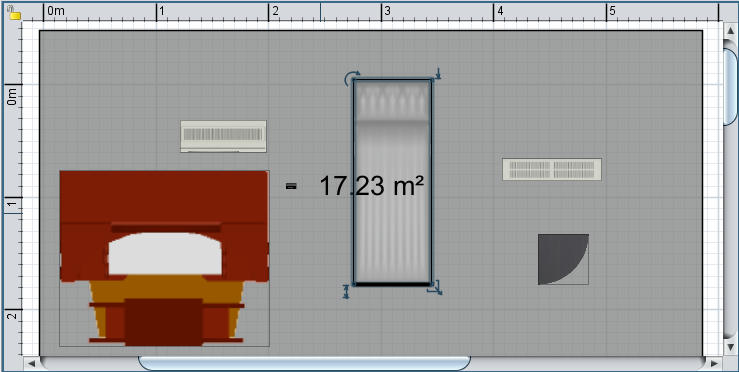
so, how do i deselect this item without selecting another or scrolling away from the room to a blank area to click in, this example is a small area, but it could be hundreds of meters of scrolling.
Mike
Still does not answer how to deselect an item without selecting something else.
so, how do i deselect this item without selecting another or scrolling away from the room to a blank area to click in, this example is a small area, but it could be hundreds of meters of scrolling.
Mike
Re: deselect...
Did you try to Shift + right click on the selected item?
Emmanuel Puybaret, Sweet Home 3D creator
Re: deselect...
your the man! though kinda long winded, could the mouse centre button be utilised?
Who is online
Users browsing this forum: No registered users and 1 guest