sad High priority Unable to start Sweet Home 3D v6.2 in Ubuntu 18.04

This topic has been viewed 7743 times and has 4 replies
Thread status: Active
Questions about Sweet Home 3D installation [img]http://www.sweethome3d.com/images/flags/en_small.gif[/img]
Post Reply New Topic
atinesh
Posts: 5
Joined: Fri Aug 31, 2018 12:25 pm
Country: India

Unable to start Sweet Home 3D v6.2 in Ubuntu 18.04

Post by atinesh »

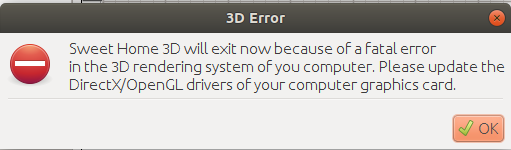
I am trying to start SweetHome3D-6.2 in Ubuntu 18.04 LTS, but I am getting this error message

Image

My system has NVIDIA GTX 1050ti GPU with NVIDIA Driver Version: 390.116.
User avatar
UbuntuBirdy
Posts: 421
Joined: Thu Aug 31, 2017 10:31 pm
Country: Switzerland
Contact:

Re: Unable to start Sweet Home 3D v6.2 in Ubuntu 18.04

Post by UbuntuBirdy »

Your driver is not the latest, but not sure if this is the problem. You can try to install the 390.129 driver following this guide.
!!! AT YOUR OWN RISK !!! And without warranty!
Pascal

SH3D 6.6 / Ubuntu 22.04 (Mainline-Kernel) / Radeon RX580 / Ryzen 7 5800x
atinesh
Posts: 5
Joined: Fri Aug 31, 2018 12:25 pm
Country: India

Re: Unable to start Sweet Home 3D v6.2 in Ubuntu 18.04

Post by atinesh »

Your driver is not the latest, but not sure if this is the problem. You can try to install the 390.129 driver following this guide.
!!! AT YOUR OWN RISK !!! And without warranty!
Hello UbuntuBirdy, I have updated drivers as you instructed

Image

But problem still persists, same error is coming.
atinesh
Posts: 5
Joined: Fri Aug 31, 2018 12:25 pm
Country: India

Re: Unable to start Sweet Home 3D v6.2 in Ubuntu 18.04

Post by atinesh »

I tried even older version SweetHome3D-5.5.2 but still same error persists
User avatar
dorin
Posts: 824
Joined: Thu Apr 24, 2014 9:14 am
Country: Vatra Dornei, Suceava, Romania

Re: Unable to start Sweet Home 3D v6.2 in Ubuntu 18.04

Post by dorin »

From me it look more a java problem.
1. IF You try to use the repository version==> FORGET IT!
-java provided by distributions are modified and almost incompatible with SH3D.
2. Download it from this site, follow the instructions and try again.
- If the problem persist, launch it from terminal and post the output.
A computer program does what you tell it to do, not what you want it to do. Murphy's Law
When all else fails, read the instructions. Murphy's Law
If you don't like "AS IS", DIY. Dorin's law
Post Reply New Topic

Who is online

Users browsing this forum: No registered users and 2 guests

