Hallo zusammen,
ich brauche Hilfe bei folgendem Problem:
Ich habe inzwischen schon einen recht umfangreichen Plan in Sweet Home 3D erstellt,mit sicherlich bald 100 Fenstern. Das Problem ist,dass ich einfach immer den Typ "Fenster" aus der Mobiliarliste hinzugefügt habe. Dieser stellt auch immer die Fensteröffnung mit dar, was den Plan extrem unübersichlich macht. Ich würde jetzt gerne für einen übersichtlicheren 2D-Plan alle Fenster durch "Durchreichen" ersetzen, aber ohne Position und Größe jedesmal neu anzupassen. Kennt jemand eine Lösung hierfür?
schonmal Danke im vorraus!
Alle/Mehrere Fenster auf einmal ersetzen
This topic has been viewed 5323 times and has 2 replies
-
jambaleiajambo
- Posts: 2
- Joined: Mon Sep 30, 2019 10:56 am
Re: Alle/Mehrere Fenster auf einmal ersetzen
Copy your project, open in winrar, extract Home.xml. Open Home.xml in text editor, find all lines with word "sash" and delete them, save and add to your project.
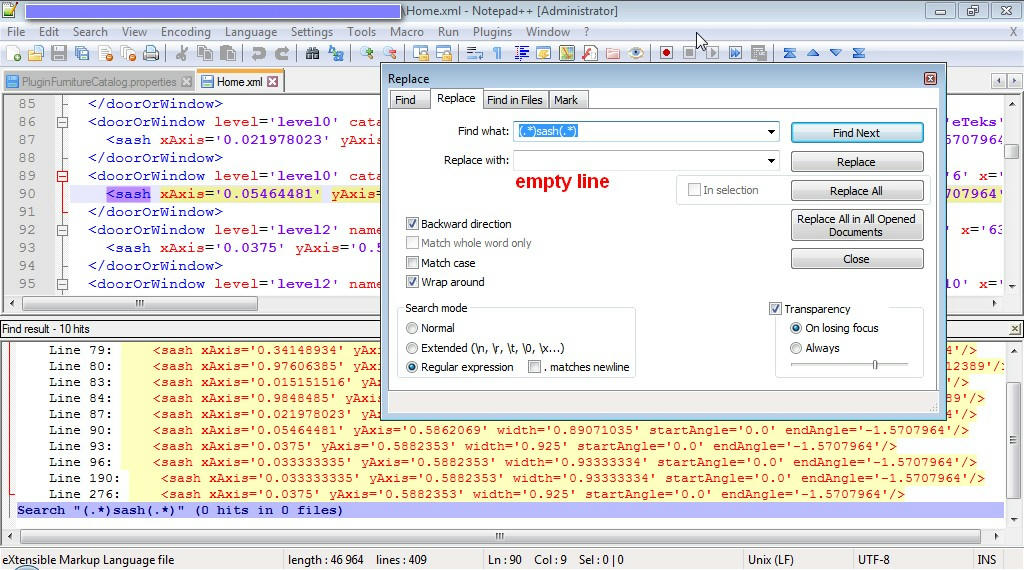
Before and after
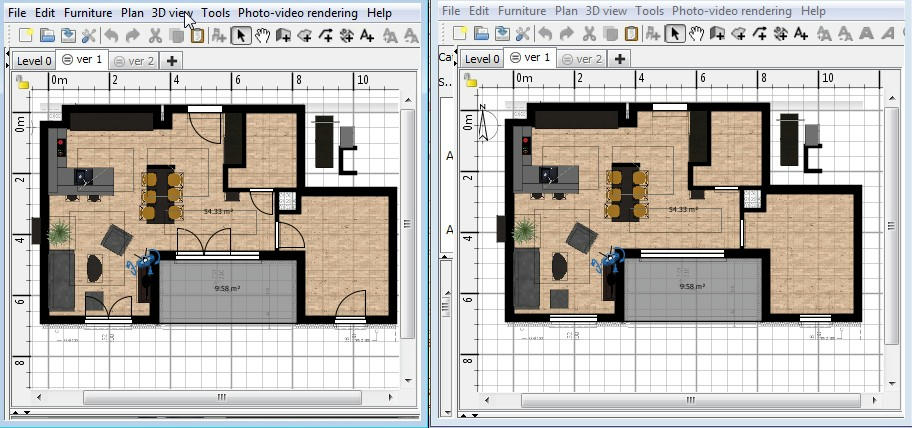
Before and after
-
jambaleiajambo
- Posts: 2
- Joined: Mon Sep 30, 2019 10:56 am
Re: Alle/Mehrere Fenster auf einmal ersetzen
Thank you! that worked!
I Also found one thing to improve:
instead of deleting the hole line with "sash" I just changed the endAngle from "-1,5707964" to "-0,01" for all Windows.
I did that with the search and replace command of the editor. Now I can open/close Doors with "replace" in seconds, because all Doors still have -1,5707964 in and all windows -0,01.
Thank you for your help!
I Also found one thing to improve:
instead of deleting the hole line with "sash" I just changed the endAngle from "-1,5707964" to "-0,01" for all Windows.
I did that with the search and replace command of the editor. Now I can open/close Doors with "replace" in seconds, because all Doors still have -1,5707964 in and all windows -0,01.
Thank you for your help!
Who is online
Users browsing this forum: No registered users and 1 guest