
Another YAUP (Yet Another Useless Plugin).
Version 1.0
-it's intend to replace RoomsSurface plugin;
-I've add two new column: perimeter and walls surface;
-for area and perimeter could be trusted;
-the walls surface is not totally really reliable; for very common home could be used but for other kind of homes used with care;
-at the moment I limit to compute only straight walls (including sloping), not curved walls.
-TO DO in the future: to subtract the opening; I've try already but I receive strange numbers. Maybe someone could help us.
That'is!
Also on Souce Forge
Rooms Information plug-in
This topic has been viewed 24034 times and has 15 replies
Rooms Information plug-in
A computer program does what you tell it to do, not what you want it to do. Murphy's Law
When all else fails, read the instructions. Murphy's Law
If you don't like "AS IS", DIY. Dorin's law
When all else fails, read the instructions. Murphy's Law
If you don't like "AS IS", DIY. Dorin's law
Re: Rooms Information plug-in
New version 1.1
-add calculation for round walls including sloping (thanks to hansmex )
-add support for imperial measurement
-few code modification
Possible errors:
-when You modify walls after room creation even in plan don't appear so
TO DO:
-subtract holes surfaces BUT
there are many situations when will give wrong results
e.g. superimposing doors over frame door or service hatch
-I could add a new column with this calculation or modify the current one or forget
PS: make some test file to verify the accuracy;
If You discover something wrong let me know.
Also on Source Forge
-add calculation for round walls including sloping (thanks to hansmex )
-add support for imperial measurement
-few code modification
Possible errors:
-when You modify walls after room creation even in plan don't appear so
TO DO:
-subtract holes surfaces BUT
there are many situations when will give wrong results
e.g. superimposing doors over frame door or service hatch
-I could add a new column with this calculation or modify the current one or forget
PS: make some test file to verify the accuracy;
If You discover something wrong let me know.
Also on Source Forge
A computer program does what you tell it to do, not what you want it to do. Murphy's Law
When all else fails, read the instructions. Murphy's Law
If you don't like "AS IS", DIY. Dorin's law
When all else fails, read the instructions. Murphy's Law
If you don't like "AS IS", DIY. Dorin's law
Re: Rooms Information plug-in
New version 1.2
It look like that:
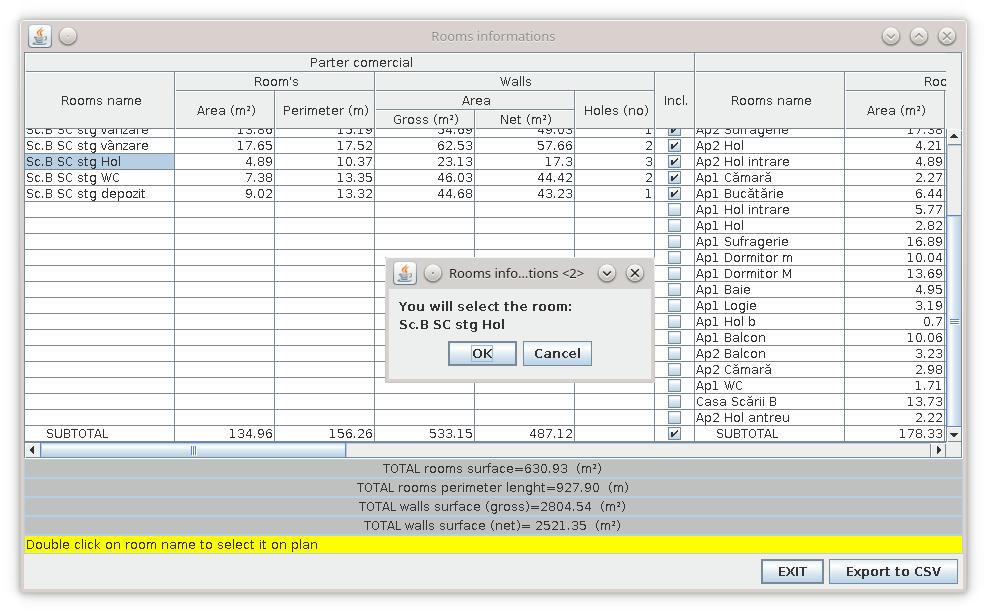
Hope You could see the news.
Advise: Don't trust it! Verify.
BUGS:
In some cases the number of holes and walls area are not correct.
It depend of how accurate and the logic of home building.
Also on SF
It look like that:
Hope You could see the news.
Advise: Don't trust it! Verify.
BUGS:
In some cases the number of holes and walls area are not correct.
It depend of how accurate and the logic of home building.
Also on SF
A computer program does what you tell it to do, not what you want it to do. Murphy's Law
When all else fails, read the instructions. Murphy's Law
If you don't like "AS IS", DIY. Dorin's law
When all else fails, read the instructions. Murphy's Law
If you don't like "AS IS", DIY. Dorin's law

Re: Rooms Information plug-in
Very useful plug-ins,but My language is Chinese 中文-中国New version 1.2
It look like that:
Hope You could see the news.
Advise: Don't trust it! Verify.
BUGS:
In some cases the number of holes and walls area are not correct.
It depend of how accurate and the logic of home building.
Also on SF
In Chinese Mainland,The unit is the meter(m2) Not inches(ft2)
Re: Rooms Information plug-in
@YGYL
1. For other language than English or French you have to:
1.1 Extract sh3p file in a folder (in fact is a jar file);
1.2 Go to /RoomsInfo/roomsinformations/ApplicationPlugin.properties;
1.3 Copy and save as ApplicationPlugin_zh_CN.properties
1.4 Make translation and converting them to ASCII encoding;
1.5 Pack back as jar and than change the extension in sh3p.
For more information about translations read this page .
2. In my country is also used the metric system.
I've test again the plugin and if I change the unit in general preferences it change also in plugin.
So, please try again to set unit to meter, centimeter or millimeter.
1. For other language than English or French you have to:
1.1 Extract sh3p file in a folder (in fact is a jar file);
1.2 Go to /RoomsInfo/roomsinformations/ApplicationPlugin.properties;
1.3 Copy and save as ApplicationPlugin_zh_CN.properties
1.4 Make translation and converting them to ASCII encoding;
1.5 Pack back as jar and than change the extension in sh3p.
For more information about translations read this page .
2. In my country is also used the metric system.
I've test again the plugin and if I change the unit in general preferences it change also in plugin.
So, please try again to set unit to meter, centimeter or millimeter.
A computer program does what you tell it to do, not what you want it to do. Murphy's Law
When all else fails, read the instructions. Murphy's Law
If you don't like "AS IS", DIY. Dorin's law
When all else fails, read the instructions. Murphy's Law
If you don't like "AS IS", DIY. Dorin's law
Re: Rooms Information plug-in
I just tried, but it didn't work. Just came to tell you@YGYL
2. In my country is also used the metric system.
I've test again the plugin and if I change the unit in general preferences it change also in plugin.
So, please try again to set unit to meter, centimeter or millimeter.
It is displayed in meters only when the language is switched
Re: Rooms Information plug-in
@YGYL
I've verify it and You've right!
I've test with ~15 languages and appear this happen only with CN.
One possible solution is to use TW when You need this plugin.
I've see some differences between this files (LengthUnit_zh_CN.properties and LengthUnit_zh_TW.properties) and after some minor modifications appear to work.
Anyway I suspect an translation error on SH3D rather than a plugin error.
I've verify it and You've right!
I've test with ~15 languages and appear this happen only with CN.
One possible solution is to use TW when You need this plugin.
I've see some differences between this files (LengthUnit_zh_CN.properties and LengthUnit_zh_TW.properties) and after some minor modifications appear to work.
Anyway I suspect an translation error on SH3D rather than a plugin error.
A computer program does what you tell it to do, not what you want it to do. Murphy's Law
When all else fails, read the instructions. Murphy's Law
If you don't like "AS IS", DIY. Dorin's law
When all else fails, read the instructions. Murphy's Law
If you don't like "AS IS", DIY. Dorin's law
Re: Rooms Information plug-in
I found the real cause of the problem
SweetHome3D.jar
In SweetHome3D.jar inside com\eteks\sweethome3d\model\LengthUnit_zh_CN.properties
Inside should be changed to
centimerUnit=\u5398\u7c73
The original has a few extra letters in front of it
SweetHome3D.jar
In SweetHome3D.jar inside com\eteks\sweethome3d\model\LengthUnit_zh_CN.properties
Inside should be changed to
centimerUnit=\u5398\u7c73
The original has a few extra letters in front of it
Re: Rooms Information plug-in
New version 1.2.1
Bug fix on units display in some languages.
Many thanks to Emmanuel who point me in the right direction.
In fact he make the hard work.
Also on SurceForge .
Bug fix on units display in some languages.
Many thanks to Emmanuel who point me in the right direction.
In fact he make the hard work.
Also on SurceForge .
A computer program does what you tell it to do, not what you want it to do. Murphy's Law
When all else fails, read the instructions. Murphy's Law
If you don't like "AS IS", DIY. Dorin's law
When all else fails, read the instructions. Murphy's Law
If you don't like "AS IS", DIY. Dorin's law

Re: Rooms Information plug-in
You're welcome. I'm happy this wasn't a bug in Sweet Home 3D [;)]
Emmanuel Puybaret, Sweet Home 3D creator
Who is online
Users browsing this forum: No registered users and 1 guest