|
Sweet Home 3D Forum » List all forums » » Forum: New versions » » » Thread: Sweet Home 3D 4.0 |
||
| Print at Dec 16, 2025, 2:26:56 PM |
|
|
| Posted by hansmex at Feb 3, 2013, 8:49:33 PM |
|
Re: Sweet Home 3D 4.0 Emmanuel, Good news, it all works just fine. I had to do an update, maybe that's why it temporarily blocked SH3D. However, I noticed another problem in version 3.7, as well as in the 4.0 betas. When I draw a room with sloping walls, the roof stays horizontal and won't follow the walls. I enclose an example, hoping that you can reproduce this bug. Hans http://www.mediafire.com/?ezy2rkqwvr4wxh8 ---------------------------------------- Hans new website - under constuction hansdirkse.info |
| Posted by Puybaret at Feb 3, 2013, 9:41:53 PM |
|
Re: Sweet Home 3D 4.0 Great that it works again ![]() As indicated in the help page about room modification (see 4th bullet), a ceiling follows sloping walls only at the last level. Remove level 4 in your file, and you'll see the ceiling you expect. But as you know, sloping ceilings are not correctly computed as soon as the room shape becomes a little complex, so I would recommend to use other objects for the roof in that case, and hide the ceiling. ---------------------------------------- Emmanuel Puybaret, Sweet Home 3D creator |
| Posted by Puybaret at Feb 5, 2013, 7:02:53 PM |
|
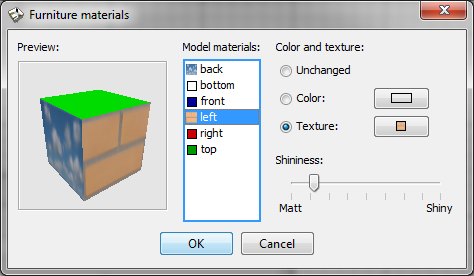
Re: Sweet Home 3D 4.0 Tonight, the Beta 13 brings the following improvements: - I added a preview of the currently modified 3D model in the new materials editing pane, so you can faster guess the result of a material change: - As the previous capture shows too, I added texture coordinates to the Box and Cylinder models of the default catalog, and I set a different material for each of their face, so you can edit the color or texture of each face individually. Note that the behavior of these shapes doesn't change from previous version when you change their color or texture globally (i.e. not with materials pane). - I fixed a bug that could save files impossible to reopen. Version 4.0 final is getting very close. ![]() ---------------------------------------- Emmanuel Puybaret, Sweet Home 3D creator |
| Posted by hansmex at Feb 7, 2013, 2:26:41 PM |
|
Re: Sweet Home 3D 4.0 Emmanuel, Having played a bit with the new feature in beta 13, I can say that I am VERY happy with it. This is a very useful trick. Of course there is room for improvement. I noticed that when you wrap a texture around a cylinder, it's used only once vertically and horizontally, regardless of the size of the cylinder, and regardless of the size (in cms) of the texture. Ideally the program takes into account the size of the cylinder, then calculates how many times the texture should be used horizontally and vertically. More good news: Transparency (I used a gif) works fine, so you can now make hollow pipes. Definition of separate surfaces is kept after exporting and importing a model. I would be delighted if there was a larger set of basic shapes that has their sides defined, such as triangle, cone, arch, etc. Thanks!! Hans ---------------------------------------- Hans new website - under constuction hansdirkse.info |
| Posted by Puybaret at Feb 8, 2013, 9:21:37 AM |
|
Re: Sweet Home 3D 4.0 Hans, thanks for you tests. Actually, my main motivation to add this preview was to show to users the result of their change without explaining that it depends on whether texture coordinates are set or not on the 3D model. I fear it's to complicate to explain the notion of texture coordinates in that kind of program, and even for people who would be ready to learn it from long explanations, it would be difficult to indicate with a text what a texture change could give without showing it. Some 3D models have some texture coordinates, some don't, and I don't want unaware people to care too much about it when they import a 3D model. Still, the rule isn't so complicate: if a face of the 3D model has some texture coordinates set and the material of that face is a texture, then the size of texture is ignored and the texture is wrapped on the face using these texture coordinates. For faces without texture coordinates, a texture material change will use the same behavior as in the global texture change of the furniture modification dialog, i.e. it might give unpleasant results on faces placed on the side of the object. In the case of the new cylinder in Sweet Home 3D catalog, the texture coordinates added to the cylinder side make the texture image being shown entirely around the cylinder. If I had to take into account the size of the texture, it would require to introduce some kind of new exception (a little like I did for mirrors) and I don't want to introduce exceptions when there is a workaround or a rule to understand with a little patience. ---------------------------------------- Emmanuel Puybaret, Sweet Home 3D creator |
| Posted by mrszekely at Feb 9, 2013, 1:37:54 PM |
|
Re: Sweet Home 3D 4.0 Now, I tested the new "create photos at points of view". It works perfectly, this function was my dream, because i spent a lot of time to wait for the end of the render process (because i made full HD or 2*HD images),move the camera,wait again.So now i'm really exciting when the new version come out! Excellent work,great job!Thank you! ---------------------------------------- Intel Core i7-2630QM 2.00GHz-8GB RAM-nVidia Geforce GT555M with CUDA-Windows 7 64bit |
| Posted by mrszekely at Feb 10, 2013, 10:55:11 AM |
|
Re: Sweet Home 3D 4.0 One more thing...when i made a lot of points of view is there any option for delete the old ones?Is that possible? ---------------------------------------- Intel Core i7-2630QM 2.00GHz-8GB RAM-nVidia Geforce GT555M with CUDA-Windows 7 64bit |
| Posted by Puybaret at Feb 10, 2013, 12:18:41 PM |
|
Re: Sweet Home 3D 4.0 Thanks Márton for your feedback. It's not possible to delete points of view at this time. I could easily add a menu item to remove all of them, but removing them individually would be more complicate. I'll see if I can do something in the next version though. ---------------------------------------- Emmanuel Puybaret, Sweet Home 3D creator |
| Posted by robal at Feb 10, 2013, 11:14:11 PM |
|
Re: Sweet Home 3D 4.0 One more thing...when i made a lot of points of view is there any option for delete the old ones?Is that possible? An option to do that would be nice indeed. As a workaround, you can set any POV's name to the same name as one of the other POV's. It will overwrite the old one. |
| Posted by mrszekely at Feb 11, 2013, 9:32:58 AM |
|
Re: Sweet Home 3D 4.0 Thanks for your feedback guys! ---------------------------------------- Intel Core i7-2630QM 2.00GHz-8GB RAM-nVidia Geforce GT555M with CUDA-Windows 7 64bit |
|
|
|
Current timezone is GMT Dec 16, 2025, 2:26:56 PM |