|
Sweet Home 3D Forum » List all forums » » Forum: New versions » » » Thread: Sweet Home 3D 4.0 |
||
| Print at Dec 16, 2025, 2:27:23 PM |
|
|
| Posted by Puybaret at Feb 17, 2013, 1:58:48 PM |
|
Re: Sweet Home 3D 4.0 It's fixed. updatesMinimumDate is now set to the latest date among available updates. Programmed that way, users can't miss any update even if they change their clock meanwhile (except if they don't have access to updates XML file of course). Thanks for pointing out this issue. ---------------------------------------- Emmanuel Puybaret, Sweet Home 3D creator |
| Posted by Gaytan at Feb 17, 2013, 4:43:34 PM |
Re: Sweet Home 3D 4.0Emmanuel, Thanks again for all the work you're putting in this very program! I still love it!!! Working with it's Linux version (Linux Mint based on Ubuntu) as well! One thing I still miss very much though, is: once you open up the properties of eg a wall, floor, etc, you DO see little thumbnails of the texture(s) used for that wall, floor, etc, but what I miss is the name of that very texture! Should not be too difficult to add that I think, no? This because I'm working on a very big project lately and don't recall all the (names of) texture(s) I used for different walls, floors etc... Would be very nice if you could add that option! Especially as I'm working with different versions of your software at the same time; like that it's easier to check if the texture was added to the library or not; with just a thumbnail it's mostly a shot in the dark to get hold of the same file/texture again. Let me know if you understand what I mean ok? Thanks! Kind regards, Ed Pays-Bas |
| Posted by Puybaret at Feb 17, 2013, 5:36:24 PM |
|
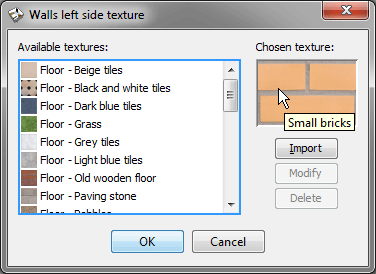
Re: Sweet Home 3D 4.0 What about a tool tip displayed when the cursor is over the preview of the chosen texture? ![]() This is the simplest solution for me. ---------------------------------------- Emmanuel Puybaret, Sweet Home 3D creator |
| Posted by Gaytan at Feb 17, 2013, 5:52:15 PM |
|
Re: Sweet Home 3D 4.0 Yes, that would represent the very same thing! Would be nice! Would that work in all the coming versions again? Windows, Linux, Java webstart etc etc? That missing option has given me soo many headaches until now! Kind regards, Ed |
| Posted by Gaytan at Feb 17, 2013, 5:55:18 PM |
|
Re: Sweet Home 3D 4.0 What I do miss with this 'small flag' is the category the item belongs to! I've many textures in Floor, Wall, etc.. Small bricks could be used either in floors as well as in walls... Could you make it: 'Walls: small bricks'? or 'Walls, small bricks'? Like that it's clear in which (sub)category in the list one has to search for 'Small bricks'... |
| Posted by Gaytan at Feb 17, 2013, 5:59:37 PM |
|
Re: Sweet Home 3D 4.0 Or...when you click 'Modify' that you get to see the full path like: 'Wall - small bricks'. Until now when you click Modify you don't get the selection bar on the 'last selection' either: like 'Wall - small bricks' with the selection bar on that very line.... so to speak... |
| Posted by Gaytan at Feb 17, 2013, 6:07:52 PM |
|
Re: Sweet Home 3D 4.0 In the extention of this very same subject: I today installed the latest Linux version (beta 4) of your program and opened a property screen of a wall. That wall has gotten texture in an earlier version of your program; as that texture has not yet been added to the textures list in this beta, is it possible that all used material like this texture example, is automatically added in the list? That would be awesome really! Now I first have to add all textures etc again to the new version before I can use them again in my project! In my big project this means a lot of work before I am where I were before! I'm curious to see if that would be possible! |
| Posted by Gaytan at Feb 17, 2013, 6:26:47 PM |
|
Re: Sweet Home 3D 4.0 Emmanuel, Something else; in this beta 4.0, 14; when I look at the right / top part of the screen with all the elements to work on; the whole workfield is 'grey-ish' like it's selected or something. Before, in other (non-beta) versions that 'working field' uses to be normal white.. Now it's about the same color as the rooms that have gotten floors, so to speak... Also 'outside the house' in the garden, so to speak.... My Linux version: Linux Mint 14 Nadia, with graphics NVIDIA Corporation C79 [GeForce 9400M G] (rev b1) (Gallium 0.4 driver) Rgrds, Ed |
| Posted by Gaytan at Feb 17, 2013, 6:29:26 PM |
|
Re: Sweet Home 3D 4.0 On top of that I cannot select any objects! I can 'select and move' them but not select and manipulate with 'turning option' etc in yellow; they don't appear at all.. For no object that is. I'll quickly make a new test project to see if the behaviour is the same... If it is different you'll hear asap. Ed |
| Posted by Gaytan at Feb 17, 2013, 6:36:57 PM |
|
Re: Sweet Home 3D 4.0 Emmanuel, Ok, made new house / project. Cannot drag anything from the furniture list on the left, to my (also completely grey) working field on the right. Only thing working is 'right mousebutton' 'Add to home'; then when it's in the working field, I can drag it to it's place alright... selecting: I see it now works differently? It does select but does not show anything on the corners; only when I hover with my mouse over the corners... Then it seems to work alright... So: 1) completely grey working field, 2) cannot drag from list (left) to working field (right). Rgrds, Ed |
|
|
|
Current timezone is GMT Dec 16, 2025, 2:27:23 PM |