|
Sweet Home 3D Forum » List all forums » » Forum: 3D problems » » » Thread: massive color-difference |
||
| Print at Dec 19, 2025, 7:56:30 AM |
|
|
| Posted by hal9000 at Oct 21, 2018, 6:08:13 PM |
|
Re: massive color-difference Easy and simple idea - and it totally works!!! For me this is a workaround and I can live with this as a solution, but I'm still wondering what's the issue with the colour... Glad to know. I'm wondering it too. May be Emmanuel can explain it, although I'm not sure whether it's a SH3D or SunFlow issue. ---------------------------------------- If a long walk every day were healthy, mailmen would be immortal. ![]() |
| Posted by Puybaret at Oct 21, 2018, 6:23:19 PM |
|
Re: massive color-difference Nobody complained until now but it's clearly an issue that should be fixed if possible, particularly if the rendering is different with a similar texture. Please, open a bug ticket. ---------------------------------------- Emmanuel Puybaret, Sweet Home 3D creator |
| Posted by UbuntuBirdy at Oct 21, 2018, 6:40:06 PM |
|
Re: massive color-difference Please, open a bug ticket. ...done. ---------------------------------------- Pascal SH3D 6.6 / Ubuntu 22.04 (Mainline-Kernel) / Radeon RX580 / Ryzen 7 5800x |
| Posted by Puybaret at Oct 21, 2018, 10:06:58 PM |
|
Re: massive color-difference Thanks. I will investigate... ---------------------------------------- Emmanuel Puybaret, Sweet Home 3D creator |
| Posted by Ceciliabr at Oct 26, 2018, 5:48:16 PM |
|
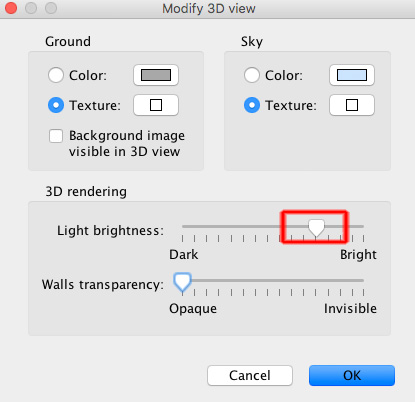
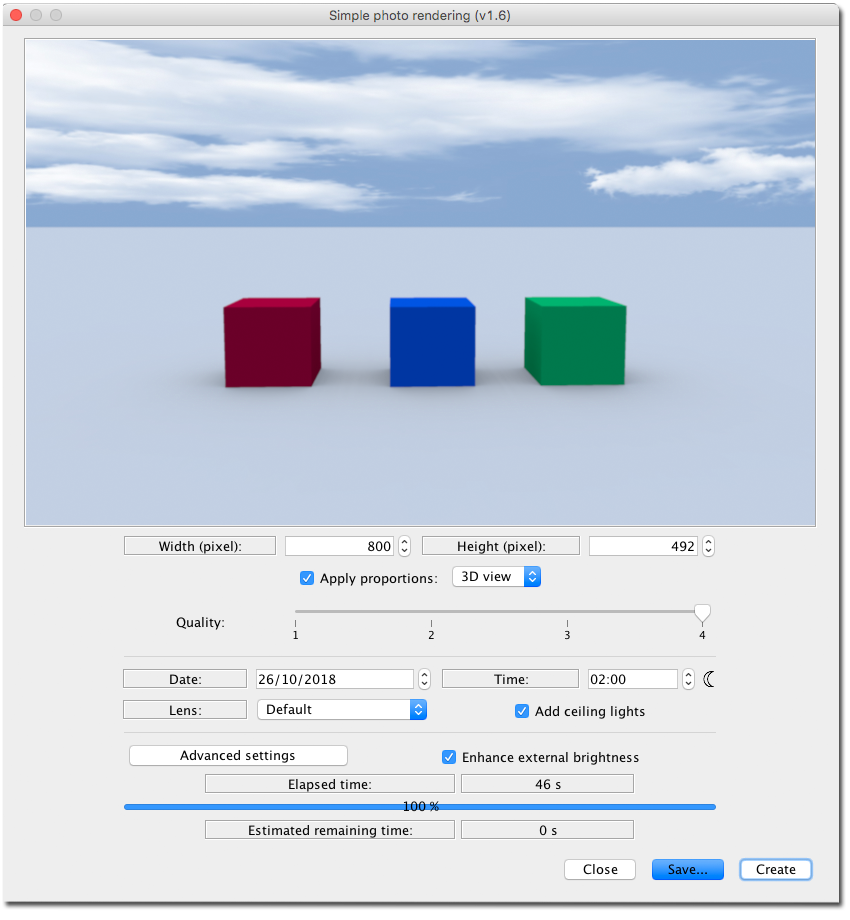
Re: massive color-difference but I'm still wondering what's the issue with the colour... There's really no issue:The reflected colours change as the light changes – just as in real life. ![]() To best manage colours, the first thing you should do is to calibrate the brightness of your 3d view, if you haven't done that already: Apply a completely white texture to the sky. Render different coloured objects with enhance external brightness checked, and no sunlight. ![]() Adjust the brightness of the 3D view until the brightness is as close to the rendered image as possible. _______ I find that applying a white top to a partly clouded sky image, is a good way to get nice daylight colours when using the enhanced brightness option. ![]() cec |
| Posted by UbuntuBirdy at Oct 26, 2018, 7:35:29 PM |
|
Re: massive color-difference Sorry cec, but this IS an issue! Such massive differences are NOT like in real life. Of course I have tried to adjust all the params, but none of them has improved the condition. And why are texture colours not the same as only colours? ---------------------------------------- Pascal SH3D 6.6 / Ubuntu 22.04 (Mainline-Kernel) / Radeon RX580 / Ryzen 7 5800x |
| Posted by UbuntuBirdy at Oct 26, 2018, 8:42:33 PM |
|
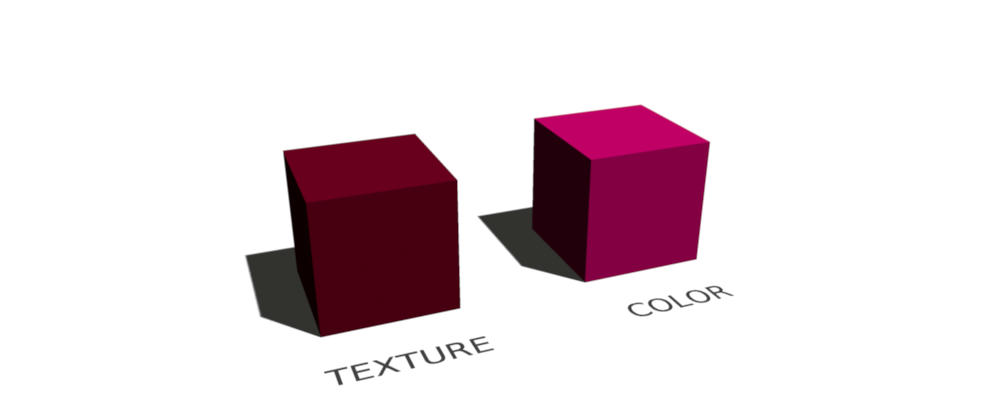
Re: massive color-difference This picture shows what's wrong in my opinion: - The left cube has a texture which is only colored as #520015 - The right cube has the color #520015 directly In my opinion both cubes should look the same, we should see exactly the same color. But only the textured cube shows the color #520015 as it should be. ---------------------------------------- Pascal SH3D 6.6 / Ubuntu 22.04 (Mainline-Kernel) / Radeon RX580 / Ryzen 7 5800x |
| Posted by Ceciliabr at Oct 26, 2018, 10:02:27 PM |
|
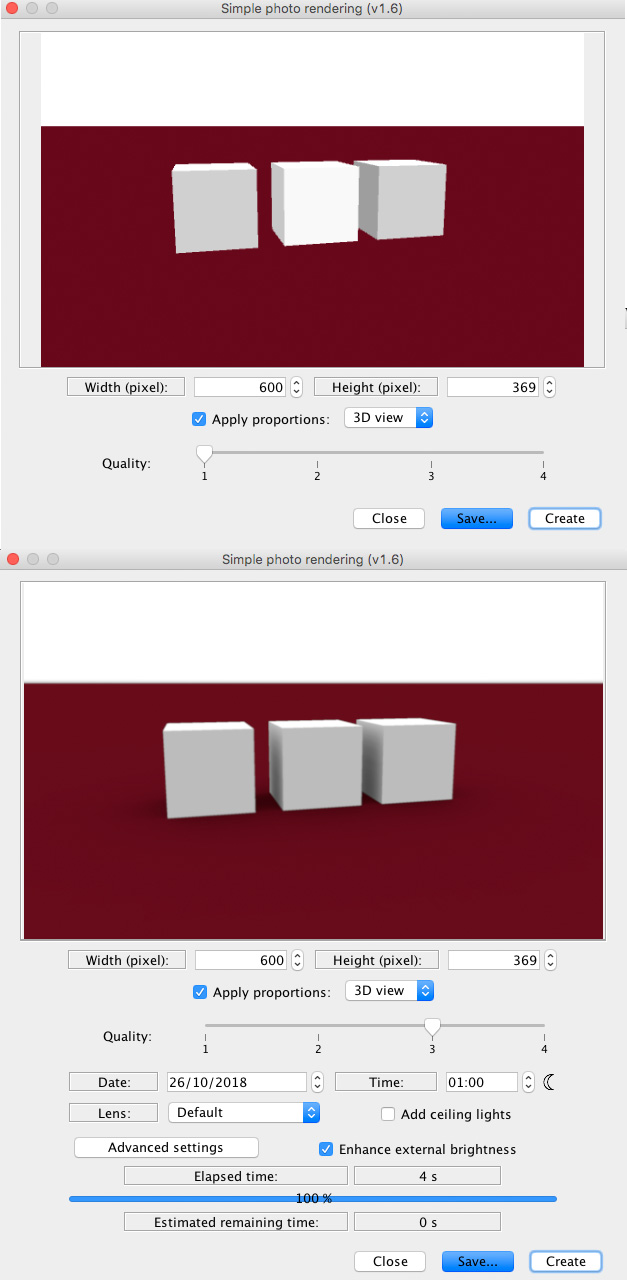
Re: massive color-difference You are absolutely right! I totally misunderstood the problem. Here is a test with white, showing the opposite effect between the preview and the rendered image. ![]() cec |
| Posted by UbuntuBirdy at Oct 26, 2018, 10:33:11 PM |
|
Re: massive color-difference I think it makes sense to post the link to the bug ticket. This way anyone can add further informations regarding the problem. ---------------------------------------- Pascal SH3D 6.6 / Ubuntu 22.04 (Mainline-Kernel) / Radeon RX580 / Ryzen 7 5800x |
| Posted by Superpippo at Nov 16, 2018, 3:12:34 PM |
|
Re: massive color-difference Problema simile ... Cielo costantemente rosso anche se cambio colori o Texture se faccio foto in modalità 3 o 4 ... parzialmente risolto : 1) mettere in modalità visita virtuale 2) alzare la testa dell'omino e inquadrare solo il cielo 3) fare una foto in modalità 3 o 4 e vedere se il colore si è resettato e il cielo è tornato blu 4) abbassare gradualmente la testa continuando a verificare che tutto sia tornato a posto 5) vedere con l'inquadratura giusta gli sfondi sono tornati normali 6) fare la stessa verica con l'inquadratura 3d aerea 7) cambiare i punti cardinali o inserire una luce bianca se alcune Texture danno sul giallo |
|
|
|
Current timezone is GMT Dec 19, 2025, 7:56:30 AM |