France
Joined: Nov 7, 2005
Post Count: 9440
Status:
Offline
Re: Wirings plugin
Mirakels, the problem with polylines is that they are flat, so you may not be able to see them from the side in the 3D view. It’s the reason why I prefer to keep them at the floor elevation of the level they are added to, even if the visibility problem remains when you don’t draw a floor room under a polyline.
----------------------------------------
Emmanuel Puybaret, Sweet Home 3D creator
Joined: Jul 6, 2015
Post Count: 40
Status:
Offline
Re: Wirings plugin
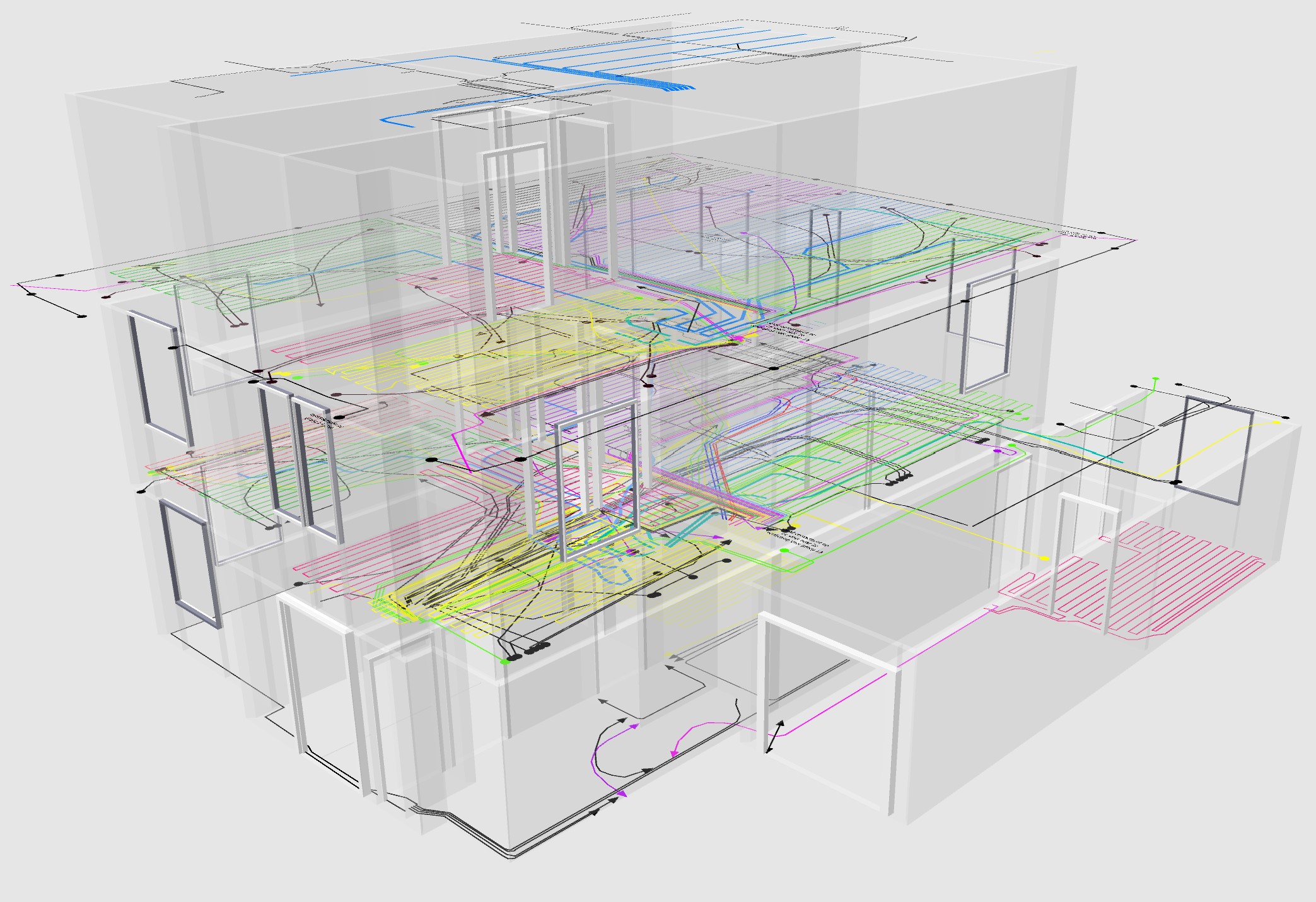
Hi Puybaret, They may be flat bit the they have a with, and are visible in 3D. See this wiring picture that is build of polylines only (build could look much better with elevated lines...;)
(and maybe a future version might add thickness to a polyline(Segment)... )
Netherlands
Joined: Apr 8, 2022
Post Count: 1807
Status:
Offline
Re: Wirings plugin
Looks good to me and I don't understand why elevated lines would improve this. But that is probably because I don't know what you want to achieve.
There is a way to elevate polylines but maybe it's a bit cumbersome if you need many different elevations: use elevated levels for those polylines you want elevated.
---------------------------------------- Dodecagon.nl 1300+ 3D models, manuals, and projects
Joined: Jul 6, 2015
Post Count: 40
Status:
Offline
Re: Wirings plugin
Looks good to me and I don't understand why elevated lines would improve this. But that is probably because I don't know what you want to achieve.
There is a way to elevate polylines but maybe it's a bit cumbersome if you need many different elevations: use elevated levels for those polylines you want elevated.
Yes I'm using levels (around 40 or so...) to cretae different polylines for different purposes and house levels. But all lines are at exatly the same height within that level.
On level for instance holds the electricity wires/tubes running in a floor. Now I let the line end with an arrow top to indicate that the tube actually goes up from that point to for instance a wall socket. But I want to add the wall socket into the picture. The only way to do that is to add a cylinder shape to connect the polyline to the socket, but they are not glued together so when changing the polyline the tube to the socket becomes disconnected from the polyline. Also many tubes run down the wall from the ceiling in a curved way. Polylines cannot do that (as there is no z-coordinate). The wirings plugin can do that but I somehow feel drawing in 3D is not always easy, and combining polylines with wirings-plugin lines is not really possible I think (i.e. glueing them together)
So I think integrating polylines with wirings-plugin would be the best of all worlds ;)
Italy
Joined: Nov 17, 2021
Post Count: 503
Status:
Offline
Re: Wirings plugin
Have you tried the automatic wiring tool? It let you link sockets with a single click, then you can optionally add more points to the cable to make more complex paths: https://youtu.be/Z_XFq4QaD8E
----------------------------------------
[Edit 1 times,
last edit by Daniels118 at Apr 3, 2024, 7:28:11 AM]
Israel
Joined: May 7, 2024
Post Count: 1
Status:
Offline
Re: Wirings plugin
Hi guys. I saw the demo video. I've been using SH3D for ages, but I'm new to the wiring plugin. I've installed it + the pan vew 3d one, but I can't find how to start working with them. I couldn't find a Switch to add from the menu of objects. When I select Tools>Wiring toolbox I get an empty list, and just OK/Cancel. Is there something I'm missing? (I'm on a mac, using the latest version of SH3D and both plugins) Thank you so much!
Joined: Aug 28, 2024
Post Count: 5
Status:
Offline
Re: Wirings plugin
Dear Daniele, thanks a lot for your plugin.
I was initially struggling a lot to get it working, I could only use the automatic wiring function (and the pan was not working).
And finally, reading all this thread meticulously, I found someone with the same trouble as me. Switching to openjdk-8 was the solution (even at the start of sweethome3d, it seems that the greeting window has changed size). So thanks for all the work !
I guess it would be very interesting to write that as a warning regarding the requirements.
If I manage to find some time, I would be interested in contributing to the french translation, which is quite cumbersome at the moments, for instance ”wiring” is translated « plantes » which has really nothing to do ;-). Could you tell me where I could help you for that ?
Joined: Aug 28, 2024
Post Count: 5
Status:
Offline
Re: Wirings plugin
I am now happy that I can make the plugin work. A strange behaviour is that when I press ESC after having drawing several points, nothing happens… So I need to manually click on the button "Draw wiring" to untoggle it, then it finishes creating the wire.
I do not have any idea of why…
For information I am on archlinux, SH3D version 7.5, last version of plugins Wirings and pan3dview.







 Hi Puybaret,