
Hi everybody,
I’m an enthusiastic recent SH3D user.
First of all let me congratulate the developers team on sharing this excellent tool. [=D>]
I’m practicing with models and light and I’m trying to obtain a realistic rendering of a translucent lampshade.
I made some tests modifying Ni parameter in .mtl file, but I had no satisfying result.
Here an example of the effect I’d like to obtain.
Can anyone give suggestions?
Thanks
Lampshade transparency
This topic has been viewed 32370 times and has 19 replies

Re: Lampshade transparency
From the MTL specifications, the Ni value is for optical density or index of refraction and not transparency.
You should better play with the d value which is the transparency factor from 0 (fully transparent) to 1 (fully opaque and default value).
I'll be happy to see the results of your tests. [:)]
You should better play with the d value which is the transparency factor from 0 (fully transparent) to 1 (fully opaque and default value).
I'll be happy to see the results of your tests. [:)]
Emmanuel Puybaret, Sweet Home 3D creator
Re: Lampshade transparency
Emmanuel, thank you for your prompt reply!
Ok, I tried with d = 0.32 on a 20x20cm empty box (with 1mm thick walls) that I put in upside-down position on the floor of a dark room.
Inside the box I put a 10x10cm light source hanging at 10cm elevation.
Unfortuntely the resulting Q4 photo is still far from my targert: there are black shimmers on the box surfaces and some light escapes from the bottom of the box [:(]
I would have sent you an image, but sorry, I just cannot find the proper "attach file" or "upload image" option....
Ok, I tried with d = 0.32 on a 20x20cm empty box (with 1mm thick walls) that I put in upside-down position on the floor of a dark room.
Inside the box I put a 10x10cm light source hanging at 10cm elevation.
Unfortuntely the resulting Q4 photo is still far from my targert: there are black shimmers on the box surfaces and some light escapes from the bottom of the box [:(]
I would have sent you an image, but sorry, I just cannot find the proper "attach file" or "upload image" option....
Re: Lampshade transparency
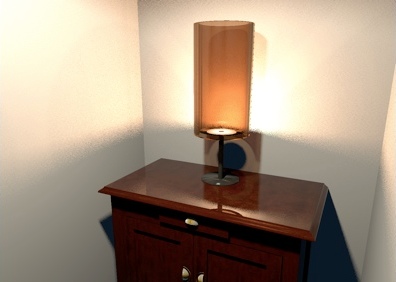
Here's an example I built from partially transparent round walls exported then reimported. I put this shade on on a small floor uplight to make it look like a small lamp.
- Attachments
-
- Lampshade.sh3d
- (207.53 KiB) Downloaded 115897 times
Emmanuel Puybaret, Sweet Home 3D creator
Re: Lampshade transparency
Wow, that's quite similar to what I mean... I'll let you know my further steps..
In the meantime you can have a look at my poor result...

Thank you!
In the meantime you can have a look at my poor result...
Thank you!
- Attachments
-
- up_dwn_cube.zip
- (697 Bytes) Downloaded 524657 times
Re: Lampshade transparency
Be sure to give the lampshade a color darker than white otherwise it will be rendered completely transparent. You can test also with textures but it might be buggy like here.
Emmanuel Puybaret, Sweet Home 3D creator
Re: Lampshade transparency
Emmanuel, could you please post the mtl assignments of your cylindrical lampshade? I'd like to compare it to mine.
Re: Lampshade transparency
Tic if you want to know these values, just create an empty document in which you copy/paste only the lampshade and then export it to OBJ format.
Emmanuel Puybaret, Sweet Home 3D creator
Re: Lampshade transparency
Great!
Thank you so much.. sorry..I'm sitll learning.. [:)]
Thank you so much.. sorry..I'm sitll learning.. [:)]
Re: Lampshade transparency
Emmanuel,
I'm back after more tests: I think that the bad rendering is due to the Obj export method of the modelling software I use (Wings3D).
On the left you can see your original lampshade and on the right the same object imported in wings3d and then re-exported as .obj.
I manteined the same mtl file for both.

I'm back after more tests: I think that the bad rendering is due to the Obj export method of the modelling software I use (Wings3D).
On the left you can see your original lampshade and on the right the same object imported in wings3d and then re-exported as .obj.
I manteined the same mtl file for both.
Who is online
Users browsing this forum: No registered users and 1 guest