
Was it similar to this bug?
I couldn't reproduce your problem, the walls looked correct and I had no problem to create a room with a double click. Maybe it was due to a temporary computed value that disappeared when the program was relaunched?
Sweet Home 3D 3.4
This topic has been viewed 193319 times and has 51 replies
Re: Sweet Home 3D 3.4
Emmanuel Puybaret, Sweet Home 3D creator

Re: Sweet Home 3D 3.4
After reloading the file, the problem was solved.
It was similar to the first stages of the bug you showed. That bug also started with a "strange" connection, that became worse after splitting the wall again.
It was similar to the first stages of the bug you showed. That bug also started with a "strange" connection, that became worse after splitting the wall again.
Re: Sweet Home 3D 3.4
I just released a version 3.4 beta 13 with a few bug fixes.
Emmanuel Puybaret, Sweet Home 3D creator
Re: Sweet Home 3D 3.4
Hello! I'm using this version because I'm tring to project the house that my housband and me are buying. It'is on two levels, but each one is on two different levels (4 steps). I've never used a 3D software before SH3D... a lot of instruction are in English (wich is not my language...), in spite of all I'm using it sucesfully! So: very good job guys, you are great! Thanks a lot!
Re: Sweet Home 3D 3.4
Thank you Tiz for your feedback. [:)]
I just released the version 3.4 Beta 15 with some small bug fixes, and two new help pages for level management (available also here: Adding levels and Editing levels).
Please tell me if you feel that my explanations aren't clear enough or that I missed some important information.
I just released the version 3.4 Beta 15 with some small bug fixes, and two new help pages for level management (available also here: Adding levels and Editing levels).
Please tell me if you feel that my explanations aren't clear enough or that I missed some important information.
Emmanuel Puybaret, Sweet Home 3D creator
Re: Sweet Home 3D 3.4
I released version 3.4 Beta 17 with more bug fixes and the ability to toggle the visibility of a piece of furniture by clicking on its Visible check box in the furniture list.
It includes also Italian and Czech updated translation. A special thank to Ondrej Dolejsi, our new Czech contributor. [:)]
It includes also Italian and Czech updated translation. A special thank to Ondrej Dolejsi, our new Czech contributor. [:)]
Emmanuel Puybaret, Sweet Home 3D creator
Re: Sweet Home 3D 3.4
I released version 3.4 Beta 18 where I added a Select object submenu in the contextual menu of the plan that will let the user select an object among the superimposed ones that appear where he clicked. This menu won't appear if there's no object under the cursor.
Hope you'll like it [:)]
Hope you'll like it [:)]
Emmanuel Puybaret, Sweet Home 3D creator


Re: Sweet Home 3D 3.4
I tried out version 3.4 Beta 18 and so far, I love it!
Once I got "the hang" of things, it's really fun to play with!
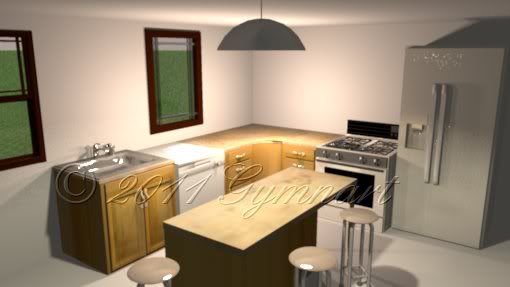
A render of the kitchen area:
http://i64.photobucket.com/albums/h186/ ... a19web.jpg
Once I got "the hang" of things, it's really fun to play with!
A render of the kitchen area:
http://i64.photobucket.com/albums/h186/ ... a19web.jpg
Re: Sweet Home 3D 3.4
Thank you for your feedback! [:)]
Tonight the version 3.4 Beta 26 brings an important bug fix for people using Sweet Home 3D on a computer with multiple screens. This is related to this bug report, this one and this one (in French). Please, if you use more than one monitor, I'll be happy to know if you have still have problems to run the Import furniture wizard on a monitor different from the main one, or if you can reopen a home window saved at location different from the main monitor. Thanks for your help.
Tonight the version 3.4 Beta 26 brings an important bug fix for people using Sweet Home 3D on a computer with multiple screens. This is related to this bug report, this one and this one (in French). Please, if you use more than one monitor, I'll be happy to know if you have still have problems to run the Import furniture wizard on a monitor different from the main one, or if you can reopen a home window saved at location different from the main monitor. Thanks for your help.
Emmanuel Puybaret, Sweet Home 3D creator
Who is online
Users browsing this forum: No registered users and 1 guest