Hi. I just joined the forums & please excuse me if this has been answered...I just installed the software & cannot figure out how to place an object, such as a box on a wall. I'm trying to create my home theater room & would like to use just plain boxes as my speakers. Can someone possibly let me know how i can put a box in a specific location onto a wall?
Thanks so much!!!!
Carmine
object on wall
This topic has been viewed 3805 times and has 4 replies

Re: object on wall
In the furniture catalog, there's a model named Box in the Miscellaneous category.
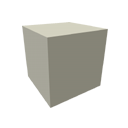
Drag and drop it on your plan. Then, as this box is 1m x 1m x 1m big, resize it to the size of a speaker with the corners of the object, or by double-clicking on it and set its width / depth / height. Finally place it along the wall you want.
For the other speakers, you can copy paste the one you already resized in the plan.
Drag and drop it on your plan. Then, as this box is 1m x 1m x 1m big, resize it to the size of a speaker with the corners of the object, or by double-clicking on it and set its width / depth / height. Finally place it along the wall you want.
For the other speakers, you can copy paste the one you already resized in the plan.
Emmanuel Puybaret, Sweet Home 3D creator
-
carminepesce
- Posts: 2
- Joined: Sun Jul 28, 2013 4:27 am
Re: object on wall
OK i figured out how to draw the speaker but what i'd like to do is place it up on the wall not actually against the wall. Is this possible?
Thanks again very much!!!
Carmine
Thanks again very much!!!
Carmine
Re: object on wall
Desactivate magnetism to place it wherever you want (see user's guide and help).
Emmanuel Puybaret, Sweet Home 3D creator
-
brightadamas
- Posts: 2
- Joined: Tue Jul 30, 2013 9:50 pm
Re: object on wall
Double click the box and adjust the elevation.
Who is online
Users browsing this forum: No registered users and 1 guest