If it were possible to select a transparent colour or texture it would be possible to make small alterations to furniture without having to use a 3D modelling tool. For example, one of the kitchen cabinets has a wood trim and knob that it would be nice to be able to hide them.
Currently I'm making such alterations by creating new furniture zip files and changing the mtl files (setting the d value to zero).
Additionally, if transparency was a slider it would be possible to have furniture items with panels that could be turned from solid, to glass, to invisible. It would would also help with creating door and window models inside SweetHome3D by combining boxes, cylinders, and triangles (which the new edit-within-group in beta-5 already makes much easier).
If it were possible to select a transparent colour or texture...
Yes, but it is already. All you need is a transparent texture. It is indeed a very useful way of hiding furniture elements (when the model is well designed with named elements).
..if transparency was a slider ...
Yes, that would be nice too. I think it has been discussed before somewhere in the forum, and there was something about the Java colour dialogue and cross platform implementation... ok
If it were possible to select a transparent colour or texture...
Yes, but it is already. All you need is a transparent texture. It is indeed a very useful way of hiding furniture elements (when the model is well designed with named elements)...
Thanks, I should have thought of that. This is going to save quite a bit of time.
If it were possible to select a transparent colour or texture...
Yes, but it is already. All you need is a transparent texture. It is indeed a very useful way of hiding furniture elements (when the model is well designed with named elements)...
Thanks, I should have thought of that. This is going to save quite a bit of time.
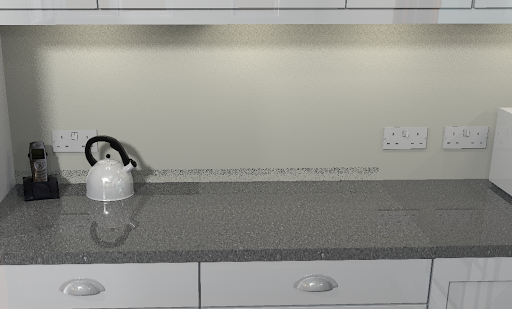
Unfortunately, when it comes to rendering an image, setting the material is not as effective as setting d=0.0000 in the model. In the following image the middle and left of the bench uses a transparent material for the bench trim and the right hand side of the bench uses d=0.0000 in a custom model. As you can see, with the transparent material some of the trim is still creating a residual "shadow". This does not appear to be influenced by the level of shininess.
(BTW - I created a transparent png 640x400 in the gimp by creating an alpha channel layer and then clearing the image).
... setting the material is not as effective as setting d=0.0000 in the model.
Thanks for sharing your tests. I have relied on the 'total alpha' texture method to hide model elements (as the .mtl d= transparency cannot be altered from within SH3D), so I need to explore this. ok