This new plug-in groups together in a specific menu the old plug-ins linked to rendering.
It consists of:
- Simple photo rendering (replaces Create photo with renderer)
- Multiple photo rendering (replaces Multiple rendering)
- Video rendering
- Rendering properties (replaces Advanced settings of photo rendering)
Simple photo rendering also allows:
- display the progress in percentage
- display the elapsed time and estimated remaining time
- enhance the external brightness (at the 2 best quality levels)
- view/edit the advanced settings (at the 2 best quality levels)
Multiple photo rendering also allows:
- display the progress in percentage (at the 2 best quality levels)
- display the elapsed time
- display the name of the point of view being computed
Video rendering also allows:
- display the progress in percentage
- display the elapsed time
- enhance the external brightness (at the 2 best quality levels)
Rendering properties allows to:
- view/edit the parameters of the rendering engine
The improvements and corrections made to SH3D-5.3 have been taken into account.
The sh3p file with source code is included in the compressed folder.
PhotoVideoRendering-1.0.zip
Photo-video rendering plug-in
This topic has been viewed 841515 times and has 225 replies
-
bdfd

- Posts: 2614
- Joined: Sat Mar 29, 2014 7:17 am
- Country: LILLE, Les Hauts de France, Western Europa
Re: Photo-video rendering plug-in
It's a good idea [:)] but it's not finished because I saw 2 problems. [:(]
A. I downloaded the previous Tools R1.3.2 with parameters 1.3.1 in Tools menu.
=> Yesterday, I downloaded the new menu 'Photo-video rendering' and the old menu was always present. [:((]
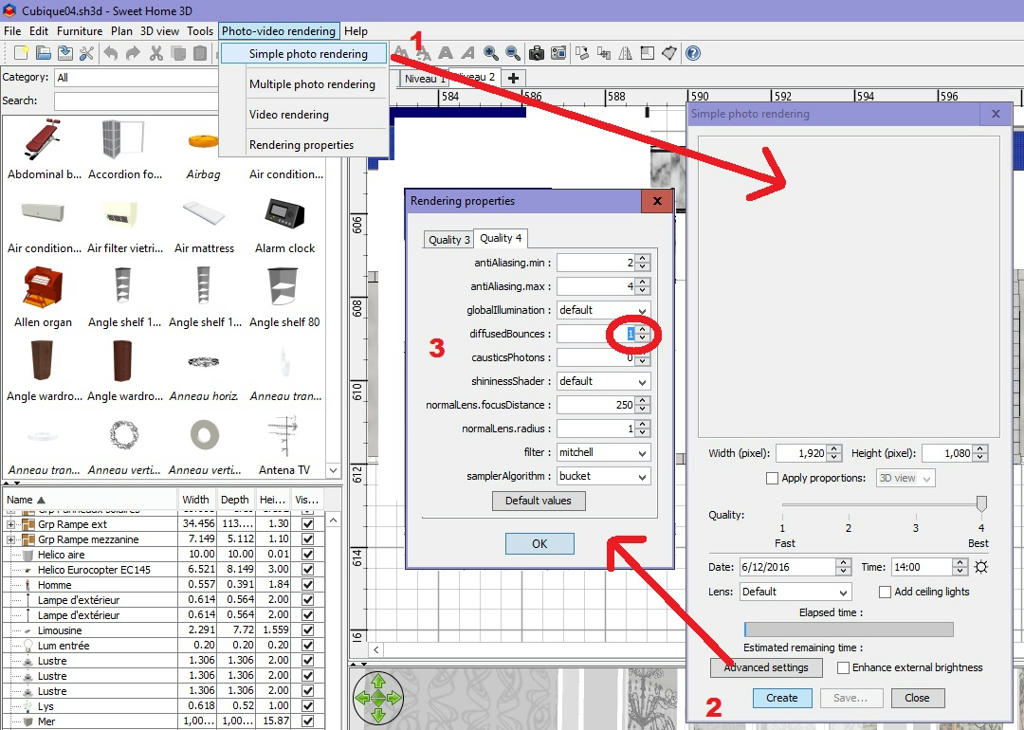
Why and how can we delete the old ?
B. Problem in parameters
When I use your new menu 'advanced settings', I cannot change value of DiffusedBounces (1 => 2) !!!
=> With the old menu it is possible. [:p]
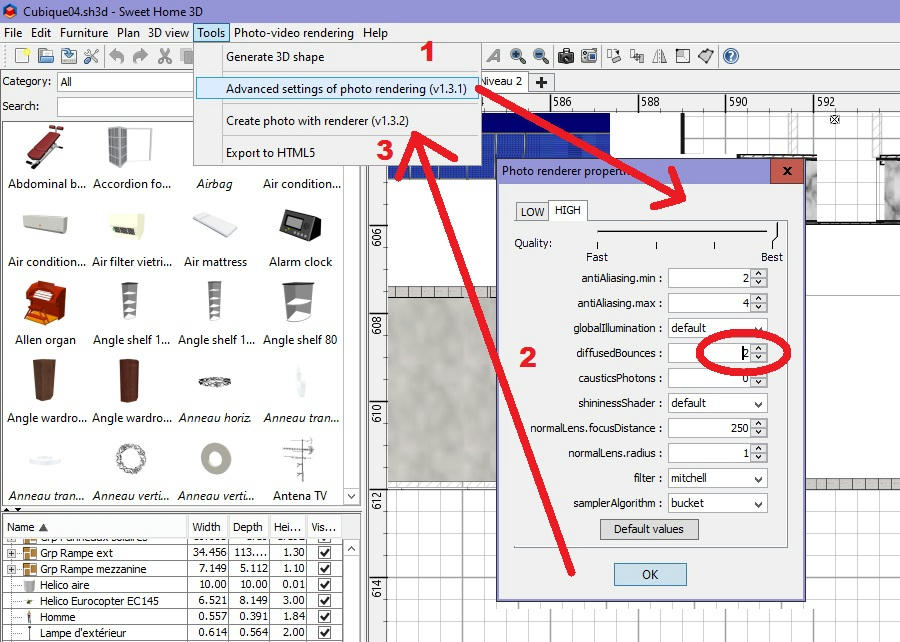
Is it a regression or just an oblivion ?
=> Can you evolve it ?
I think that with this kind of update, you must have a global vision and don't go too fast and I know that it's not easy... [#-o]
A. I downloaded the previous Tools R1.3.2 with parameters 1.3.1 in Tools menu.
=> Yesterday, I downloaded the new menu 'Photo-video rendering' and the old menu was always present. [:((]
Why and how can we delete the old ?
B. Problem in parameters
When I use your new menu 'advanced settings', I cannot change value of DiffusedBounces (1 => 2) !!!
=> With the old menu it is possible. [:p]
Is it a regression or just an oblivion ?
=> Can you evolve it ?
I think that with this kind of update, you must have a global vision and don't go too fast and I know that it's not easy... [#-o]
Evil progresses when good people do nothing!
---
SH3D 7.1 and nothing else - W11 64b in 4K
---
SH3D 7.1 and nothing else - W11 64b in 4K
Re: Photo-video rendering plug-in
You must manually remove the plug-ins from the Tools menu if you no longer want to use them.
Help -> About... -> Librairies...
- click on a file in Plug-ins
- close SH3D
- delete the plug-ins
These old plug-ins do not benefit from the improvements and corrections made to SH3D-5.3.
The new plug-in is included in a compressed folder to be replaced more easily in future updates.
As stated here , safeguards have been put in place to avoid any confusion in the interactions between parameters.
Help -> About... -> Librairies...
- click on a file in Plug-ins
- close SH3D
- delete the plug-ins
These old plug-ins do not benefit from the improvements and corrections made to SH3D-5.3.
The new plug-in is included in a compressed folder to be replaced more easily in future updates.
As stated here , safeguards have been put in place to avoid any confusion in the interactions between parameters.
EnkoNyito
Re: Photo-video rendering plug-in
Hi enkonyito
You may need to explain which to delete for thicko's like me, i just did it, now all i have is the basic photo option, no 131, no advanced options, no enhanced lighting, my bad, but help now needed
You may need to explain which to delete for thicko's like me, i just did it, now all i have is the basic photo option, no 131, no advanced options, no enhanced lighting, my bad, but help now needed

Re: Photo-video rendering plug-in
Alls well in the world [:)]
Re-installed AdvancedSettings_PhotoRendering-1.3.1 and CreatePhotoWithRenderer-1.3.2 from HERE and i am sorted. Nice one enkonyito. [:D]
Re-installed AdvancedSettings_PhotoRendering-1.3.1 and CreatePhotoWithRenderer-1.3.2 from HERE and i am sorted. Nice one enkonyito. [:D]
-
bdfd
- Posts: 2614
- Joined: Sat Mar 29, 2014 7:17 am
- Country: LILLE, Les Hauts de France, Western Europa
Re: Photo-video rendering plug-in
same thing for me, as enkonyito said, its plugin is adapted for version 5.3, so I installed it and thrown the previous.
But after a try of rendering I must to come back because I saw strange things (Rendering which not answer and don't start,
processor at 91%, ...) ??? [:((]
I had to report. [>:)]
But after a try of rendering I must to come back because I saw strange things (Rendering which not answer and don't start,
processor at 91%, ...) ??? [:((]
I had to report. [>:)]
Evil progresses when good people do nothing!
---
SH3D 7.1 and nothing else - W11 64b in 4K
---
SH3D 7.1 and nothing else - W11 64b in 4K
Re: Photo-video rendering plug-in
Version 1.1
- Sky texture visible when rendering in aerial view
- Better definition of shadows for Image Based Light (option "Enhance external brightness" checked)
Examples of IBL rendering.
- Sky texture visible when rendering in aerial view
- Better definition of shadows for Image Based Light (option "Enhance external brightness" checked)
Examples of IBL rendering.
EnkoNyito
Re: Photo-video rendering plug-in
Version 1.2
For video rendering:
- Implicit enhancement of external brightness
- Adding new video formats
- Deleting current recorded camera location
- Automatic saving of video file
Panoramic video (ImageBasedLight)
Panoramic video (SunSkyLight)
For video rendering:
- Implicit enhancement of external brightness
- Adding new video formats
- Deleting current recorded camera location
- Automatic saving of video file
Panoramic video (ImageBasedLight)
Panoramic video (SunSkyLight)
EnkoNyito
Re: Photo-video rendering plug-in
Although the video file is properly saved and playable, sometimes an error message indicates the contrary. [:(]
It would seem that the saveVideo method can not be used for direct saving of file.
Changes will be made after the release of SweetHome3D-5.5 to verify compatibility of the plug-in.
It would seem that the saveVideo method can not be used for direct saving of file.
Changes will be made after the release of SweetHome3D-5.5 to verify compatibility of the plug-in.
EnkoNyito
Who is online
Users browsing this forum: No registered users and 1 guest