Photo-video rendering plug-in

This topic has been viewed 841359 times and has 225 replies
Thread status: Active
Test the features and bug fixes of future versions [img]http://www.sweethome3d.com/images/flags/en_small.gif[/img]
enkonyito
Posts: 607
Joined: Thu May 28, 2015 4:52 pm

Re: Photo-video rendering plug-in

Post by enkonyito »

@hansmex
Even better: create the possibility to specify the size of the image preview in Preferences... :-)
I will study the feasibility of the thing so as not to complicate the photo panel too much.
Besides, I hesitated to put the option of the choice of look and feel in the preferences if it was possible.
EnkoNyito
User avatar
Ceciliabr
Posts: 637
Joined: Sun Jul 07, 2013 3:41 pm
Country: Copenhagen, Denmark
Contact:

Re: Photo-video rendering plug-in

Post by Ceciliabr »

Besides, I hesitated to put the option of the choice of look and feel in the preferences if it was possible.


Maybe you could make the plugin-window resizable?
That would meet every individual need,


Cec
ndorigatti
Posts: 66
Joined: Fri May 12, 2017 9:54 am
Country: Italia

Re: Photo-video rendering plug-in

Post by ndorigatti »

Heheheh I think it would be though... Java and Swing (programming language and UI components used here) are not the best to support responsive layouts...

I hope it is possible, but I have a few ideas/options for the developer:
- What about changing the Quality bar? we have only 4 options and it is huge, fast and best are taking a lot of space in addition to 1-2-3-4.... Maybe replace 1 and 4 with fast and best and keep 2 and 3 instead of replacing the whole component?

The lookAndFeel (that I did not understand why having that option, but maybe I missed some thread) should be a non frequent option to change (it is less important than picture size or quality, so it could stay in a "secondary" frame like advanced options, why not?
So we could have a new frame with:
Look and feel - Preview Picture Size - Any other option


And, this is completely IMHO, I would put the elapsed time bar under the "Advanced settings / Enhance Brightness" line, just to separate what will change the resulting image and require a stop-create (over that line) and what is modifying in live the UI and the components shown (below the progress bar), like lookandfeel.

Take this as some ideas from a developer that uses SH3D sometimes, and used a lot when planning a new home, so if you think is a stupid idea, feel free to tell it! [:D] [:D]
enkonyito
Posts: 607
Joined: Thu May 28, 2015 4:52 pm

Re: Photo-video rendering plug-in

Post by enkonyito »

@Ceciliabr
Maybe you could make the plugin-window resizable? That would meet every individual need
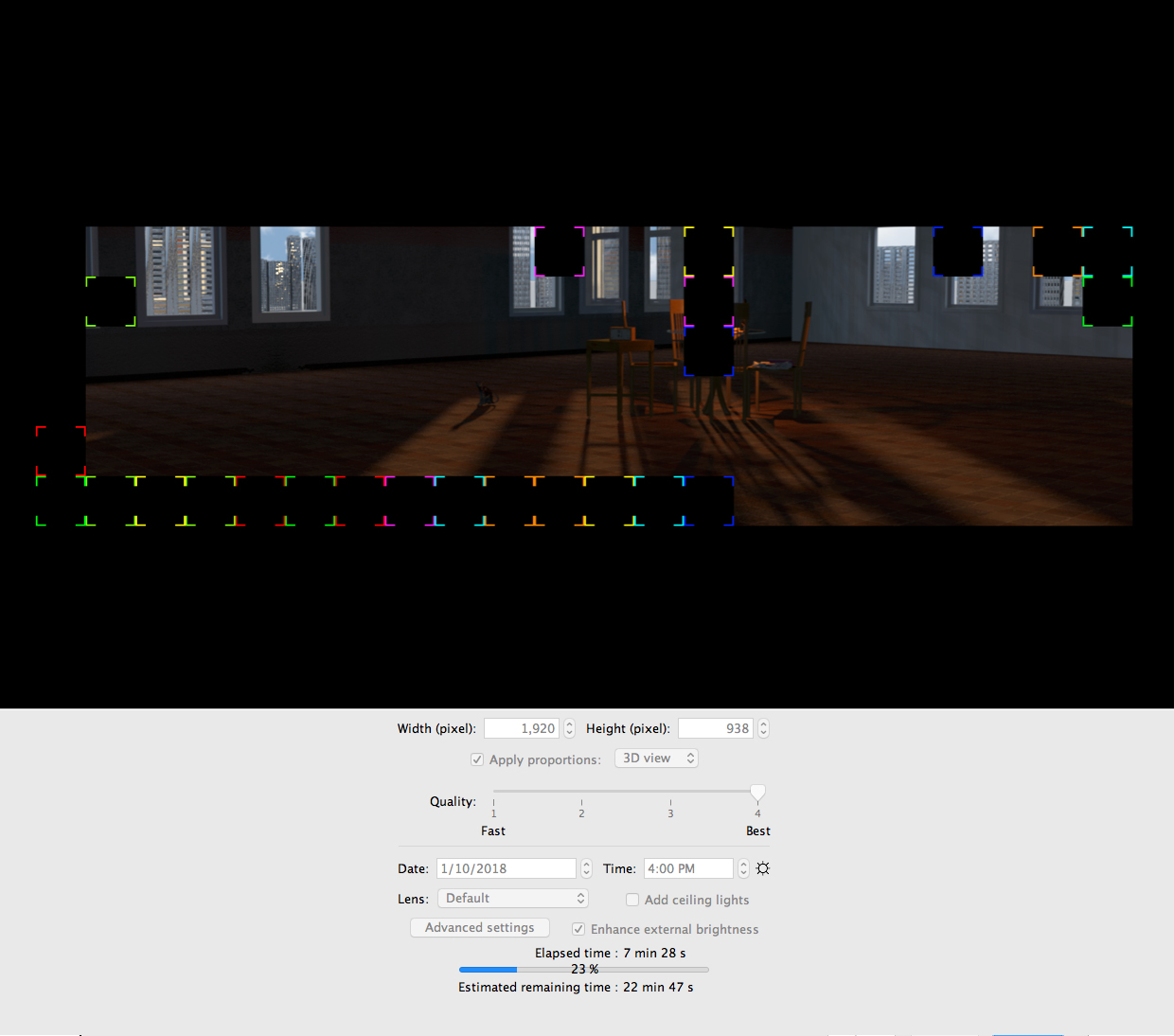
Proof by the image.
Image
EnkoNyito
enkonyito
Posts: 607
Joined: Thu May 28, 2015 4:52 pm

Re: Photo-video rendering plug-in

Post by enkonyito »

@ndorigatti
What about changing the Quality bar? we have only 4 options and it is huge, fast and best are taking a lot of space in addition to 1-2-3-4.... Maybe replace 1 and 4 with fast and best and keep 2 and 3 instead of replacing the whole component?
The goal of the plug-in is to stay visually close to the standard photo panel while providing new options.
Personally, I occasionally use quality level 1 (3D view without shadow) and one of the higher quality levels (3 or 4) with the setting of SunFlow rendering engine.

The lookAndFeel (that I did not understand why having that option, but maybe I missed some thread) should be a non frequent option to change (it is less important than picture size or quality, so it could stay in a "secondary" frame like advanced options, why not?
This option is not related to the rendering but I have integrated it in the photo panel in order to modify the appearance of the interface.
The other solution is to use a script for the installer version as shown here with "-Dswing.defaultlaf=".
Available Look and Feels:

Code: Select all

javax.swing.plaf.metal.MetalLookAndFeel
javax.swing.plaf.nimbus.NimbusLookAndFeel
com.sun.java.swing.plaf.motif.MotifLookAndFeel
com.sun.java.swing.plaf.windows.WindowsLookAndFeel
com.sun.java.swing.plaf.windows.WindowsClassicLookAndFeel
I would put the elapsed time bar under the "Advanced settings / Enhance Brightness" line, just to separate what will change the resulting image and require a stop-create (over that line) and what is modifying in live the UI and the components shown (below the progress bar)
This may be possible (see previous central image).
EnkoNyito
mirakels
Posts: 40
Joined: Mon Jul 06, 2015 12:45 pm

Re: Photo-video rendering plug-in

Post by mirakels »

Maybe make 'quality' a drop down menu... It only has 4 choices so why a slider does not add much functionality
User avatar
Ceciliabr
Posts: 637
Joined: Sun Jul 07, 2013 3:41 pm
Country: Copenhagen, Denmark
Contact:

Re: Photo-video rendering plug-in

Post by Ceciliabr »

@enkonyito

Resizable is king!

Now the next, ( and probably impossible) challenge is: Can the resizable photo renderer include a 3D preview? It would really "revolutionise" this program to have a combined preview- and render-window.

Cec
enkonyito
Posts: 607
Joined: Thu May 28, 2015 4:52 pm

Re: Photo-video rendering plug-in

Post by enkonyito »

Version 1.4.1
- resizable photo panel with modified layout
- display of the current version of the plug-in in the menu

Thanks to my beta testers Ceciliabr and hansmex for their feedback and to Emmanuel Puybaret for his advice! [;)]
EnkoNyito
User avatar
Ceciliabr
Posts: 637
Joined: Sun Jul 07, 2013 3:41 pm
Country: Copenhagen, Denmark
Contact:

Re: Photo-video rendering plug-in

Post by Ceciliabr »

Resizable renderer with rendering in progress:

Image

cec
User avatar
bdfd
Posts: 2614
Joined: Sat Mar 29, 2014 7:17 am
Country: LILLE, Les Hauts de France, Western Europa

Re: Photo-video rendering plug-in

Post by bdfd »

Hi,

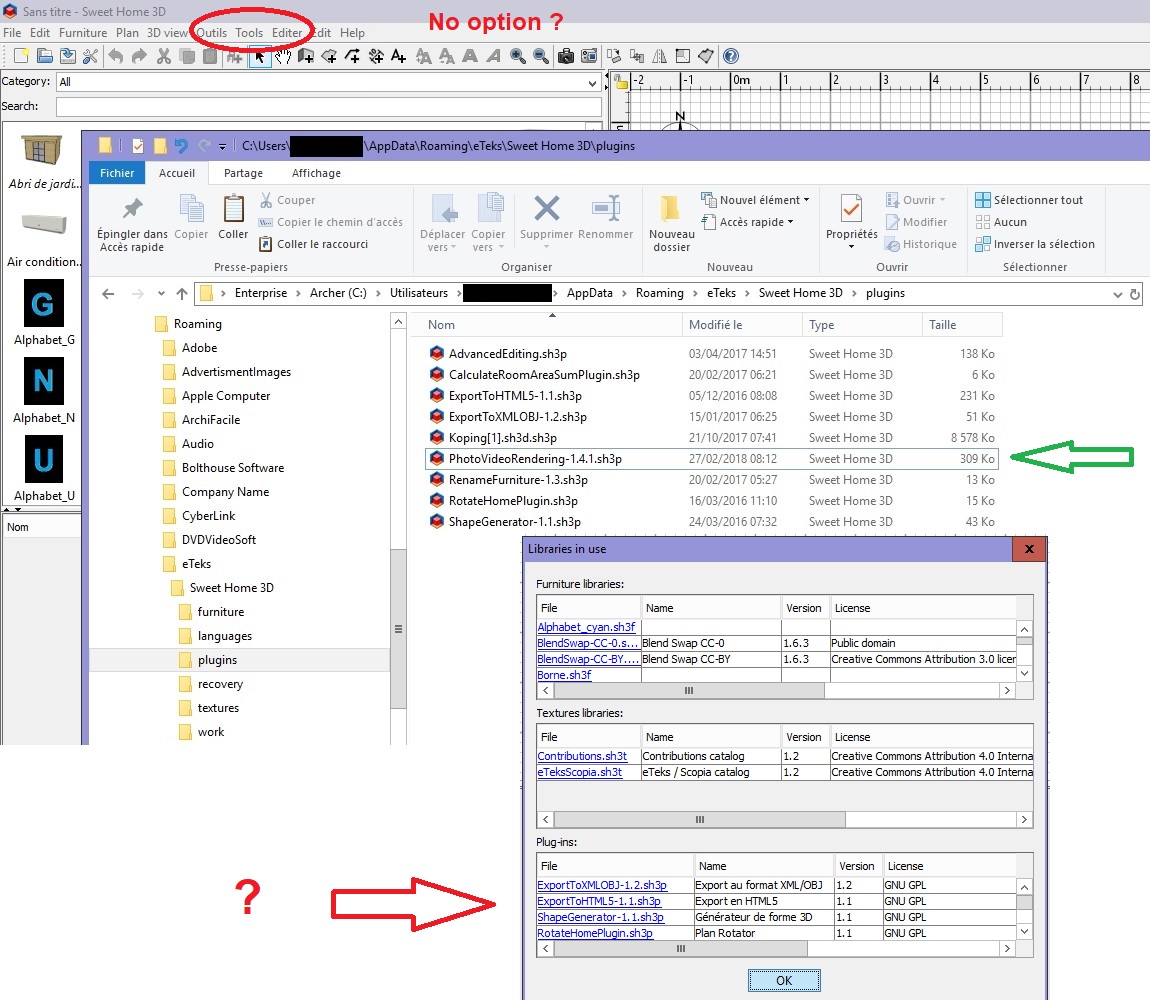
It's not my first installed plugin... but I got a problem.

Image

I don't see anything :
1. in the options menu
2. in librairies list
3. but plugin is in the good sub-directory (green Arrow)

An idea ?
Evil progresses when good people do nothing!
---
SH3D 7.1 and nothing else - W11 64b in 4K
Post Reply New Topic

Who is online

Users browsing this forum: No registered users and 1 guest