How to create a down light embedded in the ceiling

This topic has been viewed 46794 times and has 36 replies
Thread status: Active
How can I do this? [img]http://www.sweethome3d.com/images/flags/en_small.gif[/img]
okh
Posts: 1545
Joined: Sun May 12, 2013 9:43 pm

Re: How to create a down light embedded in the ceiling

Post by okh »

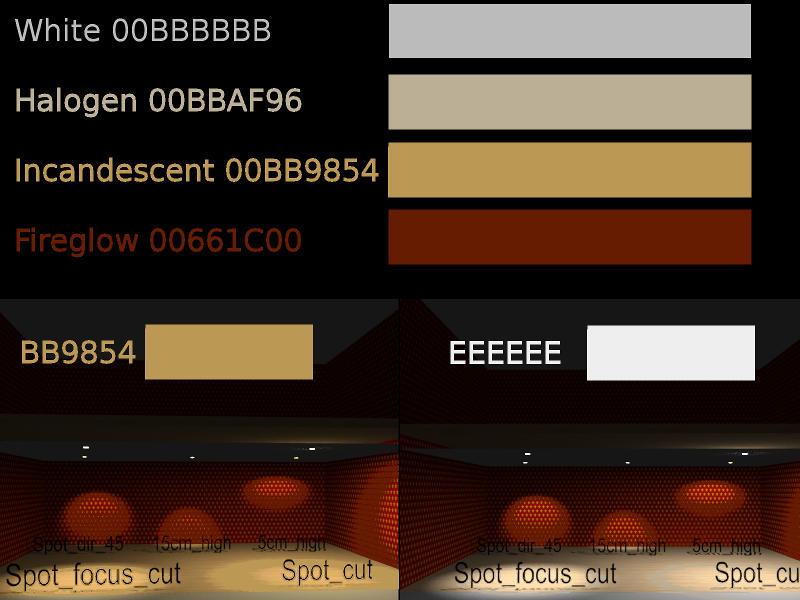
A suggestion from Антон to use neutral lightsource insted of the above Incandescent, same models, but lightsource colour changed from #BB9854 to #EEEEEE. SF 3D models 400 updated with new 'neutral light' file: spot_light_cutout_dir_eeeeee_neutral.sh3d

There are many elements to lightsources and renderings. Key to get a better result is studying posts by Ceciliabr and enkonyito on multiple lightsources and advanced rendering.

Just for reference, image below lists some of the predefined lightsource colour settings (to compare with the built in lightsources).

ok

Image
enkonyito
Posts: 607
Joined: Thu May 28, 2015 4:52 pm

Re: How to create a down light embedded in the ceiling

Post by enkonyito »

okh, in relation to your interrogation,
Last attempt of the day, a directional downlight with

Code: Select all

<light catalogId='okh#spot_dir_cut' name='Spot_focus_dir' creator='okh' model='1/downlight_directional.obj' icon='0' x='69.5' y='290.55923' width='20.0' depth='10.0' height='10.0' modelSize='14936' staircaseCutOutShape='m .52,0.5 a .23,.46 0,0,1 .46,0 a .23,.46 0,0,1 -.46,0 z' power='0.4'>
<lightSource x='0.25' y='0.5' z='0.7' color='00BB9854' diameter='0.125'/>
</light>
Point is, concept works, but the two variables are hard to handle. For me, anyway. LightSource diameter, LightSource placement in model. Which is the better generic model?
here are some details.

By default, SH3D uses the SphereLight type to render lights with the Sunflow rendering engine.
As you already know, just add these properties for an object to be considered a light by SH3D.

The LIGHT_SOURCE_DIAMETER property is optional.
If it is not present, a default value is used for the calculation of the radius of the sphere as for the lights created before SH3D-3.0.
When it is present, its value is taken into account and makes it possible to obtain soft shadows when the size of the light is enlarged.

Regarding the position of the light source in the Home.xml file, the values ​​represent a percentage of the width-depth-height of the object containing it.
In your example,

Code: Select all

<lightSource x='0.25' y='0.5' z='0.7' color='00BB9854' diameter='0.125'/>
would give in the PluginFurnitureCatalog.properties file

Code: Select all

lightSourceX#n=0.25*lightWidth
lightSourceY#n=0.5*lightDepth
lightSourceZ#n=0.7*lightHeight
lightSourceColor#n=#BB9854
lightSourceDiameter#n=0.125
My trick to properly position the light sources of a light is to match the lower left corner of the object with the origin (0, 0) of the Sweet Home 3D plan knowing that the Y axis is reversed.

Code: Select all

modelXplan = modelWidth / 2
modelYplan = -(modelDepth / 2)
Then we transfer the values ​​in the PluginFurnitureCatalog.properties file by adapting them like this:

Code: Select all

modelElevationProperties = modelElevationPlan
lightSourceXproperties = lightSourceXplan
lightSourceYproperties = -(lightSourceYplan)
lightSourceZproperties = (lightSourceDiameterPlan / 2) + lightSourceElevationPlan - modelElevationPlan
Hoping to have been pretty clear.
EnkoNyito
rontant
Posts: 113
Joined: Wed Jul 04, 2018 2:26 am
Country: Singapore

Re: How to create a down light embedded in the ceiling

Post by rontant »

This is a very informative thread that got buried deep and maybe it should be made sticky.

Now, if I observe correctly, basically a false ceiling is proposed to accomodate the embedded ceiling light without creating a hole on the floor on upper level.

I see there's one issue though on certain house design. A gap between the false ceiling and the upper level floor can be exposed.

Please look at my rendered photos below:

Image

Look at the LEFT side of the photo. How do you guys put an embedded light on the ceiling on the first level without getting the gap (of the false ceiling) exposed?

Image

Same, if we are to put a false ceiling above the painting, wouldn't the gap be exposed?
User avatar
Ceciliabr
Posts: 637
Joined: Sun Jul 07, 2013 3:41 pm
Country: Copenhagen, Denmark
Contact:

Re: How to create a down light embedded in the ceiling

Post by Ceciliabr »

Same, if we are to put a false ceiling above the painting, wouldn't the gap be exposed?
Sure, but it's easy to just insert a box to cover the gap.
Or you can have a look at this post . Half way down, starting with: And – while I'm at it: you will find a fix to mask the more complex cut-outs, like from a spiral staircase.


Cec

EDIT: How hard can it be for me to get a link working today...
rontant
Posts: 113
Joined: Wed Jul 04, 2018 2:26 am
Country: Singapore

Re: How to create a down light embedded in the ceiling

Post by rontant »

Thanks Ceciliabr. I'll study it.
r921vs
Posts: 5
Joined: Tue Jan 30, 2018 8:57 am
Country: Russia

Re: How to create a down light embedded in the ceiling

Post by r921vs »

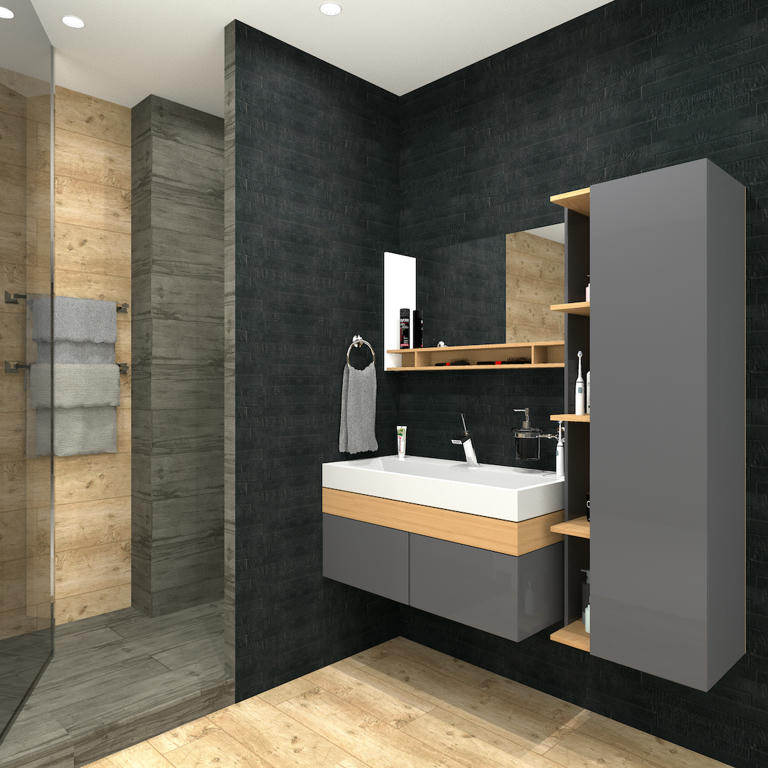
Image New light sources give excellent opportunities! Thank you, okh!
knxville
Posts: 3
Joined: Thu Oct 25, 2018 5:25 pm

Re: How to create a down light embedded in the ceiling

Post by knxville »

Image New light sources give excellent opportunities! Thank you, okh!
How on earth did you light this? It's so even. I can't for the life of me get even lighting on all my walls and ceiling.
Post Reply New Topic

Who is online

Users browsing this forum: No registered users and 1 guest